Alt Gr + Q jumps to "Search in Ribbon"

Hello,
Strange behavior in 2023.1.15, maybe also earlier. When I want to type an "@" in a RDP session, I press Alt Gr + Q. But instead of getting an "@", RDM brings me to the "Search in Ribbon" field. Outside of RDM I am able to use this shortcut. I also searched Options, Keyboard if there is a shortcut that does this - but I was unable to find one. Alt + Ctrl + Q is still working, but I am used to the other one.
Brgds Andreas
All Comments (5)
Hello,
We recently added this shortcut as we had been asked by a few users to have a default shortcut to select the search field in the ribbon.
For the key combination we used the same one that Outlook uses, so we didn't think there would be any issue there.
I think we didn't put the appropriate default value as we didn't expect it to conflict with regularly used key combination. At the moment it's configured to "default", but we will change it to "when not in session", so that it doesn't cause issues when typing with an entry open, like you did with your RDP. This will be changed for RDM 2023.1.18.0 (our version .17 is already in QA testing and will release this week with multiple fixes).
Right now you could either deactivate the shortcut, change the key combination, or change its execution mode to "when not in session", by going in File > Options > User Interface > Keyboard, and changing the configuration for the "search ribbon" shortcut: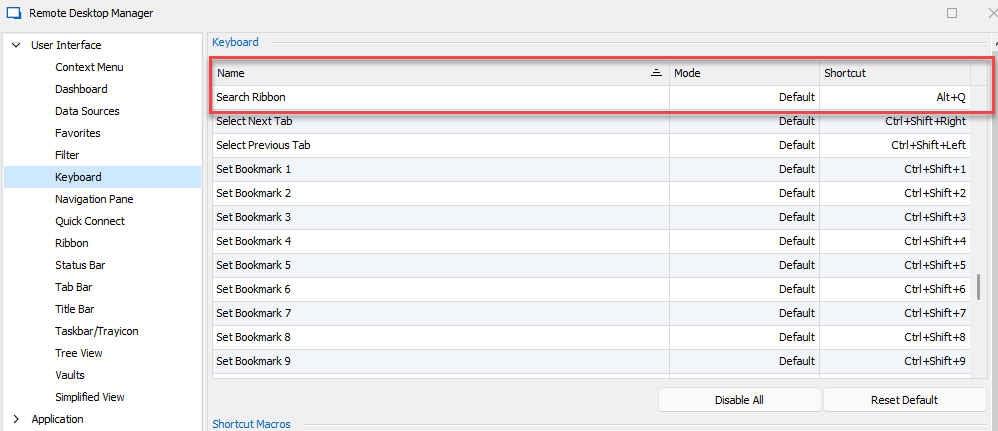
Let us know if this doesn't work for any reason.
Regards,
Hubert Mireault
image.png
Thanks for the Info! I changed this now without a restart and it is working, but even if I am outside a session, Alt + Q does not bring me to Search in Ribbon. But with this I can live as I never used it... ;)
Brgds Andreas
Glad that this works for you.
Out of curiosity, what is the keyboard input layout you're using on your machine? That seems to be the cause of the issue but we haven't reproduced here, so I suspect it's only in certain layouts.
Regards,
Hubert Mireault
I use German Keyboard layout.
Brgds Andreas
Thank you for the information. We will see if we can find a fix for this issue.
Regards,
Hubert Mireault