RDMS doesn't run after upgrade

Have upgraded from 2022.2.24.0 to 2023.1.13.0 and the application fails to run.
Event viewer says:
Faulting application name: RemoteDesktopManager.exe, version: 2023.1.13.0, time stamp: 0xeb42c1ce
Faulting module name: KERNELBASE.dll, version: 10.0.22000.1574, time stamp: 0xe40fe1da
Exception code: 0xe0434352
Fault offset: 0x00000000000440ac
Faulting process id: 0xc9c
Faulting application start time: 0x01d95fc06e8987ba
Faulting application path: C:\Program Files\Devolutions\Remote Desktop Manager\RemoteDesktopManager.exe
Faulting module path: C:\WINDOWS\System32\KERNELBASE.dll
Report Id: 96703d92-c57f-479e-b5ef-d0f363e45074
Faulting package full name:
Faulting package-relative application ID:
All Comments (13)
Also getting this in the event viewer
Application: RemoteDesktopManager.exe
Framework Version: v4.0.30319
Description: The process was terminated due to an unhandled exception.
Exception Info: System.IO.FileNotFoundException
at Devolutions.RemoteDesktopManager.Program.Main(System.String[])
Hello,
This is very strange.
Does this occurs on all your workstations?
Could you try the solution proposed in this article?
https://docs.devolutions.net/kb/remote-desktop-manager/troubleshooting-articles/kernelbase-dll-crash-error/
Best regards,
Jeff Dagenais
It happened on two workstations, so we had to rollback the upgrade
Confirming that the workstations in question are on the latest build.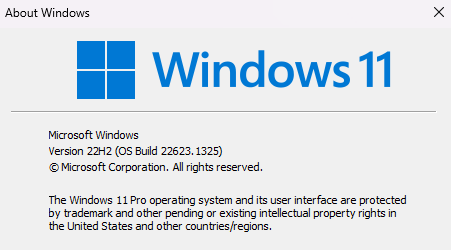
image.png
Further to this, I have tried on three Windows 11 machines and two Server 2019 servers and the same problem occurs. There are no Windows updates waiting to install. If it helps, the installer was built from the Custom Installer and is version 2023.1.13.0 (the latest version available).
I've downloaded version 2023.1.15.0 from the website and that appears to work fine. Perhaps whatever issue it was has been resolved? Are you able to make that version available from the Custom Installer and I'll see if that works?
I have the same issue (.net filenotfoundexception) when using RDM created from custom installer. i wanted to use 2022.2.29.
When using the version 2022.3.35 the custom installer works fine
I noticed when installing RDM 2022.2.29 the executable has the correct version but some dll file like RemoteDesktopManager.Core.dll has version 2022.3.35.
so there might be a version mismatch?
Thanks Chris. Good to know I'm not the only one.
@Chris,
We had an issue with our Custom Installer feature last week. Is it possible for you to recreate your custom file and retry to deploy it in your environment?
@sjames,
I will check with our engineering department if it's possible to make 2023.1.15.0 available through the custom installer
Jeff Dagenais
Thanks @Jeff - a newly compiled custom installer seems to have fixed the problem.
While I'm talking about the custom installer, any chance we can have a progress bar when it's downloading the installer? RDMS just looks like it's hung and no way of knowing status etc.
@sjames,
Glad that is now working.
Where would you like to see a progress bar? Is it possible to post a screenshot with a small mockup please?
Best regards,
Jeff Dagenais
Sure.
When I click "download MSI" here, it asks me a location to save in, which I select, and then the screen just sits here and appears frozen (RDMS unresponsive) while the file downloads to the location. After the file downloads (3-4 minutes) RMDS suddenly unfreezes and comes back to life.
You should be able to replicate the issue.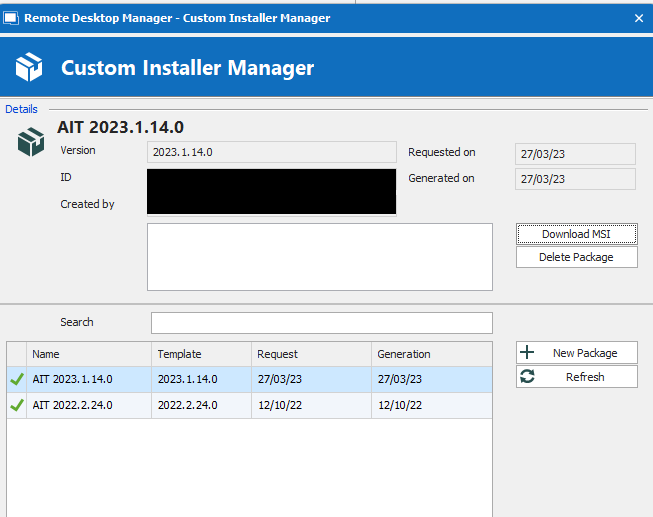
image.png
Hello,
Could you check if your "wait progress mode" is in "window" mode or a different mode? This is located in File > Options.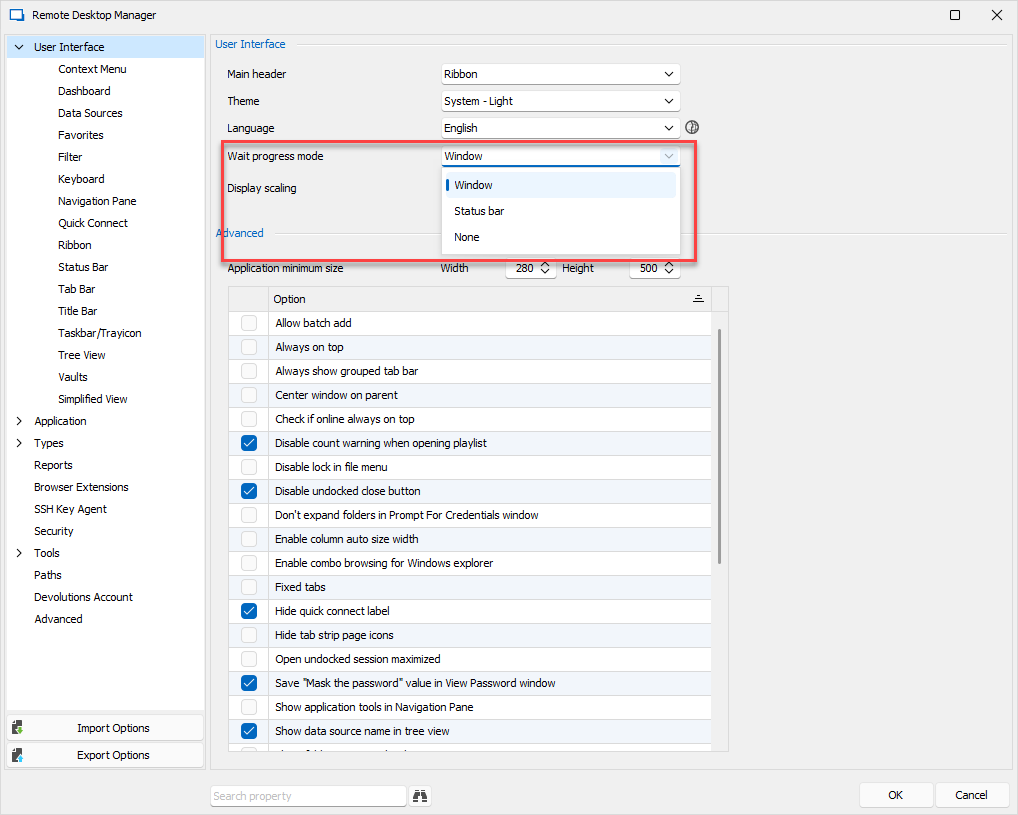
I can reproduce if it's set to Status bar. Since in this context the status bar isn't visible, that would explain the situation. We will make the change to force the "window" mode in this context.
Regards,
Hubert Mireault
image.png
Hi Hubert,
My setting was set to "status bar". I'm not sure what else changing this setting will affect, but happy enough to change it to Window.
Hello,
Thank you for the confirmation. This setting will change how RDM shows its 'loading' progress bars. In "window" mode, you will see a prompt with a progress bar, while in "status bar" mode, it will show in the status bar at the bottom of RDM.
Regards,
Hubert Mireault