Linux private key problem after migrate to Devolution Hub Personal
Linux private key problem after migrate to Devolution Hub Personal

Hi,
I migrate from Devolution Online Drive to Devolution Personal Hub (as you suggestion) and found that I have configuration error entire linux enties.
Basically, I create Private Key and store in the Vault and then, selecting preferred private key in the vault but in Devolution Personal Hub, I have no option to select private key fron Vault. the options I can select is File, Data and Find by name (User Vault) while the Online Drive, I have more option than that (File, Data, Vault, My personal private key, Find by name (User Vault)
first pic, I can select private key from Vault, if I use Devolution Online Drive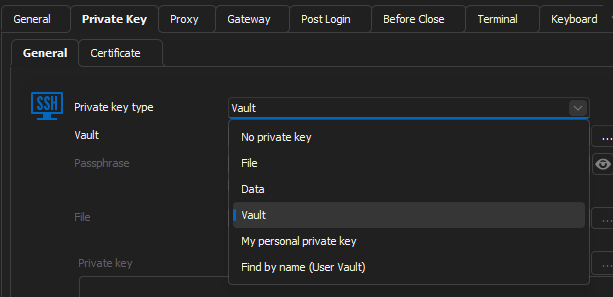
2nd pic, After migration to Hub. Linux Server configuration got error that they are unable to find private key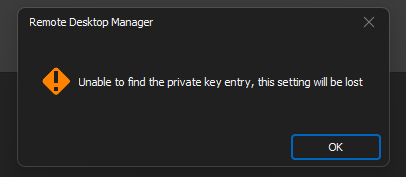
After investigation, I found that I unable to access private key because vault option is lost.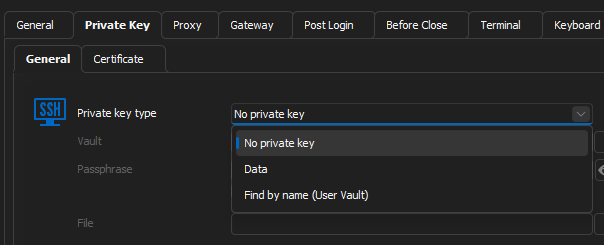
BR,
Yutttana H.
RDM-vault.png
RDM-Hub-Error.png
RDM-hub.png
All Comments (10)
Hello,
Thank you for contacting the Devolutions Service Desk !
I believe we might've managed to reproduce this internally, I've asked the engineer if there's a workaround for your issue.
But as of now this should be fixed in an upcoming version.
Best regards,
Hi,
Quick update in current version (2023.1.20.0 - 64-bit)
In Devolution Hub Personal,
I can select Vault and private key now....but I found next issue in Gateway (Jumphost)
[Issue]
Jumphost that use vault will not be able to use private key (asking for password)
after turn on Verbose, I found unknown issue 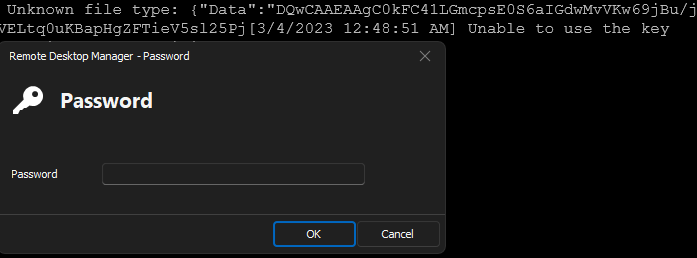
So I try to change it from vault to Data type and paste that save private key and problem is resolved.
I think it's a bug.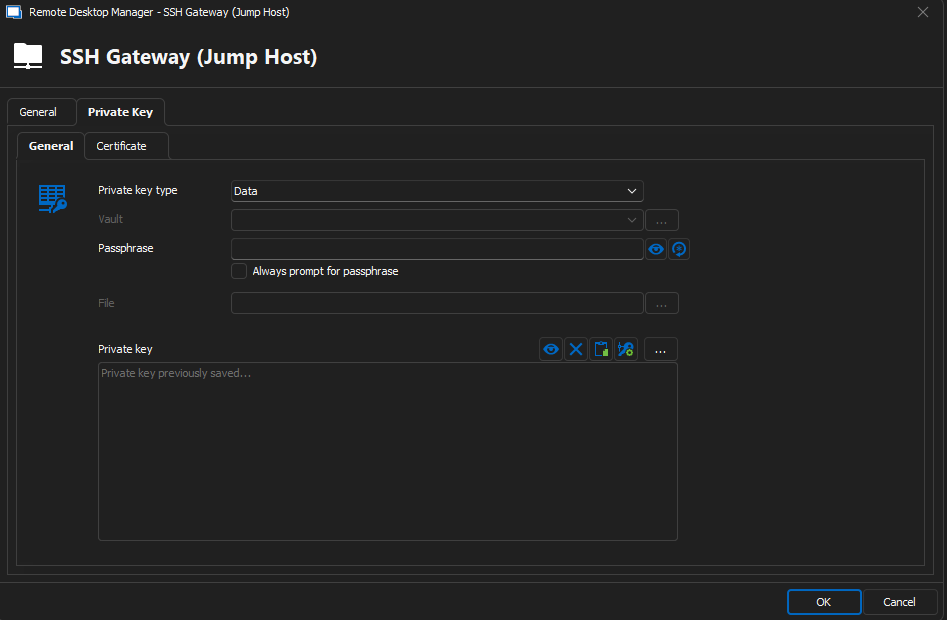
BR,
Yutttana H.
f45490fa-0699-49b9-888f-23eaf3bc9622.png
e4211de0-58f8-49d1-a030-58c5c9b94047.png
Hello,
Could you reproduce the issue and send me the Verbose file ?
I'll send you a private message with instructions and a link to send the file privately to us.
Best regards,
I already reproduce and upload the information. Did you see it?
Best regards,
Hello,
I did see the information that was sent, I will contact our engineers and see what exactly could be going on and if it's normal.
In the meantime, I suggest using the workaround you mentioned.
Best regards,
Hello,
Have you validated that the correct private key was added to the Private Key entry ?
I would suggest trying to copy the Private key being used in the SSH entry when you set it as "Data" and pasting it to the Private Key entry linked used when setting the SSH entry to "Vault".
Let me know the results !
Best regards,
Hi,
Refer to my last post above. I already workaround by changing from Vault to Data (In SSH Gateway Only) and then pasting the private key data using the private key copying from the Vault So it's the same Private Key that I use to access my server.
In order to make it clear, I try in 3 situations using my Private Key "X"
1. I access Server A using "X" from vault (and then ssh to server B) ...it's OK
2. I access Server B and use Server A as SSH Gateway (Jump Host) with "X" in Vault (configured in SSH Gateway)...it report unknown file type...Unable to use the key
3. I access Server B and use Server A as SSH Gateway (Jump Host) with "X" in Data by copy from same private key in Vault (configured in SSH Gateway)...it's OK ** I use that as workaround **
That why I report that it should be bug.
Best regards,
Hello,
Thank you, our engineers are looking to see if they can reproduce the issue internally.
We will update you once we have, and if we can't manage to then I will update you on this as well.
Best regards,
Thank you :)
Please note that this issue is occurred in Devolution Personal Hub only. I don't see that issue with Devolution Online Drive (and file - Local Data Store)
Best regards,
Hello,
No problem !
I will let them know.
Best regards,