MacOS RDM 2023.1.5.0 RDP Issues

Hello, after upgrading my RDM client on macOS ventura 13.2 and 13.3, I am experiencing RDP issues to a the majority(but not all) of my connections to windows servers.
- The error I am getting is ERRCONNECT_CONNECT_TRANSPORT_FAILED (0x0000000D)
- I was able to resolve by switching legacy engine to YES(DEPRECATED), but that provided a warning.

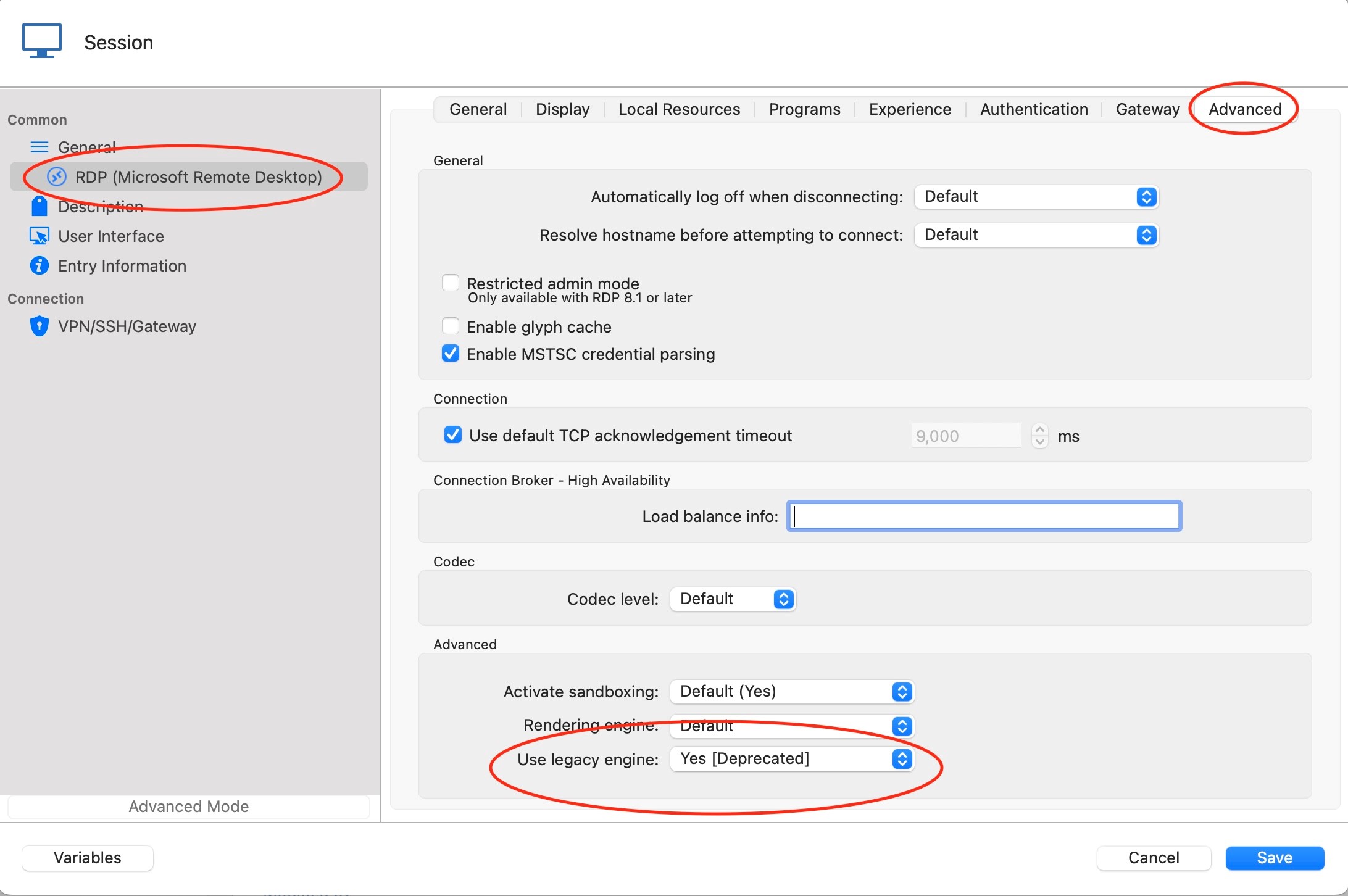
Is this a bug in the new version, or is there a more permanent solution?
deprec.jpg
image.png
All Comments (16)
Hello
Do you know the security protocol used to connect to the affected machines? Unless you have configured this specifically, you might not know (RDP will try to negotiate the protocol with server based on the options you have enabled).
I am aware of a bug affecting connections that use "RDP" security (as opposed to TLS or NLA). If you can generate a session log for one of the affected sessions and send it to me by PM, I'll be able to confirm: https://docs.devolutions.net/kb/remote-desktop-manager/how-to-articles/macos-rdm/rdm-mac-enable-send-rdp-logs.
I apologize for the inconvenience. Please let me know if something isn't clear or you have further questions.
Kind regards,
Richard Markievicz
NLA is not enabled, and we arent forcing any particular security or TLS protocols in GPO or local gpedit.
I have sent you the log.
Looks like it's negotiatingn RDP.
[15:59:27:078] [15109:0d60d000] [DEBUG][com.freerdp.core.nego] nego_connect 168 - Negotiated RDP security
Hello again
Thank you for sending the log file over, and your analysis is correct that RDP security is being negotiated.
We updated our FreeRDP dependency and unfortunately there were a few regressions; this is one of them. The good news that I already submitted a fix to the RDM Mac team at the end of last week. I'll add this forum thread to the ticket and we'll be able to notify you once that fix is available in a new RDM version.
Thank you for the bug report, and once again I apologize for the inconvenience
As always, if you have further questions or comments please don't hesitate to post back
Thanks and kind regards,
Richard Markievicz
I also just installed the 2023.1.5 and my RDP started to fail. I'm using Big Sur 11.7.1 on MBA M1
I use inheritance from the folder to all the RDP connections to use an RDP gateway.
The application log shows I had 2022.3.19 (I skipped several versions as an update also failed on me previously)
This was urgent so I downloaded that previous version and now I'm back to WORK.
I think the credentials section was missing in the gateway branch of the left tree, where I was setting the root of the inheritance. I was making changes there (troubleshooting this issue) and it was not saving the changes. When I finally rolled back, I noticed NOW it is displaying the credential prompt.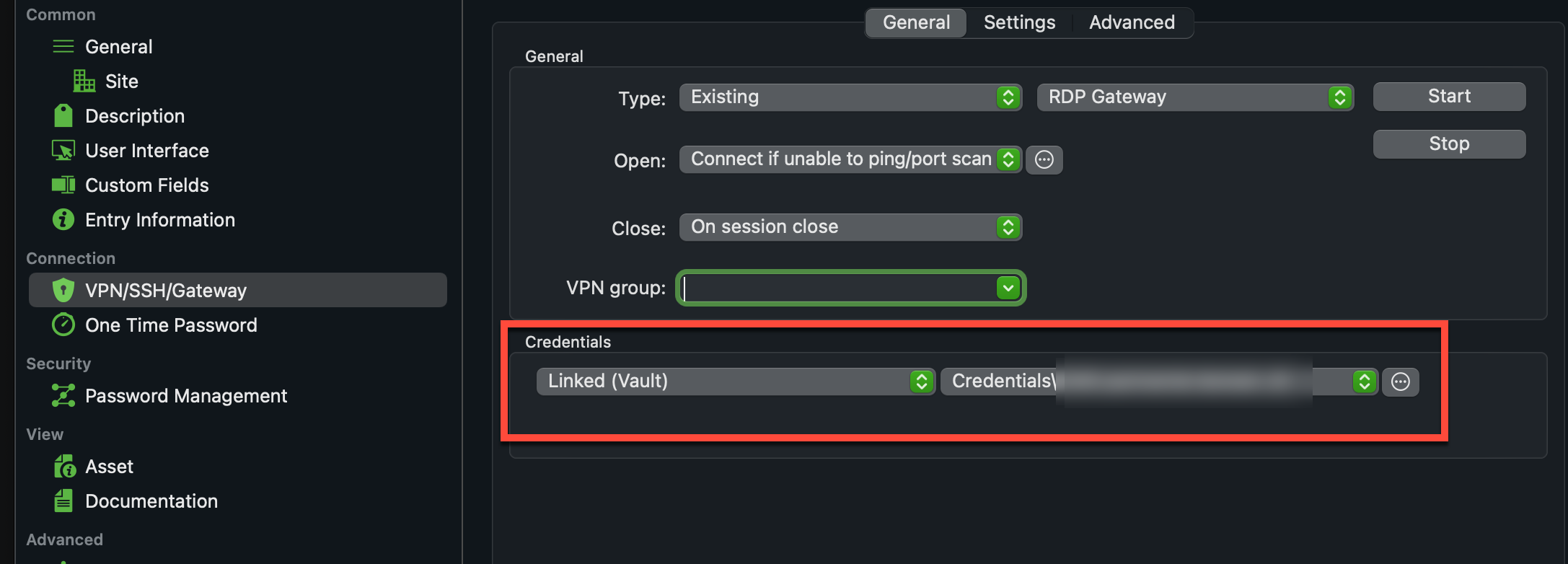
Related suggestion: Can you make the "previous versions" download page DYNAMIC so it displays the very last 5 or 10 contiguous versions at least?? I guess that section is manually maintained and shows very old versions (2022.2.x backward) which is not a bad idea for new users with old macOS versions but for people already using RDM rolling back for an update bug and going back over a year of versions is not healthy and kind of incompatible regarding the connection database. I've been there.
image.png
Hi jorgedelgado,
There is a problem with the VPN/SSH/Gateway tab in the version 2023.1.5.0. This should be fixed in a version that will soon be released. Although this issue should not have affected already existing session. To investigate those, we would need a session log.
Best regards,
Xavier Fortin
Hello tamonss
RDM Mac 2023.1.7.0 has been released and contains a fix for this specific issue. If you still have problems after the update, or if you have further questions or problems, please don't hesitate to post back in this thread.
Thanks and kind regards,
Richard Markievicz
Hello jorgedelgado
Further to what Xavier already wrote, RDM Mac 2023.1.7.0 has been released and does contain fixes for RD Gateway connectivity. Please try the new version and see if you're still experiencing an issue.
If so, it would be helpful to generate a session log as detailed here and send to us either by PM or to support@devolutions.net (mentioning this forum thread).
If you have further questions or something isn't clear, please don't hesitate to post back
Thanks and kind regards,
Richard Markievicz
Hello everybody
Had the same error ERRCONNECT_CONNECT_TRANSPORT_FAILED (0x0000000D)
Got the latest update an have a the same error
MacOS Ventura 13.2.1
The problem has appeared after installing the latest Windows Server Updates on remote servers
VERSION 2022.3.4.0
Works perfect!!!
Hello nickostroushko
With the latest version (2023.1.7), can you please enable the session log as described here and try to connect to a server giving you the error. You can send the log file to me by PM or to support@devolutions.net (mentioning this forum thread).
It could also be helpful to know the OS(es) that you are using on the remote server(s).
I apologize for the inconvenience
Thanks and kind regards,
Richard Markievicz
Hello All,
I experience the same issue, ERRCONNECT_CONNECT_TRANSPORT_FAILED (0x0000000D)
I use the latest version, 2023.1.7
I have tried the older version suggested by nickostroushko, VERSION 2022.3.4.0 but I cannot log on with my Devolution account by this version.
The error usually appears, when my Mac goes to sleep (lunch break for e.g.) By me the workaround is when I receive the above error, is a reboot, which usually solves the problem.
I have Session Log enabled, sent to you from the RDM app, share function.
My Mac is 2019 late, osX version: Ventura 13.2.1.
Please advise.
Thanks in advance
Balazs Koczan
Hello Balazs
Thank you for sending a log file over. In this case, the problem is quite simply that RDM cannot establish a network connection to the remote server. If this happens after your machine goes to sleep and can be solved by rebooting, it suggests something "off" with the network configuration or environment.
Are you accessing the server(s) over the LAN or WAN? Are you using a VPN?
When you find yourself in this situation, trying pinging the server (open Terminal.app and run `ping [serverhostname]`. What's the result? Can the IP address be resolved and the server pinged successfully?
Thanks and kind regards,
Richard Markievicz
Hey Richard,
Thanks for reaching me out that quick.
I use my private machine to reach my work environment, so I have to use VPN and Application Gateway to be able to connect.
I have tried to ping the server, after I received the error message, here you go:
Ping with Hostname:
Last login: Sat Mar 25 09:01:13 on ttys000
balage@Balazss-iMac ~ % ping AMAZxxxxxx
ping: cannot resolve AMAZxxxxxx: Unknown host
balage@Balazss-iMac ~ %
Ping with IP:
Last login: Sat Mar 25 06:53:47 on console
balage@Balazss-iMac ~ % ping 21.xxx.xx.x
PING 21.xxx.xx.x (21.xxx.xx.x): 56 data bytes
Request timeout for icmp_seq 0
Request timeout for icmp_seq 1
Request timeout for icmp_seq 2
Request timeout for icmp_seq 3
You basically suggesting to avoid my Mac to go into sleep/power save mode?
Thanks and cheers,
Balazs
Hello koczanbalazs
I don't suggest not letting you Mac go to sleep, but it sounds like your VPN or gateway is not properly re-established after waking from sleep. You can't resolve the hostname by DNS and even when trying to reach the server by IP, the address isn't routable (and this is the same reason that RDM cannot connect by RDP).
I would suggest reaching out to your IT department to resolve whatever misconfiguration is causing this; the problem is at the network level and not related to RDM.
Please don't hesitate to post back if you have further questions or if something isn't clear.
Thanks and kind regards,
Richard Markievicz
Hi, I encounter the same issue (MacOS up to date - RDM 2024.1.6.2)
Sending you logs via DM.
Hello benjamin1
The error you have in your logs is something different from the above.
You mentioned it worked with RDP (presumably MS RDP client?) - I'd ask you to double check the configuration matches. The easiest way is to temporarily set your connection to "External" - if you do that, does it connect successfully with the MS RDP client?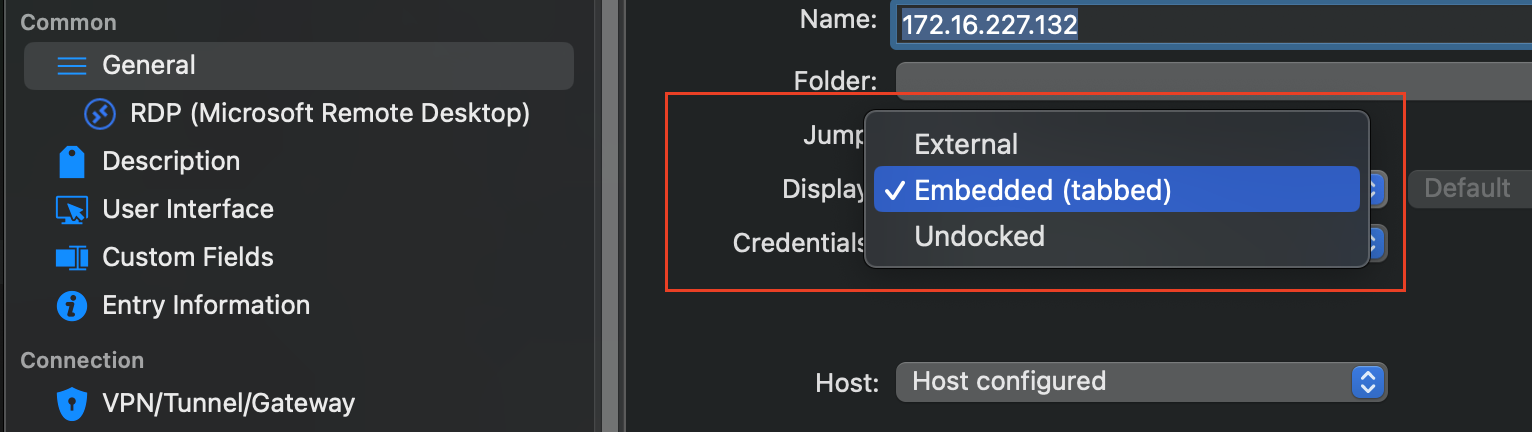
Please, let me know if something isn't clear
Thanks and kind regards
Richard Markievicz
Screenshot 2024-04-08 at 11.46.26.png