How to remove SCROLLING in the right mouse button menu on any of the tree elements ?
How to remove SCROLLING in the right mouse button menu on any of the tree elements ?

Why did you SCROLL in the menu with the right mouse button on any of the elements... it's wildly uncomfortable on the screen, it's constantly crawling up and down.... There was no such thing before, how to disable this scrolling in the right mouse menu?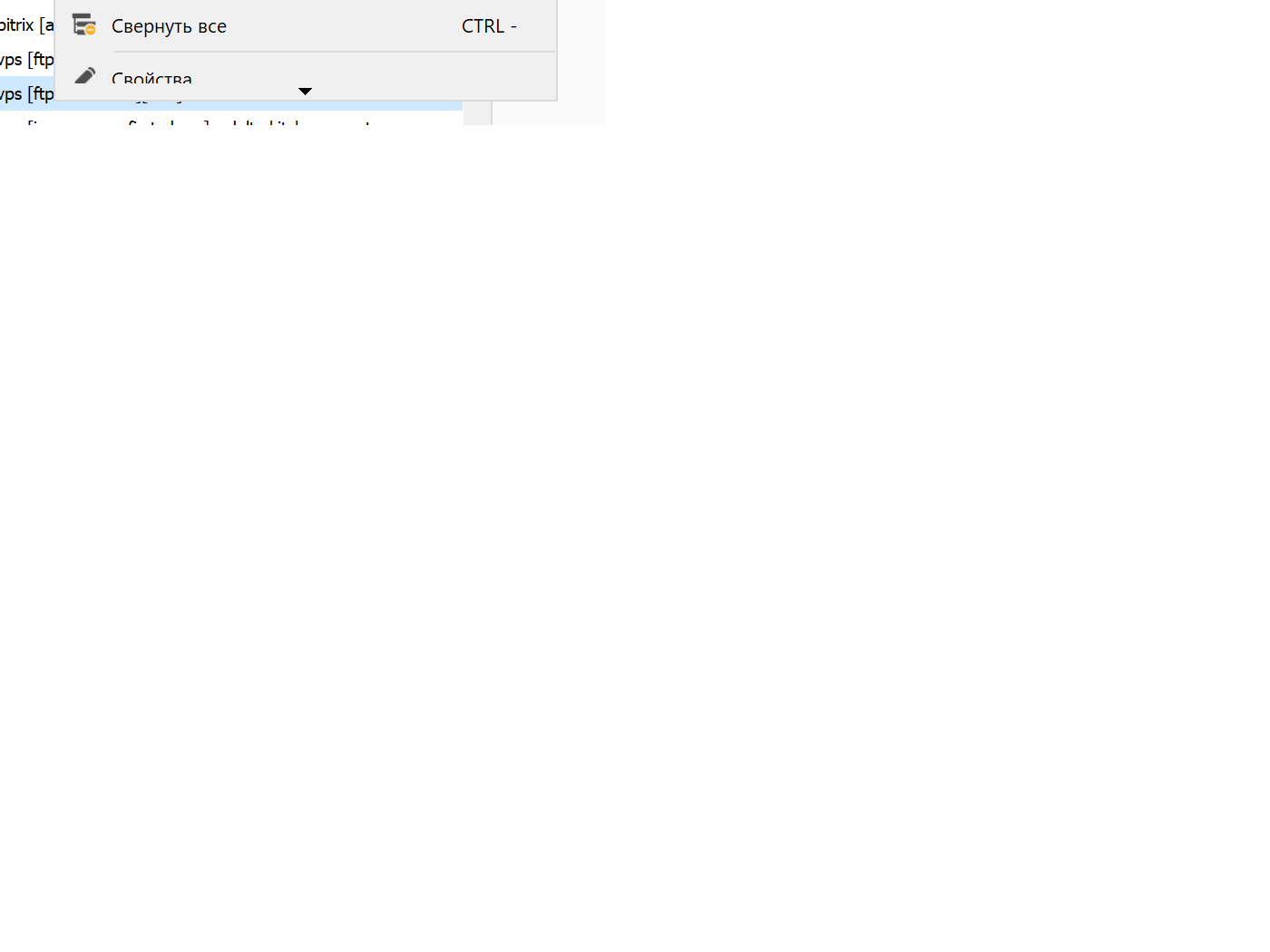
error.png
All Comments (23)
Hello,
We've been unable to reproduce the issue so far, could you tell us which version of RDM you are using now (the one with the experienced issue) and, if possible, which version you were using prior to experiencing it? If you could also tell us the current scaling of your display (usually found in the Display Settings of your desktop when navigating on the appropriate screen), that could also be helpful.
Regards,
Jafran Majeau
Probema in version 2023.1.13.0 in version 2022.3.35.0 there are no such problems (I roll back to the old release and everything becomes in vain, I update again for 2023 and such miracles with scrolling.) The resolution of the 4k monitor is 3840×2160 pixels. the problem is observed both on the standard 175 scaling and on any other at least 150 at least 350
And as you can see, there is just a lot of space from above and below, and there is no need for a SCROLLER at all!!! remove this stupid function in the right mouse menu, or tell me how to disable it?? In version 2022.3.35.0 there was no such horror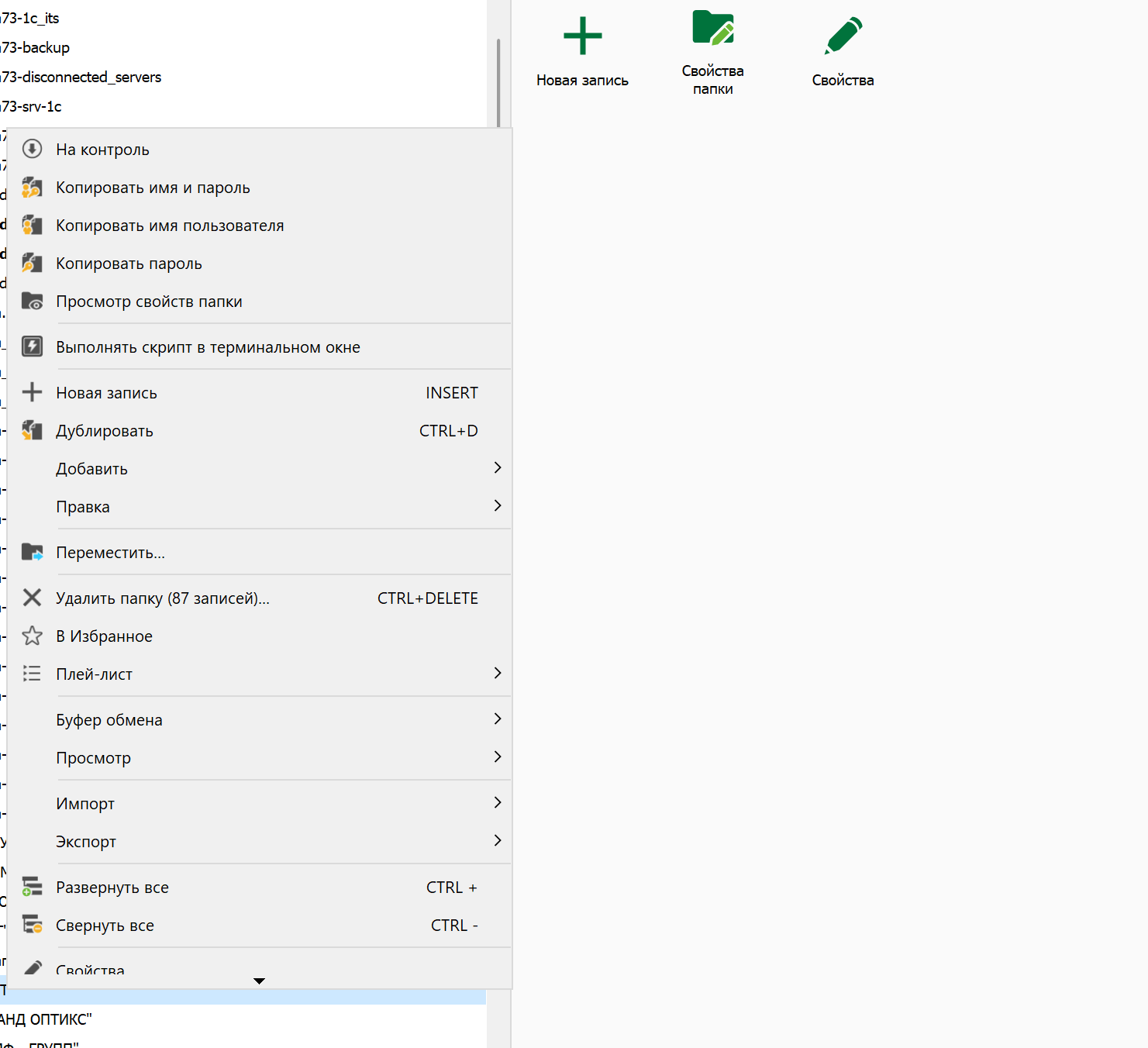
error2.png
Hello,
We will continue to investigate but just keep in my that we use a third party for the UI and we did not change that on purpose.
Regards
David Hervieux
And keep in mind that there are no such problems on version 2022.3.35.0, and when updating to 2023.1.13.0, everything has moved out, and this SCROLLING is just WILDLY ANNOYING
Hello,
I'm curious to know if it's side effect because we have more items in the context menu in RDM 2023. Could you try to hide (for the test) some items: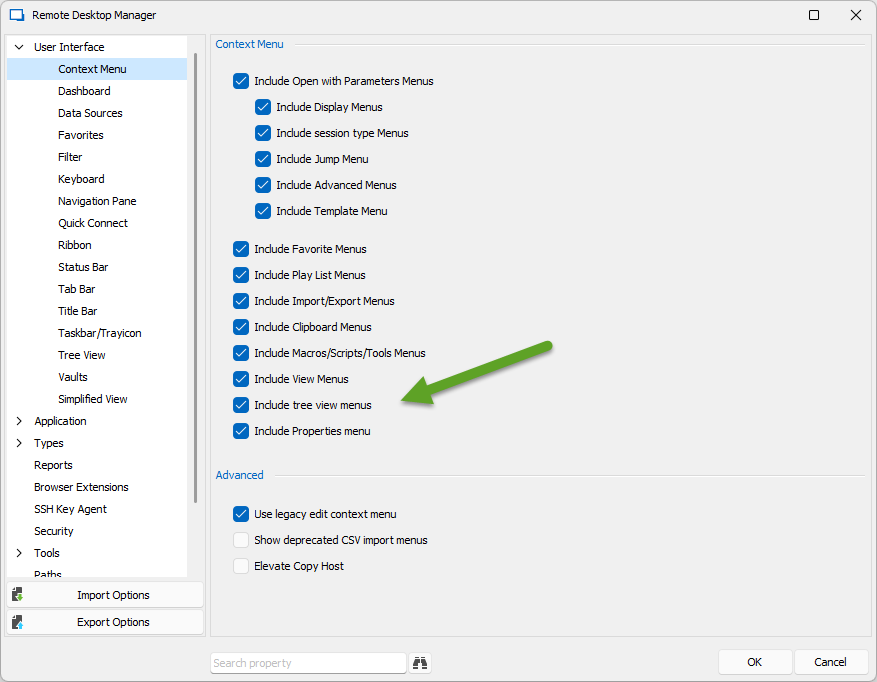
For example the tree view menus.
Regards
David Hervieux
image.png
Hello,
We have managed to replicate the issue using the information you provided. As specified by David above, this is indeed caused by the number of objects in the context menu, and is a behavior automatically handled by a 3rd party we're using. Removing parts of the menu that aren't necessary for your personal usage (as presented in the screenshot) should fix the issue for you. We will investigate this to see if we can find another solution as well.
Regards,
Jafran Majeau
Question: What has changed in the third-party component you are using? If the number of menu items that I use is the SAME, and in the previous version 2022.3.35.0 there was no such problem (although to include ABSOLUTELY ALL menu items) and in version 2023.1.13.0 this problem appeared. At least I'm not a programmer, but I'm partly familiar with the methods of how modules or libraries are used in the development environment, and there it's definitely configurable, whether to use SCROLLING after such and such a number of elements or not (everything should be flexibly configurable there, especially since you see PLACES both ABOVE and BELOW just a LOT in 4k resolution to fit absolutely everything)
PS. I think that the component and the library that forms your right-button menu are exactly the same as in version 2022.3.35.0 as in version 2023.1.13.0, so the question here is exactly to the program CODE to fix it there
I disabled A LOT of menu items (as I understand it, you didn't even try to do this for the test) and as you can see, the problem REMAINED, even on a very TINY drop-down list.... 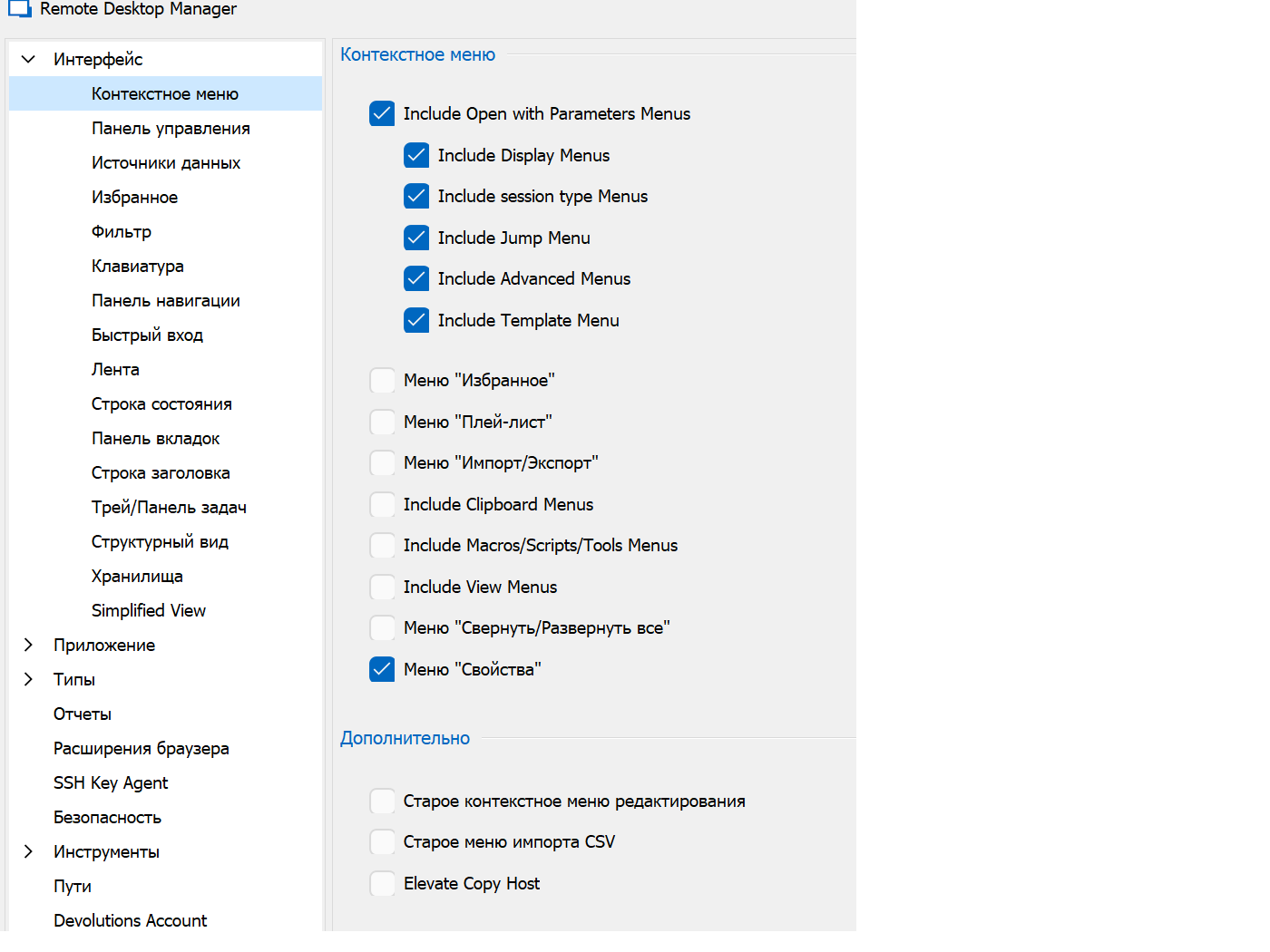
Just messed up something in the RDM code, pass this problem to the technical level ABOVE, it's impossible to work with such a CONSTANT SCROLLING.... There are just a lot of places at the top and bottom to place anything, and this CONSTANT SCROLLING infuriates alas (((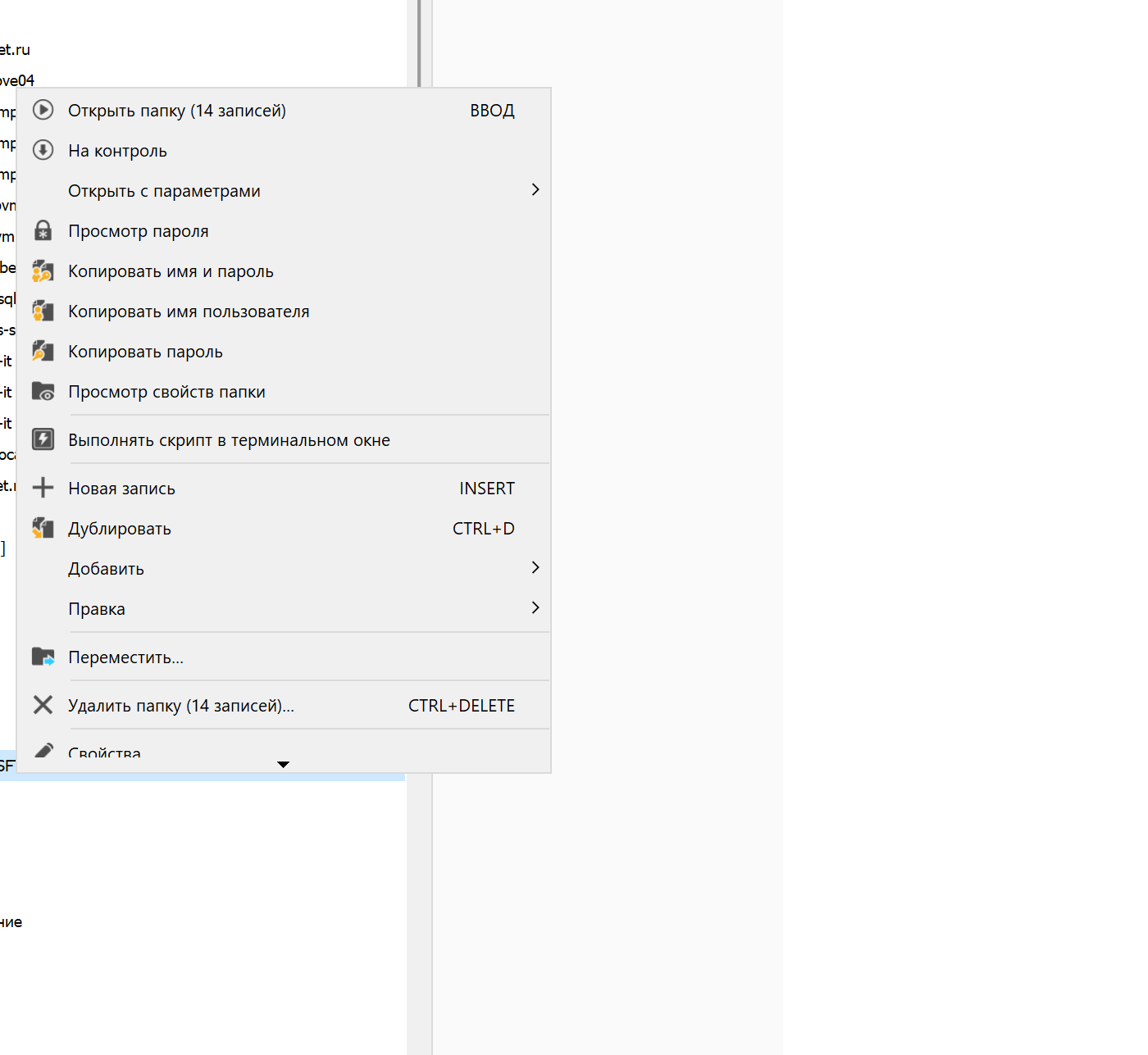
error2.png
error1.png
First of all, I will ask you to change the tone of your message or I'm done with you. We try to investigate but we can reproduce it. For now, you are the only one reporting this issue which does not help us find the root of the problem.
David Hervieux
Accepted, I apologize if the tone has offended you in some way, it's just very insulting when you're waiting for a new release, you put it on, you think you'll enjoy its work, but in the visual part there are hindrances for comfortable work, as it was before
Hello @Vitexeon,
This issue revolve around the zoom of windows, screen resolution and the amout of item there is in the contextual menu.
We're not sure how to fix this for you so the temporary workaround would be reducing windows zoom scale, which I know isin't Ideal.
I do have the same issue with a 4k screen 200% recommended scaling.
Reducing the scaling to 175% did the trick for me.
I Suggest you lower the scaling by 25% increment until you feel confortable until we figure this out internally.
We'll give you some news as soon as we have a potential fix.
Regards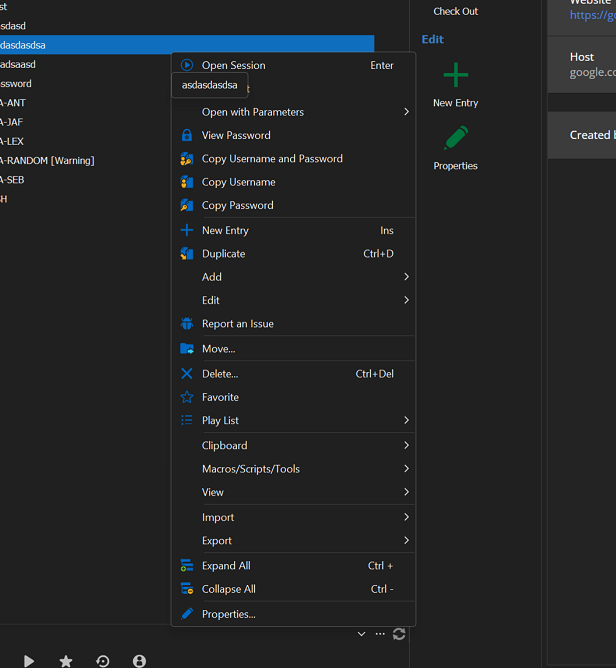
Alexandre Roy
image_2023-03-23_093522447.png
image.png
I have this problem on 4k and on a scale of 175 and on a scale of 150, below to do a scale on a 32-inch screen with 4k resolution, it is no longer possible, there is nothing to see in other programs then, and in the Windows interface too...
It's just that the menu still behaves strangely at any scale, there is plenty of space on TOP and BOTTOM (you can still place a bunch of elements), but it still adds scrolling ... and there was clearly no such problem on version 2022.3.35.0
By the way, there is exactly the same problem with the menu and on the RDM icon, which is located on the taskbar next to the clock (you don't have many elements there at all, but scrolling also appeared)
Noted,
We'll investigate to see if we could add an option to remove the scroll in contextual menu I believe it just added itself by updating DevExpress new version, which we have a limited control over.
I'll keep you updated.
regards,
Alexandre Roy
Hello,
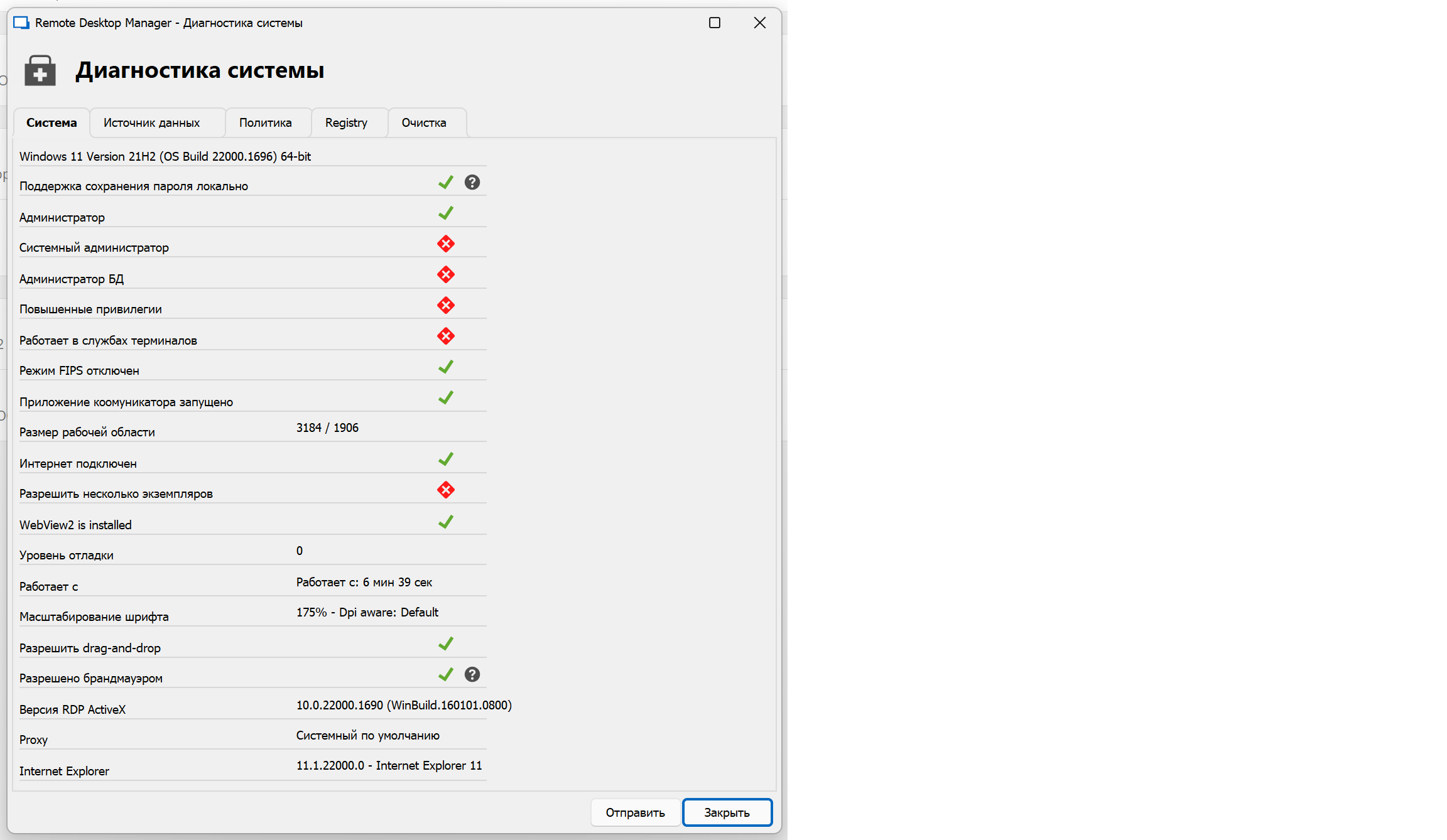
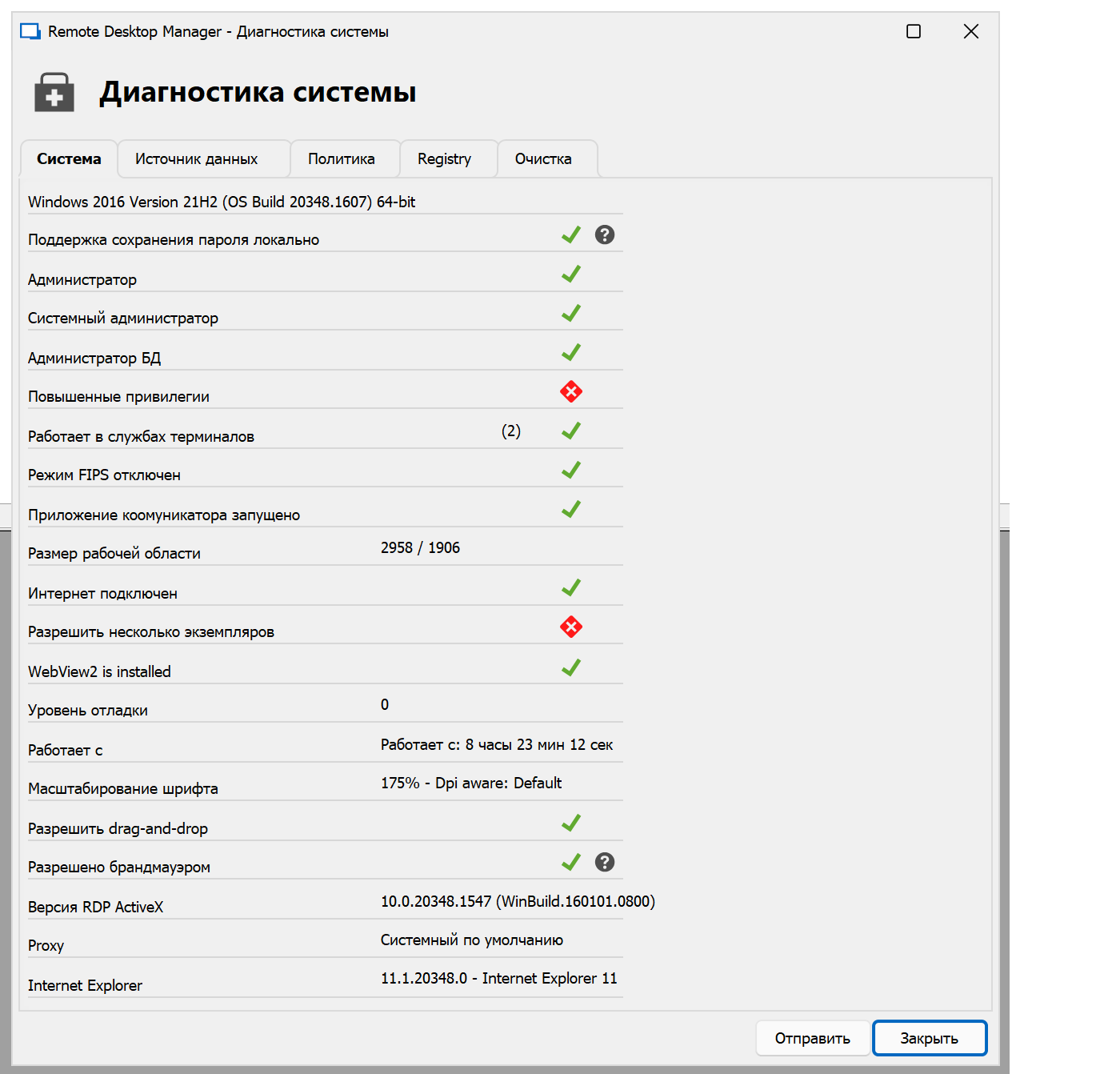
I'm still trying to find the pattern because I'm unable to reproduce it on my dev machine. Could you post your system diagnostic like this (it's in the ribbon help):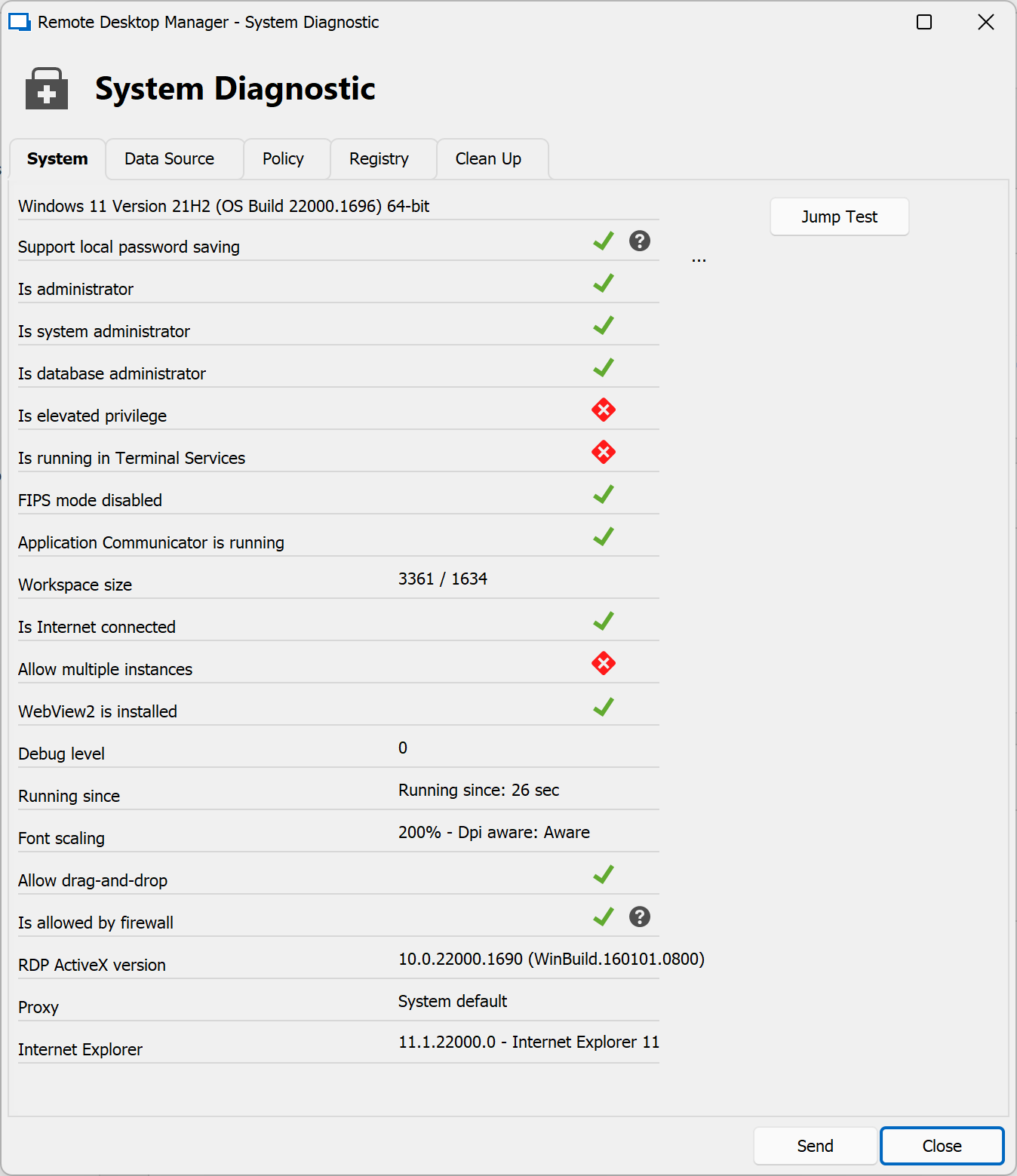
David Hervieux
image.png
@Vitexeon,
We updated the third party that causes the issue, the arrows doesn't show up anymore but the problem still remains, it still scrolls on the internal version of 2023.1.16, but we did find a work around by switching an option in File > Option. It would by changing the Display scaling from system aware to DPI unaware.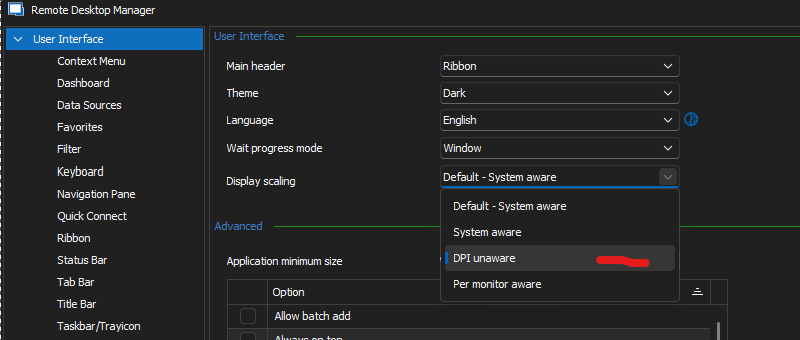
We're also contacting DevExpress to try and resolve the issue with them as it is a probably caused by one of thier addition that is misscalculated in relation with the windows scaling percentage.
I would like some news if the setting DPI unaware can solve your issue temporarily for you.
Regards,
Alexandre Roy
image.png
Of course, I will try to help find the problem. At the moment I have 2 working systems, and both have this problem, I attach screenshots of the paid diagnostic cards. By the way, I found another oshika, the diagnostic card on the second screenshot shows that I have Windows Server 2016, but this is not the case, I have Windows Server 2022 (so I understand Windows Server 2019 diagnostics would also incorrectly recognize) but it doesn't matter, all these operating systems are essentially Windows 10 in their core. So we can assume that the problem exists on 4k monitors on windows 10 and 11
1.
2.
PS:
002.png
001.png
I tried your suggestion on the DPI unaware option. and I will say this for 4K monitors, this is not a solution))). When you switch to this option, RDM naturally asks you to reboot, and after a new launch, all elements from the tree to the text, ordinary forms and other things increase at least 2 times (((
but this is not the main problem, the main one is that the entire RDM interface becomes blurry and fuzzy (the eyes got tired after 5 minutes of use) I had to go back to the jet option
it's better to tolerate scrolling than blurring)))
Indeed it's blurry when Windows takes care of the scaling. This is just a workaround and not the solution. I have an open case with DevExpress and I can confirm that the RDM 2022.3.35 does not have the issue but it uses an old version of Dev Express. I can rollback to this version but this is just a matter of time before we get the issue back. Eventually we will have to update anyway. This is the most annoying bug that we have and I can assure you that I'm on it.
Regards
David Hervieux
Alas, the problem returned on the release of 2023.3.24.0, scrolling appeared again, and in exactly the same places as in the original screenshots of this topic ((( just click the right button on any element with a 4k monitor, and the right menu again contains the bottom scrolling...
And now the last word "Properties ..." is completely closed by the scroll arrow (in the first long-standing problem in the screenshots, the word was closed in half, now the scroll arrow disappears completely there) By the way, now the shape of the scrolling arrow is different, not the same as the first time
PS:
Before this release, for many updates, there was no problem
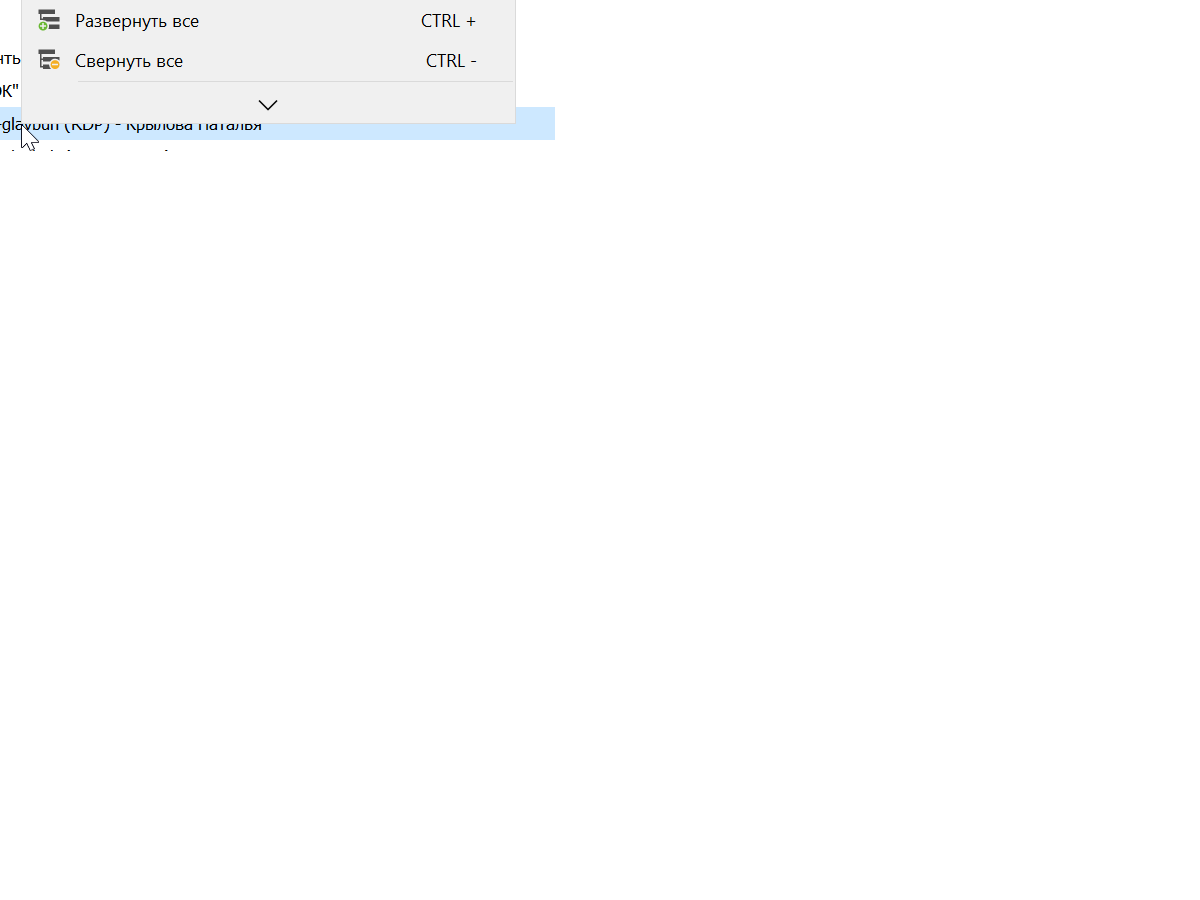
Безымянный.png
Hello,
We already have opened an issue with the third party we use but this time we have been able to create a small application to reproduce it for them:
https://supportcenter.devexpress.com/ticket/details/t1199046/popupmenu-may-display-redundant-scroll-buttons-on-high-dpi-monitors
I hope this is the last time they break it.
Regards
David Hervieux
And are there any guidelines when they fix it so that you make changes to the new RDM release as well?
Hello,
The issue has been fixed by the third party and we've rolled it out in our latest releases (2023). Updating to the latest version should fix the problem.
Regards,
Jafran Majeau