File Explorer Entry Problem

Dear All,
I'm using latest RDM (2023.1.14.0 64-bit - Win11 22H2) and I need to connect to different share using "My privileged account" (E.g. \\hostname\c$)
To do so I've created a "Quick Connect" entry linked to a File explorer template. Then when I run this entry it prompt to me for hostname, If I use hostname\C$ I'm able to connect.
The windows that appear I had my PC on the left column and the remote fs on the main windows (take a look to the attachment1). Is it possibile to how remote folder tree on the left instead of my pc foleder?
If I change the display in the entry to external I'd like to a have a windows explorer folder connected to \\hostname\c$. is it possible?
Thank you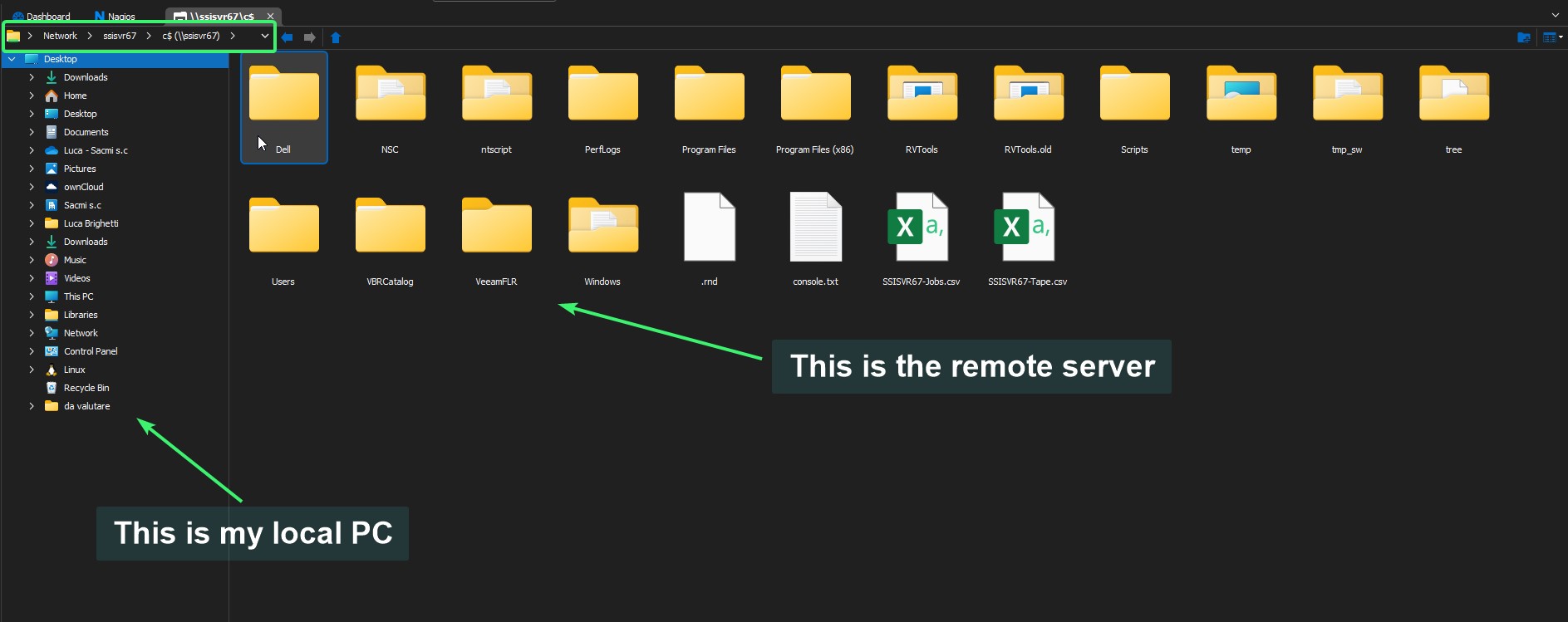
attach1.jpg
All Comments (1)
Hello Luca,
Thank you for contacting us. I appreciate you reaching out to us,
Unfortunately, based on my understanding of the situation, it may not be possible to fulfill your request. However, I would be happy to assist you further if you could provide me with additional details about your requirements.
Alternatively, you could consider using an RDP type entry and enabling the drive share by going to the "Local Resources" section and enabling the "Hard Drives" option. This might work for you, but I would need more information to be sure.
Please let me know if you have any further questions or concerns.
Best regards,
Samuel Dery