Right click on vm menus not working - Dissappears! Doesnt happen in other RDP Managers
Right click on vm menus not working - Dissappears! Doesnt happen in other RDP Managers

So i am just trying out RDM instead of mRemoteNG and Since i have moved i have found that 2019 and 2022 servers i cant right click and see the context menus.
I have gone through and changed all the settings I can see scaling, smart resizing etc and turned them all off. but the issue persists.
Anyone else had this issue? I found some people had issue with Macs, but i cant find anything about it for Windows...
Recording 2023-03-20 102814.mp4
All Comments (8)
So it seems to only affect hyperv Console... failover manager window.
Anyone else had something similar?
Hello,
Could you confirm your Remote Desktop Manager version? I will have a look on my side.
Best Regards,
Etienne Lord
I am running 2023.1.13.0
So it only happening in failover cluster manager. normal HyperV seems fine.
looked at graphics drivers. aspeed graphics, aswell as microsoft basic display driver.
we have built a fresh new cluster and it affects that too. server 2022 datacenter
This is on different hardware and has a Matrox G200eW3 display driver..
Server 2016 failover cluster manager isnt affected. that works normally..
@TDMPro2K
I've got a test for you to validate where the issue could be coming from.
1- If do not use RDM and instead use the Mstsc to connect to that server instead and use the contextual menu in the console, do you have the same behavior.
If yes, the activeX of windows might be the issue and a possible workaround for this would be to change the property of your entry RDP version to (FreeRDP Lastest)
It could potentially fix the issue.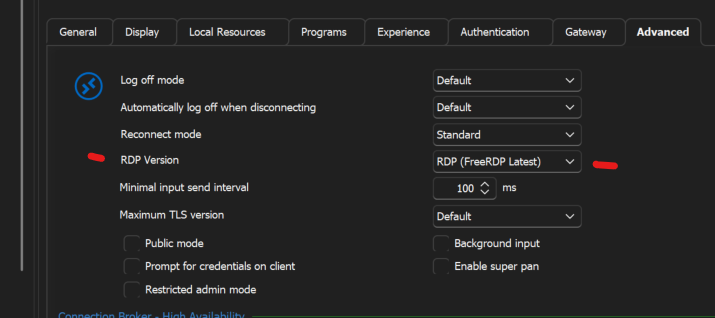
And if this does not help.
For us, starting an RDP session embedded and opening the version 10 of HyperV console work fine, our UI was a little bit different than yours so, updating the Hyper-V console to a newer version could also solve you issue.
Lemme know how that goes,
Kind regards,
Alexandre Roy
image_2023-03-23_135038623.png
image.png
Hi all.
so I ran mstsc and it doesn’t disappear. I have changed the RDp to freerdp in the advanced options and that has cured it. It now works in failover cluster manager. Very random on why context menu doesn’t work in certain windows..
thanks all
Happy to help :)
Alexandre Roy