The current vault has a large number of entries, which may impact performance.
The current vault has a large number of entries, which may impact performance.

Hello,
we get this warning: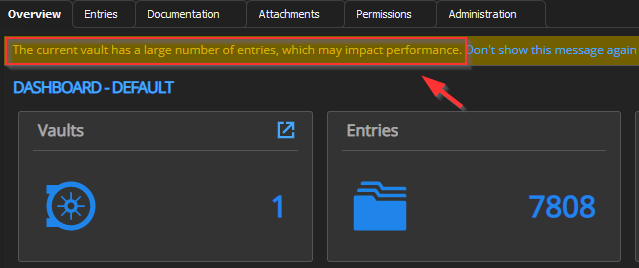
I can't imagine that with just 7808 entries we are already approaching the RDM limits?
We only use some password objects, RDP connections (and few other object types).
Where does the message come from?
Is there a SQL/RDM performance tuning guide? ... whereas I don't really find the RDM sluggish in our case.
Best regards,
Daniel
image.png
All Comments (7)
Hello Daniel,
Based on our internal testing and feedback from clients, it has been observed that having over 5,000 entries may lead to performance issues. However, this is only one of the factors to consider.
Other factors that can impact performance include VPN connections, whether the database is stored in the cloud or on-premises, the use of custom images, and the number of variables in use, among others.
The warning message you received serves as a guideline and can be dismissed. If you find that your current performance is satisfactory, you may choose to disregard the warning without any concerns.
Best regards,
Richard Boisvert
Hi Richard,
thanks for your feedback. That makes me wonder - we are just a small team of IT specialists (about 20-30 RDM users).
What would happen, if we (and our customers) grow further, like we will?
Other factors that can impact performance include VPN connections, whether the database is stored in the cloud or on-premises, the use of custom images, and the number of variables in use, among others.
Well, we also have one VPN connection for each customer, DB is stored on Prem on a very fast server. We use about 20-30 custom images and just a few variables.
Best regards,
Daniel
Hello Daniel,
You'll be pleased to know that there is no limit to the number of vaults you can create: https://help.remotedesktopmanager.com/rdm_administration_vaults_overview.html
Creating multiple vaults can simplify permissions management and enable you to organize vaults based on customers, sites, and other criteria. As long as you don't experience any performance issues, as mentioned earlier, you can continue to use the current setup. However, you may want to consider dividing your entries into two or more vaults in the future. Please refer to the "Move entries to a different vault" section in the provided Knowledge Base article for guidance.
Best regards,
Richard Boisvert
Thanks for the input, Richard.
I'm considering more vaults for future plans.
Best regards,
Daniel
Hello,
My pleasure, glad to be of assistance. If you have any more questions or concerns, please don't hesitate to reach out.
Best regards,
Richard Boisvert
Is there a way to hide this message by default ?
And if hidden , how can i remove the setting so i will get the warning information again ?
Hello Magnus,
It is not possible to hide the message by default, the only option would be to click to not show the message again. Once hidden that way, it cannot be brought back.
Best regards,
Richard Boisvert