RDM only listing entry type "Username/Password" from Devolutions Cloud when creating/editing credential entry
RDM only listing entry type "Username/Password" from Devolutions Cloud when creating/editing credential entry

Is this a fault? I would have expected entry types of Host and Website to be available too, at a minimum. Given that Email is a username format under Advanced in the RDM credential entry for Password Hub Business record types, I'd also expect Contact to be a usable record type (since a Password Hub Business Contact record also has a username, domain and password). Is a setting wrong somewhere?
All Comments (16)
Hello,
Indeed, all sessions type should be available, except if you are using Devolutions Hub Business and that your administrator may have blocked some entry type.
Are you using Devolutions Hub Business or Hub Personal?
Could you post a screenshot of what you are seeing?
Best regards,
Jeff Dagenais
Here's what I see browsing my user vault from RDM and from Workspace. The "Testing" folder doesn't show up in RDM if there's no "Username/Password" record type in it. When I added one in the "One of Everything" sub-folder, a folder showed up with just that entry and a CLSID-looking folder name rather than Testing or Testing/One of Everything. Of the four in the redacted CLSID folder in the RDM screenshot, one is in the work_Database folder and three are in the root of my user vault.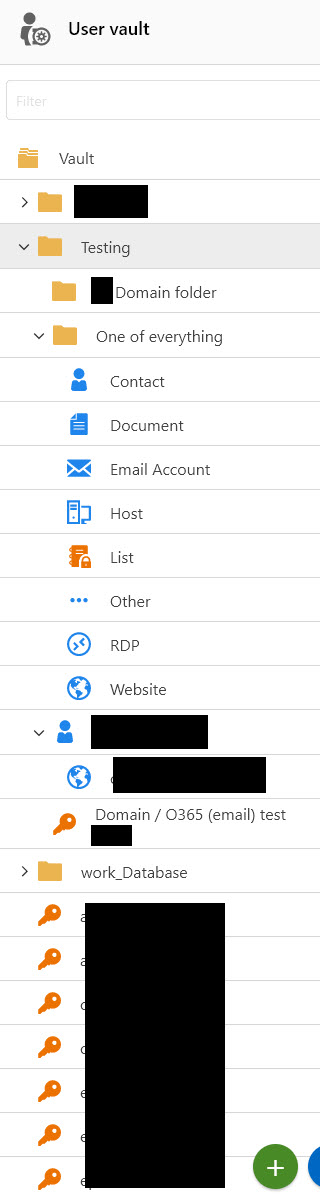
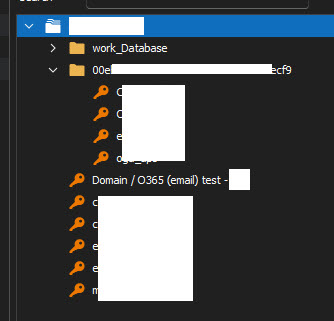
2023-03-18_07-02-26.jpg
2023-03-18_07-02-05.jpg
Sorry, forgot to add that it's "Password Hub Business", which I think might now be "Devolutions Hub" or "Devolutions Hub Business"? (It's not the free personal one)
It's a brand new business account as of last week. If there's a setting in the admin panel that affects this, can you please point me to it so my boss can review it?
Hello,
Could you confirm your Remote Desktop Manager version?
Best Regards,
Etienne Lord
2023.1.10.0 64-bit.
Please note that I am exactly 12 hours ahead of your time zone, so we only get one chance a day to move this forward. If at all possible, please try to bundle a few questions or suggestions into each response, thanks. In that spirit:
- The entries above are from my user vault in the business account.
- The same behaviour is seen from the main vault in the business account
- The same behaviour is seen from my personal hub that uses my company email address
- The same behaviour is seen from my personal personal hub that uses my own email address.
When I tried to add a second personal hub to my Workspace Windows app it told me something like "A password personal app already exists with that username", except it doesn't. Also, I note that the username, domain and password fields for Contact only exist in the Windows app, not at https://hub.devolutions.com/app
Hello,
Thank you for the details, I will look into it!
Best Regards,
Etienne Lord
Hello,
Could you screenshot of your RDM Dashboard with the listing and the Folder name issues (The whole window instead of the cropped version?)
Best Regards,
Etienne Lord
I didn't know what you meant by that at first, but I've just had a meeting with one of your staff.
We're not using Devolutions Hub Business as a data source. Our primary data source where all our entries and license lives is a mysql database. We're only adding Devolutions Hub Business entries one at a time as credential entries into our main database (and user vaults). The RDM Dashboard doesn't have a direct view of the contents of Devolutions Hub Business, you can only see it through the Entry selection dialogue box in a "Devolutions Password Hub Business" credential record.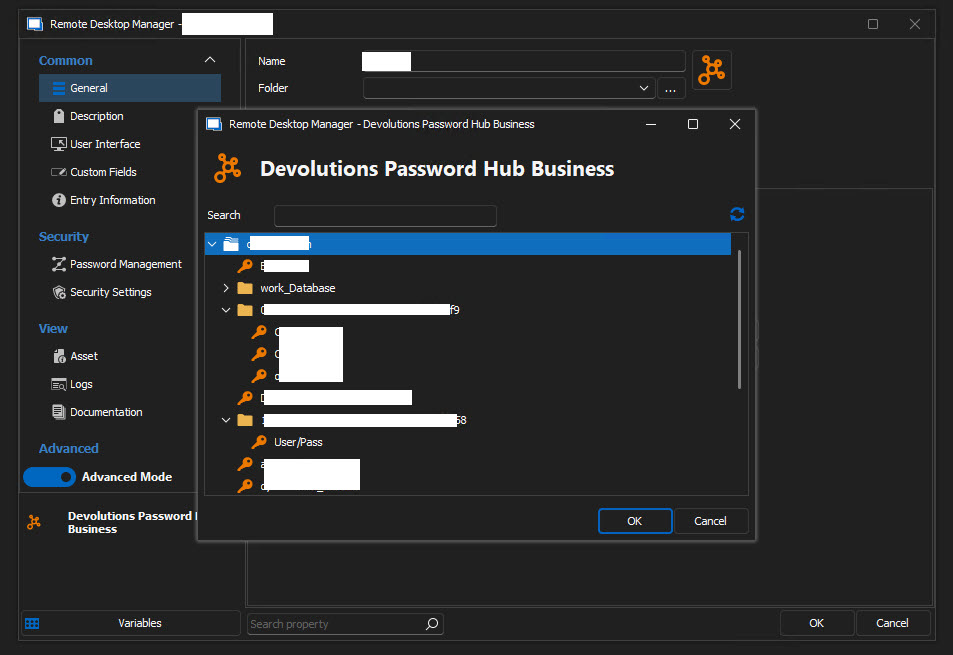
2023-03-28_10-58-43.jpg
Hello,
Thank you for the details, we understand what you are looking for, I will check with the engineering department!
Best Regards,
Etienne Lord
How are we going with this? Our migration project has been on hold and this is one of the last few things that needs to be resolved or clarified.
Hello,
We were able to reproduce your issue with folder IDs being displayed instead of folder names. We are currently working on fixing that.
As for the other part of your issue, if we understood correctly, you are trying to link your Hub Business user vault entries into another data source. Is that correct? I believe it's currently not possible, but it's something that we could add. Just keep in mind, that it would only work for you and nobody else. In other words, it make sense to link them from user vault to user vault, but anything else will provide the user with an error.
Did we understand the second issue correctly?
Have a good day!
Maxime Morin
Ok, let's try again for the second issue
- Our main database that's our data source is mysql (I know, I know)
- We are implementing accounts for individual technicians wherever customer devices or services permit. For this example, let's use a customer AD
- We create an adm_jsmith AD account in a customer domain, say cust.local
- This is not our domain. There are many customers, all with their own domain. We can't just use "Personal Credentials"
- We create an RDP entry for DC01.cust.local with the credential option of "Find by name (User Vault)" and give it a value of cust_adm
- Our technician Jay Smith has already put their email into the "My Account Settings" for Devolutions Hub Business in RDM
- They then go to their User Vault in RDM and create a new Devolutions Hub Business entry and call it "cust_adm".
- They tick "Use "My Account Settings""
- They hit refresh for host, go through some logins probably and get our devolutions.app URL in the Host box
- They select their vault in the Vault section
Then when they click on the ... for the Entry box to select a credential entry from Hub they're only presented with records of type "Username / Password".
If the credential entry they want is of type "Username / Password", they select it and everything works. If it's not that one record type it's not available to select.
How are we going with this?
Hello,
Sorry for the delay!
I will look back with my team.
Best Regards,
Etienne Lord
Hello,
A ticket is open with the Remote Desktop Manager Windows regarding your points, they are still working on it!
Best Regards,
Etienne Lord
Hello,
With the latest version of Remote Desktop Manager and Devolutions Server, Host and Website entries can now be seen in Hub Business and Hub Personal entries!
Best Regards,
Etienne Lord