Launch RDM on Last Known Monitor
0 vote

Good morning.
I'd like to suggest a feature / fix for RDM, that when you have external monitors, it opens on the last known monitor.
I have it set in my Startup Folder, and every morning when logging in, it always launches on the main monitor and I have to move it to the last monitor I had it on via the right click Taskbar > Move RDM to current display.
Would be nice if there is a way to get it to possibly launch on the last known monitor, if possible.
Thanks!
--- Chuck
Overgaard, AZ (-7 MST / Zulu Year-Round)
RDM Version: 2026.3.2.0 64-Bit - Free
All Comments (19)
Hello,
Allow me to see with our engineers what can be done about this.
I will get back to you once I receive news from them.
Best Regards,
Hello,
Do you have multiple monitor setups ? As in one at at, say, the office and a different one at home ?
The reason I ask is because what you're asking should be the behavior RDM gives you out of the box, when the application is closed it will reopen in the same monitor it was closed in.
Let us know !
Best Regards,
Hello,
Do you have multiple monitor setups ? As in one at at, say, the office and a different one at home ?
The reason I ask is because what you're asking should be the behavior RDM gives you out of the box, when the application is closed it will reopen in the same monitor it was closed in.
Let us know !
Best Regards,
Good afternoon.
I work from home, so I have three external monitors attached to my laptop which is not used as a display.
--- Chuck
Overgaard, AZ (-7 MST / Zulu Year-Round)
RDM Version: 2026.3.2.0 64-Bit - Free
Hello,
Thank you for the information,
Could you also tell me what resolution your 3 monitors are in ?
I'd also like to know if this happens regularly or if it happens occasionally ? (If you don't know, try testing by closing RDM while it's in one monitor and reopening it again, and then do this a second time to see if the results are the same)
Best Regards,
Good afternoon, and sorry for the delay in response. I was out of town for a bit.
All three monitors are the same settings: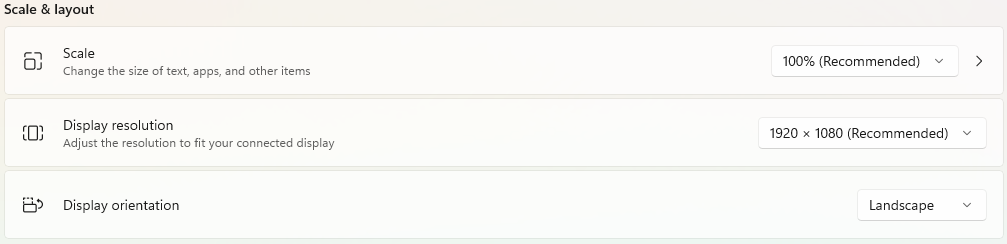
It now seems to be happening 8 out of 10 times since upgrading to the latest version to fix other issues.
I will grab my camera from downstairs in the next day or two and video record what is happening during logon and logoff and launching.
That will hopefully assist in seeing what is going on.
Thank you!
--- Chuck
Overgaard, AZ (-7 MST / Zulu Year-Round)
RDM Version: 2026.3.2.0 64-Bit - Free
image.png
Hello,
No problem, I'll will wait for your recording.
If you wish you can send it to me as a private message in the forum.
Best regards,
Direct Message sent to ya with the link where you can download the video.
Thanks!
--- Chuck
Overgaard, AZ (-7 MST / Zulu Year-Round)
RDM Version: 2026.3.2.0 64-Bit - Free
Hello Chuck,
Did you manage to see my last direct message ?
Unfortunately due to our security policies I can not use the link you sent me.
So I instead sent you a link in your private messages to upload the video to our Sharefile.
Let me know !
Best regards,
Hello Chuck,
Did you manage to see my last direct message ?
Unfortunately due to our security policies I can not use the link you sent me.
So I instead sent you a link in your private messages to upload the video to our Sharefile.
Let me know !
Best regards,
No I did not, sir! I will get that done for you today
--- Chuck
Overgaard, AZ (-7 MST / Zulu Year-Round)
RDM Version: 2026.3.2.0 64-Bit - Free
Hello,
Thank you very much !
I received the recording, and will look into what coiuld be causing this issue for you.
As of now it seems RDM is commited to be on your main display, but I'm not too sure why and if this something that can configured.
I'll get back to you with news once I have some.
Best regards,
Good morning, Zach. Just wanted to touch base and see if there was an update.
Have a great week!
--- Chuck
Overgaard, AZ (-7 MST / Zulu Year-Round)
RDM Version: 2026.3.2.0 64-Bit - Free
Hello,
Indeed ! Sorry about not getting back to you sooner,
I've been trying to reproduce the issue but can't seem to do so. Everyhting opens normally and as it was.
So I'm going to look to see if our QA department can try reproducing the issue.
Have you had any luck getting the behaviour to stop with the latest update ?
Best regards,
Hello,
Indeed ! Sorry about not getting back to you sooner,
I've been trying to reproduce the issue but can't seem to do so. Everyhting opens normally and as it was.
So I'm going to look to see if our QA department can try reproducing the issue.
Have you had any luck getting the behaviour to stop with the latest update ?
Best regards,
Thanks for the update.
No, I have not had any updates.
I get the same actions as the video I sent you showing what occurs.
--- Chuck
Overgaard, AZ (-7 MST / Zulu Year-Round)
RDM Version: 2026.3.2.0 64-Bit - Free
Hey Chuck !
Can you confirm if you have any other applications that seemingly never want to open on anything other than your main display ?
Best regards,
Negative sir.
Otherwise, I would have figured it was something with my set up.
RDM is the only program that likes to move when launched, when hitting the "File" tab, when doing properties of an entry, etc.
--- Chuck
Overgaard, AZ (-7 MST / Zulu Year-Round)
RDM Version: 2026.3.2.0 64-Bit - Free
Hello,
Understood, thank you for confirming.
Have you validated that the drivers for your monitors are updated ?
Best regards,
I was just checking to see if there was an update on this ticket, and I can't believe I missed this.
Yes, ASUS VS247, Dell P2412H (Digital), and Sceptre monitors use the Generic PnP Monitor driver.
And before your thoughts of it being the driver...
Another docking station I have a Dell Dock, Two Dell E2723HN with the latest drivers, and same reaction.
Thanks!
--- Chuck
Overgaard, AZ (-7 MST / Zulu Year-Round)
RDM Version: 2026.3.2.0 64-Bit - Free
Hello,
Understood, thank you for this, I will mention this to our QA team and get back to you as soon as I have news from them.
Thank you very much again for providing us with these details.
Best regards,
Hello,
This is just to let you know I've sent you 2 direct messages regarding this forum.
Thank you !
Best regards,