Telnet session error (-2147014839)

Dear Devolutions Team,
I`m not able to connect to telnet session on my switch, putty works without any issues.
I created entry by searching telnet. What I`m doing wrong ?
(10057L) A request to send or receive data was disallowed because the socket is not connected and (when sending on a datagram socket using a sendto call) no address was supplied.
Regard
Andris
All Comments (10)
Hello Andriskirpis,
Thank you for contacting us on this matter.
Could you send us a screenshot of the properties of this entry?
Be sure to not share any sensitive information.
Could you try to set the internet protocol to IPv4 and try again?
Could you try to connect to it with an SSH Shell entry?
Best regards.
Patrick Ouimet
Hi Patrick
tried to change to IPv4, the same.
tried with SSH Shell, got following error:
after entering username:
Regards
Andris
Hello Andriskirpis,
Thank you for this nice feedback.
A ticket is now open with our engineering department.
ill get back to you as soon as I get news from them.
Best regards,
Patrick Ouimet
Hello Andriskirpis,
This kex error is related to the diffie-hellman-group 14-sha1 algorithm, to fix this error, you could enable the diffie-hellman-group 14-sha1 by following the steps inside the error message that you receive.
In the meantime, could you provide a verbose = 2 log?
with this log, we will be able to get information about the traces and connections.
Here is a link to help you how to get that log:
https://kb.devolutions.net/rdm_send_ssh_logs.html
Best regards,
Patrick Ouimet
Hello Patrick,
I added all possible Algorithms using this link https://docs.devolutions.net/kb/remote-desktop-manager/troubleshooting-articles/ssh-algorithm-support/ and now it works.
case closed !
Regards
Andris
Hello Andriskirpis,
Thank you for this kind feedback.
This will help everyone that should encounter this behavior.
Best regards,
Patrick Ouimet
I did the same, but I am still getting this error.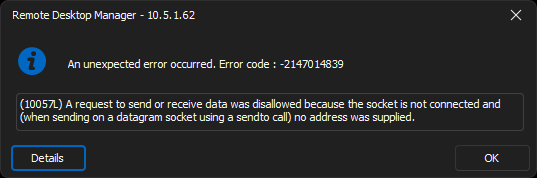
eae993c7-5afb-432b-a8bf-d67036c6ef35.png
Hello Parker,
Thank you for contacting us on that matter.
Which version of RDM and what type of Data Source you are currently using?
Best regards,
Patrick Ouimet
Please check the version 2024.1.29.0 64-bit as the error still exist after adding all algorithms
Hello Parker,
Thank you for contacting us on that matter.
Which version of RDM and what type of Data Source you are currently using?
Best regards,
Hello Mohamed,
Could you provide the Verbose level 2 of this telnet entry? Could you also clarify if the issue relates solely to Telnet or if there are other entries in RDM that are affected?
Additionally, please specify which type of data source you are using.
Best regards,
Patrick Ouimet