Login attempt failed even though password correct

I'm trying to use a saved password to connect via RDP to an AzureAD joined machine.
This works fine in RDCMan from sysinternals
If I set connection to not have NLA I get dumped to the login screen.
If I set to enable NLA I get "The Login Attempt Failed" in red, with a credentials popup. If a retype my credentials it lets me in.
Is there anyway to get the system to save credentials or use the proper credentials in the proper way on first connect?
Credentials and host are both set as custom.
All Comments (12)
Hello,
Which version of RDM are you currently using ?
I'd also like to know which data source you're using to store your entries.
Thanks !
Best Regards,
Version is: 2022.3.35.0 64-bit
Datasource is just a local install (Local Data Source)
I switched everything to custom and pasted in the password directly as well to the entry for the session.
Hello,
Thanks for the information, have you recently updated the application or is this a fresh install ?
If it's the former, were you receiving this error before the update or only after ?
I'd also like to know what your disply is set to. It could be Embedded, External or Undocked.
If it's Embedded, can you tell me what the results are when using the External mode ?
Best Regards,
I am able to log into an AzureAD joined machine, by configuring the following settings in the RDP item:
- General | Host: fill in the actual computername, not the IP Address.
- General | Username: your UPN (email address)
- General | Password: your relevant password
- General | Authentication: leave the Enable Network Level Authentication (NLA) option enabled. Enable it, if it is not.
- General | Authentication: enable the Enable Azure AD SSO option. This one will allow you to remote in on the machine.
- Leave everything else as default
Additionally, if you have Intune/Autopilot, you might want to create an Configuration Profile where you configure the OMA-URI for adding additional admin accounts to the Local Admin group. The above settings will allow you to log on with other authorized user accounts (e.g. IT engineers).
With kinds regards,
Roland
I am able to log into an AzureAD joined machine, by configuring the following settings in the RDP item:
- General | Host: fill in the actual computername, not the IP Address.
- General | Username: your UPN (email address)
- General | Password: your relevant password
- General | Authentication: leave the Enable Network Level Authentication (NLA) option enabled. Enable it, if it is not.
- General | Authentication: enable the Enable Azure AD SSO option. This one will allow you to remote in on the machine.
- Leave everything else as default
Additionally, if you have Intune/Autopilot, you might want to create an Configuration Profile where you configure the OMA-URI for adding additional admin accounts to the Local Admin group. The above settings will allow you to log on with other authorized user accounts (e.g. IT engineers).
Hello,
Thank you very much for these details !
Best regards,
I am having this problem as well and a) do you use the "Azure AD/Entra ID" option and b) I don't have the Authentication -> Azure SSO option in my client. Latest version of Remote Desktop Manager Free.
Hello Jay,
Thank you for your reply,
Could you confirm your RDM Version number? You can verify this under "Help" -> "About".
I'm also wondering if you could provide me with a screenshot of your RDP entry "Properties" I would like to see the "Authentication" section.
Let me know,
Best regards,
Samuel Dery
Version 2024.1.5.1
I'm on MacOS so maybe that's not implemented yet?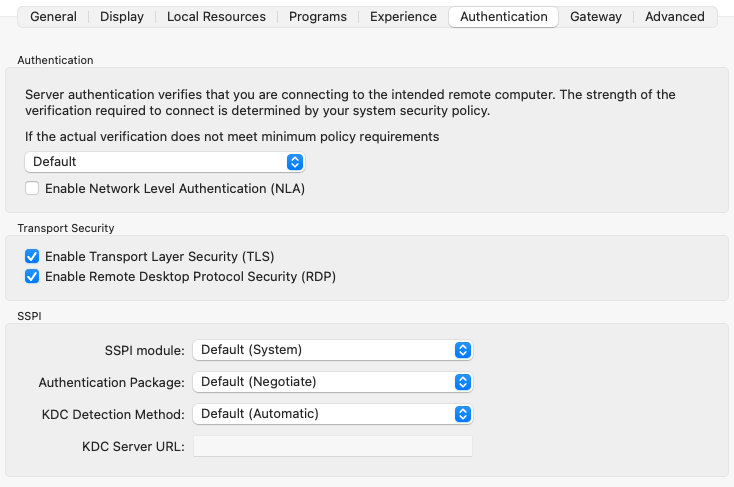
3056dce4-5264-4acc-80de-affcf185af06.png
Hello Jay,
I see, Indeed I believe this is not currently supported for RDM Mac,
That being said, I will reach out to our Development team to confirm,
Best regards,
Samuel Dery
Hello,
No, AzureAD/Entra ID is not implemented yet on RDM Mac, although we plan to do so.
Sadly, I can't really give more informations or an ETA since it only been added recently to our implementation of RDP
and there's still lot of testing to do before we can even think about adding it to RDM.
I hope this answer your question. I have opened a ticket so we can keep track of the issue and keep you informed when it will be available.
best regards,
Michel Lambert
Would be great to know what's the timeline for this feature to be available on Mac. I recently moved from Windows to Mac and seriously missing this!
Hello,
Thank you for your reply,
Unfortunately, there is still no ETA on this; demonstrating your interest in this thread was however a good idea!
Feel free to let me know if you have any additional questions,
Best regards,
Samuel Dery