RDM & Devolutions Server - Allow Change Username
0 vote

Hi,
we are currently evaluating Devolutions Server as a data source for RDM.
We have a scenario where employees log on to a workstation with a generic PAM user and then are supposed to start RDM and log on personalized. So we can't use Windows Integrated Security either and use LDAPs.
But now it is the case that a fixed user must be stored in the Datasource Settings, which is not possible in our case.
Is it possible to allow the user to change the username? The best would be, if at the RDM start (as it was with MySQL) the username and password are requested and are sent to the DPS.
Best regards
All Comments (9)
Hello,
The username is required when creating a DVLS data source in RDM. This is a requirement for the OAuth secure delegation process that is being used for the authentication process. So there is no possibility to change the username of an existing data source and there is no option to prompt for the username and password.
About the Windows Authentication feature, the user can launch RDM with the RunAs command and use domain account to connect on DVLS.
Let us know if that could be a viable workaround.
Best regards,
Érica Poirier
Hi,
thanks for the fast reply!
I completely understand that that is not possible using OAuth, but we are using LDAPS (configured via the Domain menu point within DVLS).
We need to do this on these workstations cause the Windows user is a local account and no AD user.
Within RDM I can then set my AD Account and DVLS is doing the authentication via LDPAS (but not the Windows client itself).
I am redirected to a web page and have to type in the password for the account, which is working. But the username is prefilled and can't be changed.
We could also use a different AD Account if we change that within the RDM data source settings, but of course that won't be convenient for the users.
So what we would need is that the username that is specified within the data source settings is dynamic.
I hope, now the requirement it is more clear.
Best regards
Hello,
Thank you for your feedback.
The security challenge we have on RDM side is when a token refresh occurs, to ensure it's the same user that is asking this refresh and to prevent accessing the cache of another user's entries, the username is prefilled and cannot be modified.
A workaround would be to have one data source per user in RDM properly identified with the user account name. Then enable the Disconnect data source options in Administration - System Settings - Remote Desktop Manager, like the On close, On Windows lock, On idle, depending on the scenario you consider critical.
A discussion have been opened internally about your request. This may take quite some time as the feature request board is already full for version 2023.2. Once an update will be available, we will post it here.
Thank you for your patience.
Best regards,
Érica Poirier
Hi,
as always, thanks for your quick feedback - that's really great.
And yes, we would like to set the RDM to automatically log out of the datasource when it closes.
When other users start the RDM, they should be able to log in with their own credentials.
It would be enough if the browser window opens and the username is editable too.
But I understood that this is not a small change for you . But please keep us updated here. That would be important for us to know if we can use DVLS for this scenario.
Best regards
Hello,
Thank you for your feedback.
We will keep you updated for sure once any idea ill come out from these discussions.
By the way, I forgot to mention that if you choose to use multiple data sources for now, then you can set the On start up data source parameter to Prompt for data source value. 
Then when opening RDM, the user will get the following prompt to select his data source.
I know that's not the ideal solution for you but I think it's a viable solution.
Best regards,
Érica Poirier
Hi,
thank you for taking the request to the engineers and also thank you for the suggestion.
We just have the concern that we have ~200 RDM users, so probably too much to maintain and select own datasources here...
Best regards
Hello,
Thank you for sharing this fact.
We understand that creating ~200 data sources is not a viable workaround in your case.
We will update this thread once any information will be available.
Best regards,
Érica Poirier
Hi,
We've made the changes to allow to configure a DVLS data source with "Always ask username". This will be available in the next release of v2023.1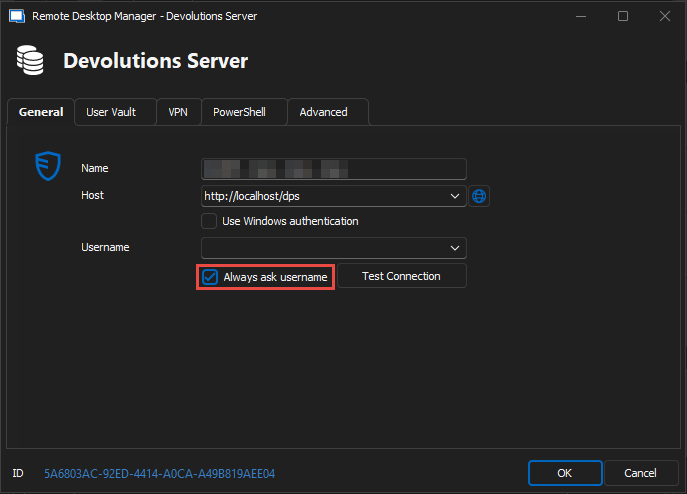
Best regards,
Stéfane Lavergne
image.png
Hi,
great! Thank you very much for the fast implementation :)
Looking forward to test the next release.
Best regards