Automate Application Key / Port for RDM & Browser Extension

Good morning,
one of our customers uses Remote Desktop Manager in a Citrix farm and uses Chrome as the browser and the corresponding Chrome plugin. Is there a way to automate the creation & assignment of the user-specific application key and the port per user?
Thank you & kind regards
Martin
All Comments (12)
Hello,
The Devolutions Web Login browser plugin can be deployed using a GPO in Chrome.
https://kb.devolutions.net/dwl_deploy_gpo.html
The rdmPort parameter can be configured but this will propagate the same value for all users.
I will verify with the engineering team if there is any possibilities on that end and will get back to you.
Best regards,
Érica Poirier
Hello,
Sadly there is no feature available to automate the configuration of the port and application key per user.
There is a workaround that can be done by adding the following lines using a script for each user. The files are located in %appdata%\Devolutions\RemoteDesktopManager folder.
In the RemoteDesktopManager.cfg file, add the custom port for a user by adding this value in the <Option> node.
<HttpBrowserLinkerRDMPort>19444</HttpBrowserLinkerRDMPort>
The application key can be added in the RemoteDesktopManager.ext file with the following value in the <OptionExtension> node.
<HttpBrowserLinkerApplicationKey>ApplicationKey</HttpBrowserLinkerApplicationKey>
Let us know if that helps.
Best regards,
Érica Poirier
Hello Erica,
thank you for the quick response!
At least you could do something with Powershell ;) One more question about the Chrome plugin:
Under the attributes on https://kb.devolutions.net/dwl_deploy_gpo.html there is "rdmApplicationCode": "" is this then the applicationKEY of the RDM?Or how else could the values be entered automatically in the plugin?
Regards,
Martin
Hello,
The rdmApplicationCode is the correct parameter to set the application key.
Let us know if you have more questions about this.
Best regards,
Érica Poirier
Hallo Erica,
perfect, thank you ;)
Hello Erica,
i have to bring the topic up again.
Unfortunately setting the ApplicationKey and port via GPO for the browser extension does not work.
Attached is a screenshot where you can see on the left that the values in Chrome were entered by the GPO, but the standard port / application code is still in the RDM plugin.
What I also noticed: Even if you enter the values manually in the Chrome plugin, NO keys are generated in the registry under the OFTWARE\Policies\Google\Chrome\3rdparty\extensions path.
Do you have an idea?
The JSON string that is written via GPO: {"settings": {"rdmApplicationCode": "das2rfs","rdmPort": "19452" }}
Regards,
Martin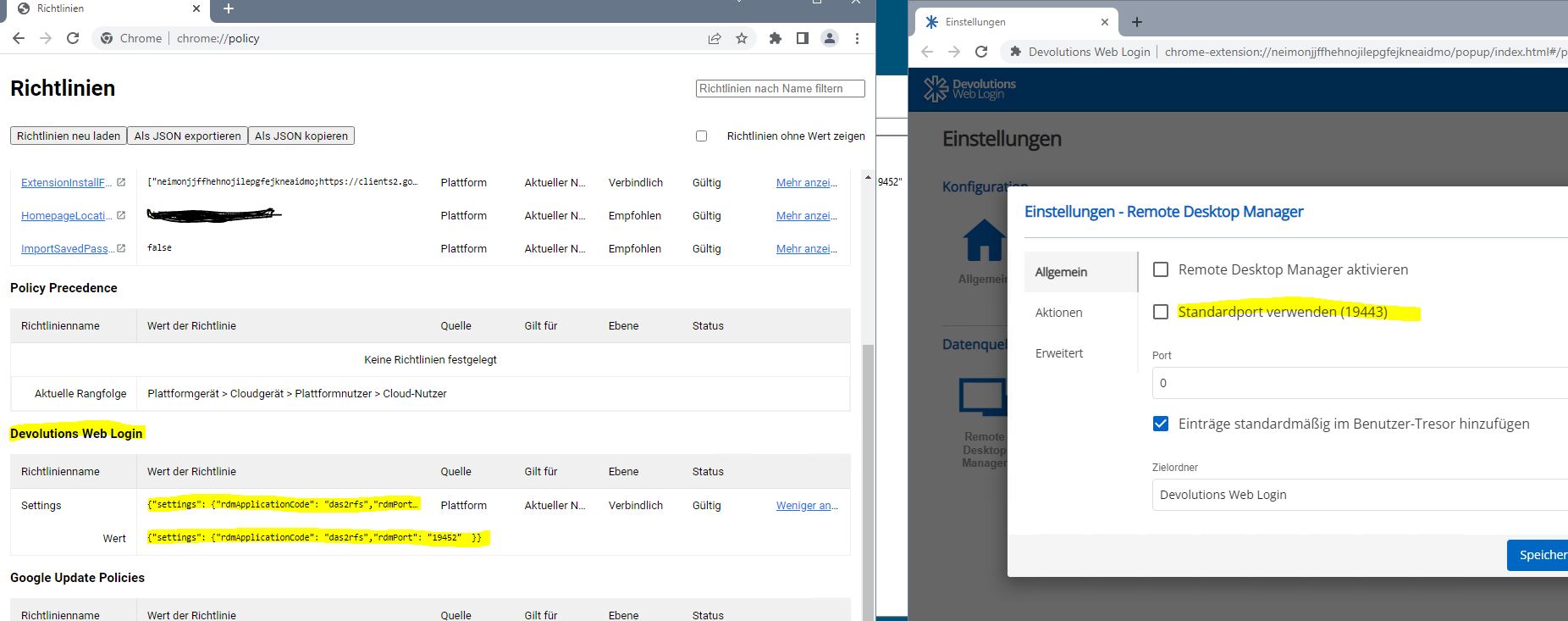
lmchrome.JPG
Hello Martin,
Thank you for your feedback.
Have you tried to set the setGPOSettings of the adminSettings section to AlwaysOverride?
https://docs.devolutions.net/kb/devolutions-web-login/how-to-articles/deploy-dwl-chrome-gpo/#default-admin-settings
When modifying the information in the DWL browser extension, it won't impact the registry keys.
Let us know if that helps.
Best regards,
Érica Poirier
Good morning,
Thank you for the hint! Port and key are now entered correctly!
Unfortunately, what is still missing is the selection of the "Application" for the browser extension, I also looked through the values but did not find any that could fit here..
Below a screenshot.
Thank you very much!
regards,
martin
rdm_app.JPG
Hello,
Thank you for your feedback.
To enable RDM application in the DWL browser extension using the GPO, the rdmActivated parameter should be set to true in the Default Settings section.
Let us know if that helps.
Best regards,
Érica Poirier
thank you :)
Hi Erica,
we are nearly finished,
for the last step: is there a way to automate the linking of the Chrome plugin to the RDM? (Grant Access)
Thank you!
Hello,
Thank you for your feedback.
If you are referring to this DWL association with RDM, no it's not possible to automate it. The purpose of the prompt you get in Chrome is to accept the connection from DWL to your RDM and let them exchange the keys. You can have an infinite number of DWLs connected to RDM at the same time and each one will have a different and unique association. The association link should be a one-time deal per browser profile. Once the link is made with a browser profile and RDM, it doesn't have to be created again unless you delete the DWL extension or files in RDM that contain the associations or delete the associations in File - Options - Browser Extensions.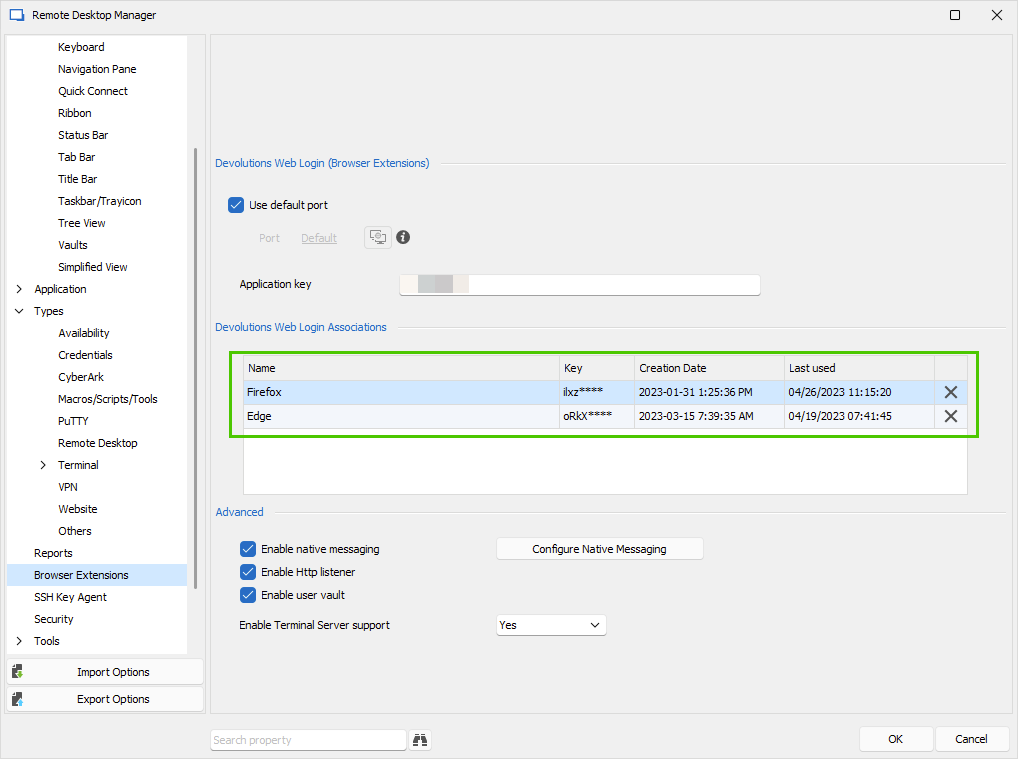
Let us know if you have further questions about this.
Best regards,
Érica Poirier
f94c06b8-5874-4953-b032-8179aaad7f72.png