VPN 'Before Open' event seems to be blocking calls to RDM-CloseSession
VPN 'Before Open' event seems to be blocking calls to RDM-CloseSession

G'Day,
I'm using a FortiClient VPN to connect to four different domains with a number of sessions per domain, and I want to be able to implement some kind of mutex on the VPN entries (as FortiClient only supports a single connection at a time) which will automatically apply without my having to manually manage the VPNs, and just focus on the sessions.
To that end, I've put the following powershell scripts into the 'Before Open' Event for each of the VPN's (changing the "DEV" portion to reflect each domain):
if((get-netadapter -name "Ethernet 3").Status -eq "Up") {
  import-module -force RemoteDesktopManager

  write-host "getting vpns";
  $sessions = get-rdmsession | where { $_.ConnectionType -eq "VPN" -and -not $_.Name.Contains("DEV")}
  write-host "killing vpns";
  foreach ($sess in $sessions.ID) {
    Close-RDMSession -Force $sess
  }

  write-host "Waiting for VPN clear";
  while((get-netadapter -name "Ethernet 3").Status -ne "Disabled") {
    Start-sleep -seconds 5;
  }
  write-host "Done!"
}
However, if I select "Wait for Exit" to enure that any other VPN is closed before this one opens, what actually happens is that it blocks on the very first session ID until the script times out, and then it continues in parallel with the new VPN connection attempting to open, which is blocked by the existing VPN connection, which is subsequently closed by the script after this VPN thinks it's connected.
Does anyone have any ideas as to how I could accomplish this kind of VPN-switching?
I've gotten pretty close by saying all my sessions should ping something to check for VPN connectivity, and putting in a before-open script on the VPN entries to manually disconnect an existing VPN connection via commandline the same way that closing the VPN entry would:start-process -wait "C:\Program Files\Fortinet\FortiClientCLI\FortiSSLVPNclient.exe" disconnect;
The problem with this is that while it works when managing things at the RDP session level, the VPN entries do not accurately reflect the state of the VPN connection.
Either I tick 'Use adapter to detect connection', in which case they're all open all the time because Forticlient uses the same adapter for all the connections, or I don't tick that in which case the state of the entry is completely independent of the actual state of the vpn, which causes problems in other areas such as when the VPN drops unexpectedly.
Also, as part of my trying things out, I've noticed that setting this 'Wait for adapter' setting will just wait for the duration and then flag the entry as 'Open' even if it never actually detected the adapter having connected. 
I'd have expected it to instead fail to open the entry. Is that a bug to be reported or is it expected behaviour and the adapter connecting is just a way to shortcut the timeout before the VPN connects?
All Comments (12)
Hello,
For the PowerShell script, there is no need to load the RDM PowerShell module as it's already available when using this Event feature.
Regarding the opened sessions, the Get-RDMOpenedSession cmdlet should return all opened sessions. It seems that there is a problem with that cmdlet at the moment and I will raise a ticket to the engineering department.
I will ask our engineering team the behaviour of the Wait for exit option for a PowerShell script in the Before Open Event.
And will check with them if there is an option to disconnect an opened VPN connection while trying to start a new one.
Thank you for your patience.
Best regards,
Érica Poirier
Hello,
Ah yes, I originally had it without the explicit load, but added the load with some surrounding prints as a troubleshooting step to make sure it wasn't having issues with the module.
I'll take it back out at some point, thanks :)
I did check to see if there was a way to filter Get-RDMSession to do only open sessions, but there wasn't a flag for it, the results didn't contain a property indicating connected-ness, and was Get-RDMSessionStatus wasn't returning anything at all.
I'll have a look at Get-RDMOpenedSession though, that sounds very handy. My initial impression is that it's currently not listing VPN entries, only remote sessions. So you're right in that it probably won't help with the VPN side of things, but it'll surely help me with my post-VPN-closing script to prevent those annoying "Can't find the host" popups!
I look forward to hearing further from you & the engineering department, and thank you for your help thus far!
Cheers.
Hello,
Thank you for your reply.
About the Wait for exit parameter, in fact RDM will wait for the configured time set in the Timeout parameter before launching the session. We do not have the ability to really wait for the script to be completed. So if it is set to 30 seconds, then after 30 seconds the session will be launched. We need to adjust the Timeout value to the amount of time the script needs to be completed.
About the strategy on how to handle what you want to achieve, I will get back to you once I will get more information.
Thank you for your patience.
Best regards,
Érica Poirier
Hello!
We do not have the ability to really wait for the script to be completed. So if it is set to 30 seconds, then after 30 seconds the session will be launched.
Mine is definitely terminating earlier than the specified timeout when powershell is finished doing what it's doing...
I've got my script set currently to kill the VPN connection if it exists, and then poll for the adapter to be disabled (for up to 10 seconds), and then print that it's finished and exit, with a timeout of 5 minutes (for testing purposes, normally it's 60 seconds):
It prints 'Ending' and then the powershell window closes and the VPN starts connecting, after 22 (ish) seconds according to my phone's stopwatch.
Using this script, for reference:
write-Host "Starting";
if((get-netadapter -name "Ethernet 3").Status -ne "Disabled") {
start-process -wait "C:\Program Files\Fortinet\FortiClientCLI\FortiSSLVPNclient.exe" disconnect;
}
Write-Host "Waiting";
start-job {
while((get-netadapter -name "Ethernet 3").Status -ne "Disabled") {
Write-Host "Looping";
Start-sleep -seconds 5;
}
} | wait-job -timeout 10
write-Host "Ending";
My issue seems to be that, if I try to use the close-rdmsession commandlet in the script (so that RDM doesn't think the VPN is still open next time I try to use a session that depends on it), the powershell will execute up to that commandlet call, but then won't run the commandlet or anything afterwards until the timeout has expired, even if it reaches the commandlet in 10-20 seconds out of a 600 second timeout.
ie:
For testing purposes, I set the script below in the "Before Connect" section of the VPN's events tab and ticked "Wait for Exit".
It's the same script as earlier, but with some get-date calls for duration tracking, and a section inserted in the middle to call close-rdmsession on the list of VPN sessions.
get-date; write-Host "Starting";
if((get-netadapter -name "Ethernet 3").Status -ne "Disabled") {
start-process -wait "C:\Program Files\Fortinet\FortiClientCLI\FortiSSLVPNclient.exe" disconnect;
}
get-date; write-host "Closing RDM Sessions"
  $sessions = get-rdmsession | where { $_.ConnectionType -eq "VPN" -and -not $_.Name.Contains("DEV")}
get-date;  write-host "killing vpns";
  foreach ($sess in $sessions) {
get-date; write-host "Killing $($sess.Name)";
    Close-RDMSession -Force $sess.ID
  }
get-date; Write-Host "Waiting";
start-job {
while((get-netadapter -name "Ethernet 3").Status -ne "Disabled") {
get-date; Write-Host "Looping";
Start-sleep -seconds 5;
}
} | wait-job -timeout 10
get-date; write-Host "Ending";
When I open the VPN, it runs down to the firstClose-RDMSessioncall as usual, but then sticks on closing the first VPN entry for the whole timeout duration.
Then, as soon as the timeout is over and the powershell window goes away, it seems as though the script unblocks and the cmdlet is run at that point as the VPN does get closed (if it's open)
By contrast, if I run the same exact code in the RDM Cmdlet (Without the "Wait for Exit" mechanism in play, and not in the context of a VPN session being opened, but with all the same connections and entries active and open), it runs in a much more palatable amount of time:
Hope that helps!
Cheers.
Hello,
Thank you for your patience and I'm sorry for this late reply.
Here is the information I got following a discussion with an engineer.
The way RDM interacts with PowerShell means that there is a communication channel that opens from RDM to PS. Then, via the script used, PS will try to contact RDM which is already waiting for PS on its side. So, RDM will wait until it triggers the timeout. It's in fact a dead end.
As RDM is unable to close an existing VPN connection when opening a new VPN Connection, the only solution I have in mind is to manage your VPN connections outside RDM with PowerShell scripts that won't use the RDM PowerShell cmdlets.
If we ever find a different solution, we will post it in this thread.
Thank you for understanding.
Best regards,
Érica Poirier
Hello,
No worries at all, I appreciate the support.
I am thinking about whether any of the other options available to me might allow me to bypass the powershell connection being opened from RDM?
If, for example, I pick the 'Command Line' variant, to me that feels like it's a 'Run' task, or a 'CMD' task, which might not be using the same powershell channel...?
However, what those things can do, is run powershell themselves...
So could I select one of them instead, for example "Command Line", and tell it "Run powershell.exe with this script as a parameter", and then have RDM open a channel to CMD, which then runs the powershell required to close the VPNs across the powershell channel, and then returns back to CMD, which then returns back to RDM across the CMD channel?
Do any of the options allow for that sort of thing? Or do all of those options in the background just pick the same 'default' shell/channel?
The ones I'm specifically considering are:
Script
Command line
Macro/Script/Tool
Cheers.
Hello,
Thank you for your feedback.
When opening a Command Line entry in RDM, that will launch an independent channel. If that entry opens PowerShell, it's no longer tied to RDM like a PowerShell entry does.
On the other hand, there is no method for RDM to know the status of the task opened by the Command Line and the Before Open event should relies only on the Wait timeout value set in the event. If that value is too short, RDM will open the session even if the script hasn't finished its task.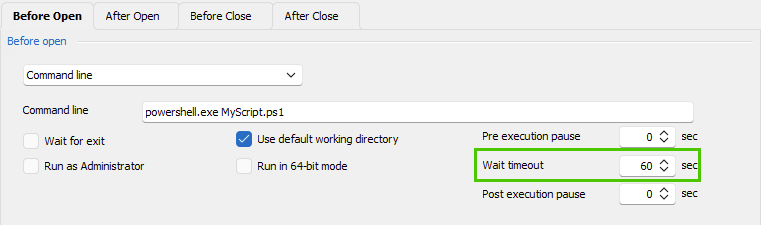
Finally, as long as you do not use the PowerShell option or PowerShell Macro/Script/Tool entries, then that should work.
Let me know if you have further questions about this.
Best regards,
Érica Poirier
image.png
Hi,
Thanks for confirming, though my testing seems to indicate otherwise.
It looks like the only way for 'commandline' to not use the same powershell channel is to untick 'Wait for Exit', which is the functionality I am specifically trying to retain when looking for an alternate channel.
So it seems that there's not really any difference to using 'Powershell' with that option un-ticked, and probably 'Wait for Exit' on any and all tool types will just use the same channel.
Could I make a request to add some way to select a different channel?
Either for the powershell cmdlets, or for the 'Wait for Exit' checkbox, or even just for different tool types?
Cheers.
Hello,
Thank you for your feedback.
I will verify with the engineering about your request to know if it's something feasible and I will get back to you.
Thank you for your patience.
Best regards,
Érica Poirier
Hello,
After a discussion with an engineer, sadly RDM is not multi-thread. So it's not possible to have multi channel connections with PowerShell and fulfill your request.
Other than launching an external PowerShell script that will close any existing VPN connection and use the Wait for exit option with an appropriate delay, I don't think there is any other possible method.
We are very sorry about that.
Let us know if you have further questions about this.
Best regards,
Érica Poirier
Ah fair enough, thanks anyway.
An alternate suggestion, could it check for a file to exist?
It's more of a linux-y way of doing things, but should work quite well for Windows also...
So, alongside 'wait for exit' there could be a 'wait for file exists' checkbox with a filepath able to be specified for the file name+location, and a timeout (which would ideally follow the same concept of 'timeout exceeded = failure' as I've suggested here) so it's not sitting there checking forever, and potentially even a polling interval as well to better tailor to the expected/typical script duration.
Then, a powershell script could be kicked off by RDM without RDM having to block itself while waiting for it, which would allow the script to run RDM powershell commandlets and have RDM respond to them.
Then the powershell when it's finished, could create the file that RDM is periodically checking for, to indicate to RDM that it had finished.
Which could be quite useful in many scenarios actually, now I'm thinking of it.
The script could even be configured to create the file, wait the polling intervalx2 or something, and then delete the file.
Which would seamlessly clean up after itself while still effectively communicating back to RDM that it could proceed, at the correct point in time.
Hopefully, given that RDM can be told 'Close this session after X duration', RDM is able to be told "Check for this file to exist, if it does, trigger event 'connect', if it doesn't, and the timeout is reached, trigger event 'failed to connect', if it doesn't and the timeout is not reached, schedule another check after X duration". Which would hopefully get around the single-threaded issue because it wouldn't have to be *constantly* waiting for a response and could do other things in the meantime.
A check for an environment variable being set would also potentially work quite well, though it'd be a little more complicated to figure out how to set it in the correct environment from a user perspective, it might be faster enough to make it worthwhile.
Hello,
Thank you for your feedback.
Following a discussion with the engineering team, an improvement ticket has been submitted for the "Wait for file exists" request. Once an update will be available, we will post it here.
Thank you for your patience.
Best regards,
Érica Poirier