Changing the icon of the green connected triangle

Hello everyone,
Is there a way to change the green triangle icon that shows up when you're connected to an RDP session?
I figured this would be doable within the themes folder by adding these:
StatusConnectedLarge.png
StatusConnectedSmall.png
But it does not reflect in the UI. Any suggestions?
green triangle.png
All Comments (3)
Hello,
Since we have changed to the SVG format, we no longer support the theme change. Could you give me more detail or perhap the sample image you would like to use? Maybe we could improve our application with something more interesting.
Regards
David Hervieux
Hello,
Since we have changed to the SVG format, we no longer support the theme change. Could you give me more detail or perhap the sample image you would like to use? Maybe we could improve our application with something more interesting.
Regards
Ideally, it would be nice to either be able to specify what icon to use when a session is connected or have the icon change to a green version. I attached two examples, one using the default icon and the other with the custom icons I am using (along with the icons themselves). I use the red icon to indicate a Hypervisor, blue to indicate its child VMs, then the green icon would indicate a connected session. For me, it gives an overall cleaner look with the consistency. Thank you for the response!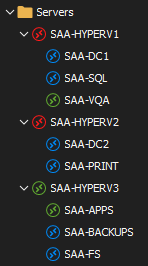
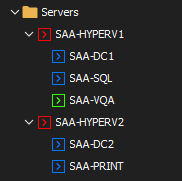
Chevrons.zip
Custom icons.png
Default icons.png
Hello Caseysmith,
Thank you for your kind feedback.
I have sent your request to the engineering department, they will look at this nice idea and see if it can be implemented in RDM.
I'll keep you updated as soon as possible.
Best regards,
Patrick Ouimet