FreeRDP: Can't connect to any server via RDM

Good morning, all.
What am I doing wrong?!
This is what I get on any machine I try and connect with FreeRDP.
If I do the command line, wfreerdp /v:10.106.239.11, I can connect after accepting the cert window for the very 1st time.
I have already accepted the cert for the IP listed in the error box.
The unable to connect window pops immediately when I double click an entry.
--- Chuck
Overgaard, AZ (-7 MST / Zulu Year-Round)
RDM Version: 2026.3.2.0 64-Bit - Free
All Comments (24)
Hello,
Thank you for reaching out to us regarding this,
I have a few questions which you can hopefully answer.
- Which version of RDM are you using?
- Which type of data source are you using?
That being said, from my understanding you're using an RDP type entry is that correct? Have you changed the "RDP Version" in your entry "Properties" under the
"Advanced" section to "RDP (FreeRDP Latest)"
Let me know,
Best regards,
Samuel Dery
Hello,
Thank you for reaching out to us regarding this,
I have a few questions which you can hopefully answer.
- Which version of RDM are you using?
- Which type of data source are you using?
Good afternoon, sir. Version info:
--- Chuck
Phoenix, AZ (-7 MST / Zulu Year-Round)
RDM Version: 2022.3.33.0 64-Bit Registered
Password Hub Personal
That being said, from my understanding you're using an RDP type entry is that correct? Have you changed the "RDP Version" in your entry "Properties" under the
"Advanced" section to "RDP (FreeRDP Latest)"
Yes sir, that is correct.
I have tried this:
As well as this:
--- Chuck
Overgaard, AZ (-7 MST / Zulu Year-Round)
RDM Version: 2026.3.2.0 64-Bit - Free
Hello,
Thank you for your reply,
I see, was this working for you previously in RDM?
To clarify, you mentioned that this was not working for you using FreeRDP specifically, I'm wondering if this is working for you using other RDP Version?
Let me know,
Best regards,
Samuel Dery
I see, was this working for you previously in RDM?
Honestly, this is the 1st time I am trying to utilize FreeRDP.. Using it for testing in our lab environment for a client request.
To clarify, you mentioned that this was not working for you using FreeRDP specifically, I'm wondering if this is working for you using other RDP Version?
Yes, All MSTSC options that are built-in to RDM work as they should.
--- Chuck
Overgaard, AZ (-7 MST / Zulu Year-Round)
RDM Version: 2026.3.2.0 64-Bit - Free
Hello,
Thank you for your reply,
I see, this is working for you as expected outside RDM with the same remote host is that correct?
Could you generate us some logs of the problem by following the steps mentioned in this knowledge base article?
https://kb.devolutions.net/rdm_debugging.html?q=profiler#method-ad-hoc-debugging
You can use Debug level 2 for this, once done simply change this back to 0.
I will provide you a link in a private message so that you can send us the resulting logs.
Let me know,
Best regards,
Samuel Dery
Completed
--- Chuck
Overgaard, AZ (-7 MST / Zulu Year-Round)
RDM Version: 2026.3.2.0 64-Bit - Free
Hello,
Thank you for your reply,
Perfect, I will contact our engineering department with these logs and keep you updated with any news I receive.
Best regards,
Samuel Dery
Hello,
Thank you for your patience,
As you mentioned I'm afraid the logs did not provide much details.
Could you generate some new ones by going under "File" -> "Options" -> "Types" -> "Remote Desktop" in this section enable the option "Enable Logging" and enter the desired path.
Once configured restart RDM before attempting the connection, I will send you a private message with the method to provide us with the resulting logs.
Let me know,
Best regards,
Samuel Dery
Logfile uploaded.
I tried a connection with FreeRDP, then exited RDM so you should have just that info there for you, sir.
--- Chuck
Overgaard, AZ (-7 MST / Zulu Year-Round)
RDM Version: 2026.3.2.0 64-Bit - Free
Hello,
Thank you for your quick reply,
Perfect, I will forward this new file to our engineering department and keep you updated with any news I receive.
Best regards,
Samuel Dery
Hello
We're unable to perform a TLS (SSL) handshake with the server. Can I ask the operating system of the server you're connecting to?
It's possible the server is configured to only support specific TLS/SSL versions, and those versions aren't compatible with how we have FreeRDP configured. Where is your wfreerdp build from? Did you take it from a specific release, build from source (and if so - what branch/tag)?
From the server, can you share the contents of the registry key HKLM\SYSTEM\CurrentControlSet\Control\SecurityProviders\SCHANNEL\Protocols?
If it's not too much trouble, you could run `reg export HKEY_LOCAL_MACHINE\SYSTEM\CurrentControlSet\Control\SecurityProviders\SCHANNEL\Protocols $Env:UserProfile\Desktop\schannel-protocols.reg` (note that the example is PowerShell, configure the path to the .reg file appropriately)
You could send that to my via a PM or to support@devolutions.net (mentioning this forum thread so it finds it's way to me).
Please let me know if something isn't clear or you have further questions
Thanks and kind regards,
Richard Markievicz
You could send that to my via a PM or to support@devolutions.net (mentioning this forum thread so it finds it's way to me).
Sent via PM, sir.
--- Chuck
Overgaard, AZ (-7 MST / Zulu Year-Round)
RDM Version: 2026.3.2.0 64-Bit - Free
Hello Chuck
I received all the files you sent by PM, thank you for sending those over.
I understand you have two seemingly identical Windows 2019 DataCenter servers (in terms of Active Directory, group policies, etc, etc).
I have some confusion when we talk about FreeRDP (via RDM) and FreeRDP (via wfreerdp), so I'd like to be really clear about which cases work:
+---------+-----------+----------+-------------+---------------+
| Server  | mstsc.exe | wfreerdp | RDM (MSRDP) | RDM (FreeRDP) |
+---------+-----------+----------+-------------+---------------+
| working | YES       | YES      | YES         | NO            |
| failed  | NO        | YES      | NO          | NO            |
+---------+-----------+----------+-------------+---------------+
Does that seem right?
The first thing that stands out is that you have TLS1.3 server support enabled in the registry. Although TLS1.3 is available on Windows Server 2019, AFAIK it was shipped "experimentally" and is officially not supported by Microsoft. I would start by disabling it (the usual caveats apply around changing your registry - you should back up first, etc etc). I wonder if that is sufficient to unblock RDM (FreeRDP) on the "working" server?
For the not working server; try a RDM (FreeRDP) connection with the RDP logging enabled as suggested by my colleague upthread. That might tell us more (if even mstsc can't connect to that system, I suspect something else is going on). You can send to me by PM.
Finally, where is your wfreerdp build from? Did you compile from source, or use a release? I'd like the version information to know how current it is with our FreeRDP build.
Please let me know if something isn't clear!
Thanks and kind regards
Richard Markievicz
Hello Chuck
I received all the files you sent by PM, thank you for sending those over.
I understand you have two seemingly identical Windows 2019 DataCenter servers (in terms of Active Directory, group policies, etc, etc).
I have some confusion when we talk about FreeRDP (via RDM) and FreeRDP (via wfreerdp), so I'd like to be really clear about which cases work:
+---------+-----------+----------+-------------+---------------+
| Server | mstsc.exe | wfreerdp | RDM (MSRDP) | RDM (FreeRDP) |
+---------+-----------+----------+-------------+---------------+
| working | YES | YES | YES | NO |
| failed | NO | YES | NO | NO |
+---------+-----------+----------+-------------+---------------+
Does that seem right?
That looks correct to me, sir
The first thing that stands out is that you have TLS1.3 server support enabled in the registry. Although TLS1.3 is available on Windows Server 2019, AFAIK it was shipped "experimentally" and is officially not supported by Microsoft. I would start by disabling it (the usual caveats apply around changing your registry - you should back up first, etc etc). I wonder if that is sufficient to unblock RDM (FreeRDP) on the "working" server?
Problem is, 1.3 is on at the request of some of our clients / customers. So that will be a hard one to disable / shutoff.
For the not working server; try a RDM (FreeRDP) connection with the RDP logging enabled as suggested by my colleague upthread. That might tell us more (if even mstsc can't connect to that system, I suspect something else is going on). You can send to me by PM.
I will get that logging re-enabled and sent over to you in just a few.
Finally, where is your wfreerdp build from? Did you compile from source, or use a release? I'd like the version information to know how current it is with our FreeRDP build.
Download the portable WFreeRDP master branch binaries (continuous build)
--- Chuck
Overgaard, AZ (-7 MST / Zulu Year-Round)
RDM Version: 2026.3.2.0 64-Bit - Free
Hello again
I understand if TLS 1.3 is a requirement from your customer. Since you're using a nightly build of wfreerdp; it's ahead of us in patches and (perhaps more importantly) dependencies. I'll investigate what's needed to get us up-to-speed in this area, but would you be able to test with TLS 1.3 disabled on the server and isolate if that's truly the issue?
Thanks and kind regards,
Richard Markievicz
Good morning, sir.
TLS 1.3 was disabled long enough for a test on two of the servers can't connect to.
No change in connection status.
Also disabled TLS 1.3 on two of the servers I was already successful on, and could still connect to them.
Re-enabling TLS 1.3 I could still connect to those as well.
All servers in question are 2019 DataCenter with the same TLS/SSL GPO enabled.
--- Chuck
Overgaard, AZ (-7 MST / Zulu Year-Round)
RDM Version: 2026.3.2.0 64-Bit - Free
Hi Chuck
Thanks for the follow up.
A couple more things: can you make a visual inspection of the server certificate and check what is the “Signature Hash Algorithm”. Is it something other than sha256? If so, export the certificate (without the private key, which is sensitive) and send it to us.
I'd also be interested in what ciphers the server is offering. From PowerShell:
Get-TlsCipherSuite | Format-Table Name
Please let me know if something isn't clear!
Thanks and kind regards,
Richard Markievicz
Hello again Chuck
I think you can disregard my previous message.
I built a test setup on my side and reproduced your issue. I do note that disabling TLS 1.3 _was_ enough for me to be able to connect - when you tried this, did you reboot the server after changing the registry? I note that it seems to be required to pick up the new configuration.
I understand we should be able to connect with both TLS 1.2 and 1.3 enabled, so I'm investigating what the issue is here.
On the server that doesn't work with _any_ client, I never received a log file from you. Feel free to send it over if you get chance.
Thanks and kind regards,
Richard Markievicz
Hello again
I think I understand the issue. On the server, you have TLS 1.2 and TLS 1.3 enabled. FreeRDP will select the TLS version it wants to use at runtime. There was a bug that could allow TLS 1.3 to be used even if the OpenSSL version being linked doesn't support it. We don't currently have that fix on our branch, which explains why it works for you using the nightly FreeRDP build.
We actually already have a fix for this in our FreeRDP integration; however the setting is not exposed currently in any RDM platform.
I'll work on adding the proper settings to RDM and, longer term, we'll follow up on what needs to be done to properly support TLS 1.3 on the client side. I'll post back to this thread once the update is available.
In the meantime, as I said, if you can generate a RDP log for the server that no client can connect to, I'll gladly take a look.
Thanks and kind regards,
Richard Markievicz
Hello again
I've proposed an update for RDM that I believe will work around this issue. I hope the fix will be in the 2023.1 release, and I expect there will be at least one more beta before the official release. I'll update this thread once that is available.
Thanks and kind regards,
Richard Markievicz
This is pjenominal, sir...
Thank yuou for the update!
--- Chuck
Overgaard, AZ (-7 MST / Zulu Year-Round)
RDM Version: 2026.3.2.0 64-Bit - Free
Hello
RDM Windows 2023.1.x is now available, and has a fix for this specific issue.
If you're using FreeRDP to connect to a Windows 2k19 server with TLS 1.3 _enabled_, you'll need to:
- Open the RDP session settings
- In the "Advanced" tab, change "Maximum TLS Version" to "1.2"
TLS 1.3 is not officially supported by Microsoft on Windows 2k19; but as the highest TLS version available on the server it's what gets negotiated. However, the version of OpenSSL we link to is not able to agree a cipher with the server. This setting forces FreeRDP to select a lower TLS version.
Newer servers have proper TLS 1.3 support and aren't affected.
Please let me know if you have some questions, or if anything is not clear!
Thanks and kind regards,
Richard Markievicz
Sir...
My apologies for the reply delay. I was out of last week.
You, and whomever else was involved in implementation of this fix / workaround are ROCK STARS!!!!
This was verified to work using the following steps:
1) Simple change to "RDP Version > RDP (FreeRDP Latest):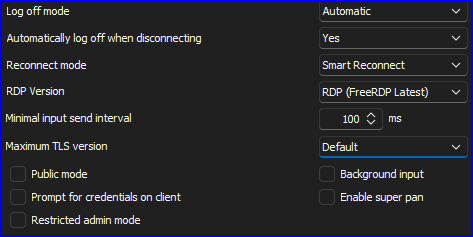
2) This change did not work with the above shown options (expected):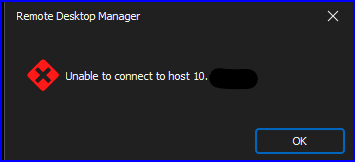
3) Simple change to "Maximum TLS version > 1.2":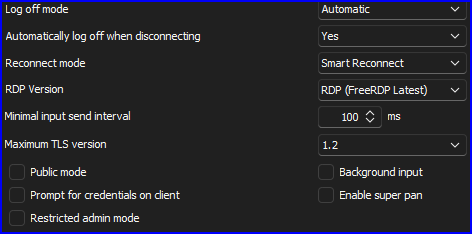
4) Worked like a champ (expected):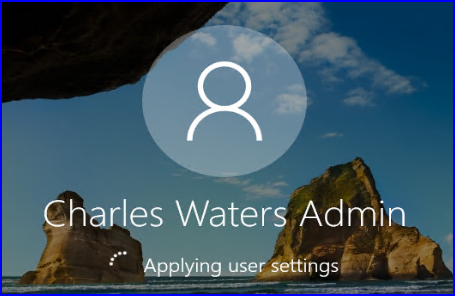
Now the only question is...
Since this is tried and true for FreeRDP, how hard would it be to implement the "Maximum TLS version" setting for MSRTC?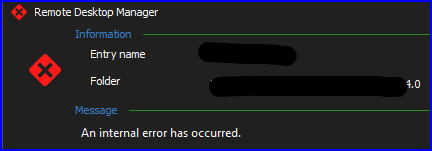
If it can't be done, that is understandable. There's just a few options that work via RDM with MSTRC that don't work with FreeRDP (ie: Auto logoff, etc).
THANK YOU again for implementing this.
--- Chuck
Overgaard, AZ (-7 MST / Zulu Year-Round)
RDM Version: 2026.3.2.0 64-Bit - Free
Screenshot 2023-03-20 091450.png
Screenshot 2023-03-20 091309.png
Screenshot 2023-03-20 091107.png
Screenshot 2023-03-20 091812.png
image.png
Hello
I'm glad that the change is working well for you!
Sadly, I don't see a way to set this for mstsc. We _do_ have the ability to set various internal properties on mstsc, but I can't see any setting that corresponds to this functionality.
Unfortunately the only thing I can suggest trying is disabling TLS 1.3 on the _client_ (using either the registry or GPO). It's not a very ergonomic workaround because changing the available SCHANNEL providers requires rebooting the machine.
Please don't hesitate if you have further questions or comments
Kind regards,
Richard Markievicz