Remote Utulities sessions
0 vote

Hello,
I am new to this software, which I find fascinating, but I am missing the creation of Remote Utilities connections. Is there any other way to connect to Remote Utilities host?
If not, do you have any plans of adding this feature in your app? It would be awesome.
Thank you in advance
All Comments (6)
Hello,
Could you try a Command Line session and add the parameters?
https://www.remoteutilities.com/support/docs/viewer-parameters/
Let me know if it works and if it the case, we could wrap everything into an add-on
Regards
David Hervieux
Dear David,
Thank you for your prompt reply.
I just tried this solution and it worked just fine.
Thank you again for your time.
Regards
Spiros
Hello,
We already have an entry for Remote Utilities, it's name being Remote Utilities - Viewer (despite the name, you can also create new utilities with it).
Since this entry is an add-on, it needs to be activated through the Add-On Manager. This manager can be found in the Main Ribbon (top of the application by default), inside the Tools section, under Managers. Simply filter for the desired add-on from here, and then Activate the Add-On.
Hopefully this will provide you the behaviours you were looking for.
Regards,
Jafran Majeau
I have added the RU Viewer add-on as you describe above. However I am quite confused as to how to set up a new connection. I have been using RU Viewer for years and have manu connections already configured in RUV. I typically connect via the RUV "Interned ID" with a single password for authentication. The screenshot below shows how I am trying to configure the new session in RDM.
I am entering my RUV Internet ID in RDM's "Host" field. I overrode the default port to the one I think RUV uses "5650". I'm not sure at all what if anything goes in the "Override address book path", but when I click the ellipse, it does take me to the RUV %APPDATA% location where RUV data is stored.
Here is the problem, when I try to initiate a connection to a RU Host using the parameters below, the ONLY thing that happens is that RDM starts the RUV windows app and brings that window to the forefront. No connection attempt is made to the RU Host at all. I was expecting RDM to connect to the RU Host as defined by my RU Viewer session and put me into the remote host just like an RDP connection session would.
What am I doing wrong?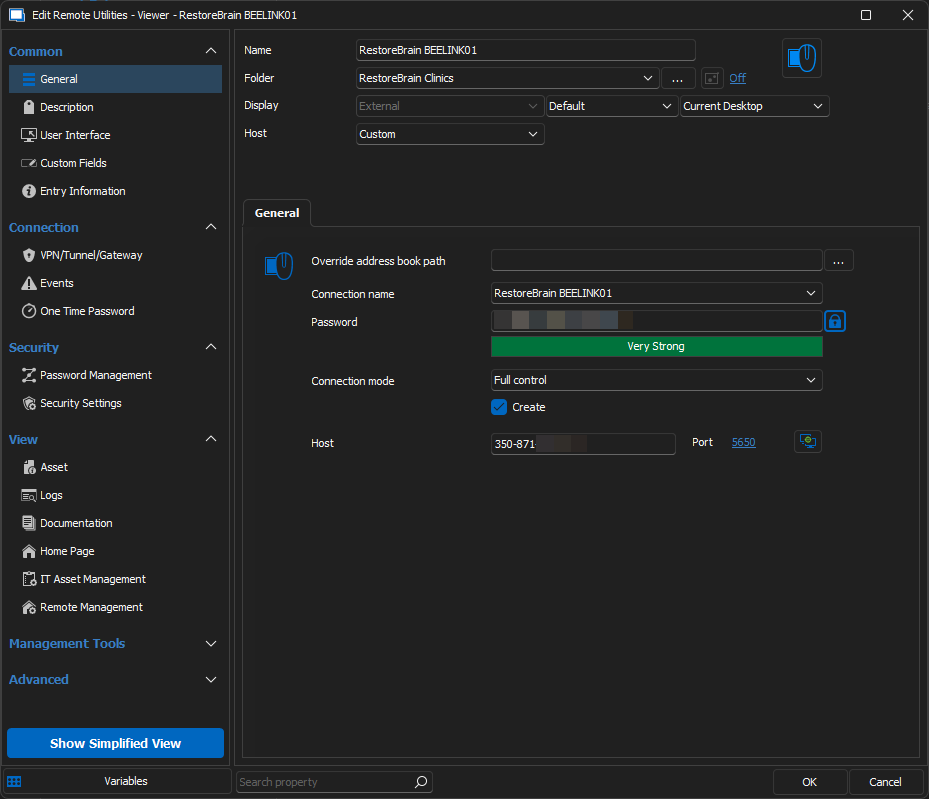
4e64583e-2408-4c1f-ba8f-b23d78603734.png
Hello,
We've re-opened a ticket and will investigate this.
Regards,
Jafran Majeau
Hello dmcichy,
I've investigated and have been able to properly launch RUV sessions through RDM without issues. You've correctly interpreted the fields as far as I can tell as well.
I can see a few possible differences with my tests:
- I didn't need to change the port for "5650", although when I did change it to test the same use-case as yours, I encountered no issues regardless, but you could perhaps try without modifying it.
- I can see from your screenshot that you are attempting to create a new connection in your RU Host (from using the checkbox), note that this is only necessary if the connection name doesn't already exist in the list. An already existing connection only requires the proper name.
- The override Address book path refers to the actual folder locations of the RU files (for the name of the connections and etc). This is usually located in C/Users/"CurrentUser"/AppData/Roaming/Remote Utilities Files, but if you've changed this manually in the RU settings or on installation, then you would need to properly set the new override path. However on a default installation with no changes this was not required for me.
If none of those are the source of your problem, there might be something else at play here, but I've tested under 2 different environments on my end and I've been able to launch RUV through RDM without issues. Could you provide us with your RDM version and ensure that you have the latest RUV installed (as well as RUH on the target computer)?
Regards,
Jafran Majeau