VNC modification of color to 8 bits or lower is invalid

Because of some network restrictions, I want to sacrifice some image quality to improve the speed. When I modify the color depth in VNC to 8-bit color or lower. And connect again after restarting the program. The setting doesn't take effect. The color has not changed.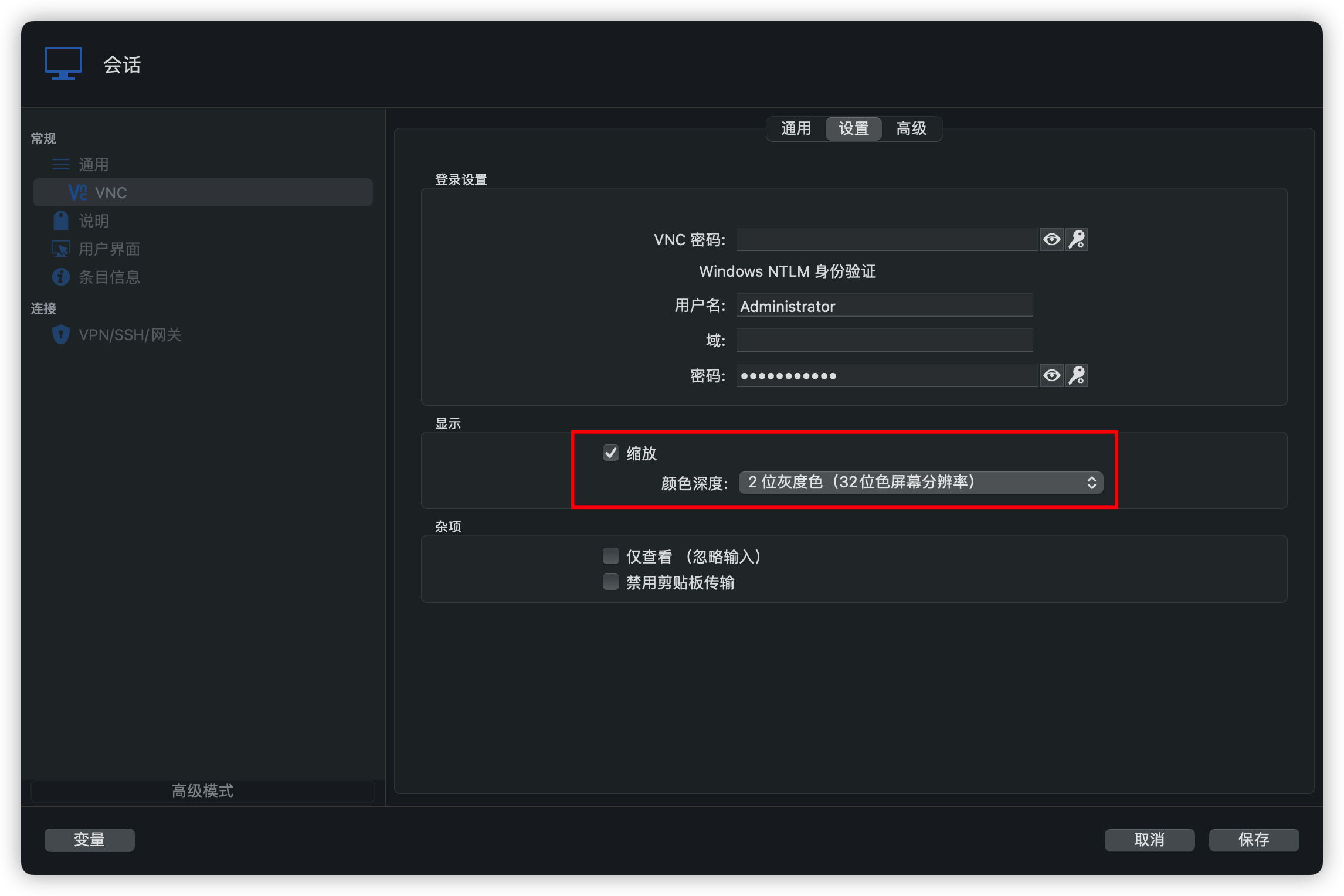
未命名.png
All Comments (22)
Hello
Setting the colour depth of a session is not currently supported by our embedded VNC engine (the setting exists because it might be supported by other VNC applications and/or on other platforms).
We have already a feature request open to add this feature to embedded VNC sessions, and I'll link this thread to the ticket so you can get notified once that's available.
Please don't hesitate if you have other questions or feedback
Kind regards,
Richard Markievicz
Thank you. The other two questions are also about VNC, which may often be flowered when the embedded VNC is opened. And embedded VNC cannot copy and paste files whether it's on mac or windows.
Hello
Setting the colour depth of a session is not currently supported by our embedded VNC engine (the setting exists because it might be supported by other VNC applications and/or on other platforms).
We have already a feature request open to add this feature to embedded VNC sessions, and I'll link this thread to the ticket so you can get notified once that's available.
Please don't hesitate if you have other questions or feedback
Kind regards,
Hello
Your embedded image doesn't seem to have uploaded correctly, can you try to attach it again or upload somewhere else and link it here?
Copy paste of files isn't something supported by the RFB (VNC) protocol itself. Certain VNC vendors might support this as a proprietary extension, and it might be possible for us to add support. Which VNC server(s) are you connecting to that support this feature in their own clients?
Thanks and kind regards,
Richard Markievicz
I attach the image again, and upload in attachments. Real VNC is support Copy paste. (Windows)
Hello
Your embedded image doesn't seem to have uploaded correctly, can you try to attach it again or upload somewhere else and link it here?
Copy paste of files isn't something supported by the RFB (VNC) protocol itself. Certain VNC vendors might support this as a proprietary extension, and it might be possible for us to add support. Which VNC server(s) are you connecting to that support this feature in their own clients?
Thanks and kind regards,
WechatIMG1549.png
Hello
Thanks for the update.
I'll open a ticket to investigate file copy/paste with RealVNC, but their VNC extensions are closed source and it likely won't be easy to implement. Just to be clear - are you talking about actual copy paste of files, or they offer some kind of file upload/download UI?
The graphics corruption is very strange. Are you connected to a RealVNC session? I guess it doesn't happen all the time?
A good starting point would be to capture a session log and send it to us, along with an export of the session itself so we can see the connection options you use.
Please let me know if something isn't clear or you have further questions
Thanks and kind regards,
Richard Markievicz
yes, I connected to RealVNC. It happen 10 times approximately. when it happen again, I get the log.
I see that he doesn't generate logs when he connects, but the problem happens when he connects. In addition, I just found out. If he waits for a few minutes in this state, he will return to normal.
Hi
The log file captures the whole session; are you sure you saw the whole log? It also might not be flushed fully to disk. Try to grab the log after closing the session.
Thanks and kind regards,
Richard Markievicz
There will be no log generation until the control begins after the connection. Only when the connection is performed will be generated.
Hello
I'm still not quite sure I understand. You need to enable the session logging ahead-of-time; then, when you encounter a session with the problem, the log will already be enabled and captured from the beginning.
In the meantime, I'd like to troubleshoot this more on my side. Please can you share an export (.rdm) of a session where you encounter the problem (you can send by PM or to service@devolutions.net, mentioning this thread). Additionally, please share any relevant details of the server side (RealVNC) configuration.
Finally, what kind of Mac are you using? Intel or Apple Silicon?
Thanks and kind regards,
Richard Markievicz
My Mac is Apple Silicon.
b0efc875-7241-4da8-97b7-a84c4a3cbdcc.log.zip
Hello
Thanks for posting the log. I don't see anything too strange in there; except that perhaps screen updates aren't being requested very regularly.
I'd like to ask a few more questions while I try to reproduce the problem on my side
- Your screenshot is from RDM Windows, right? So you see the same issue on RDM Windows and Mac?
- What's the version of RealVNC on the server ("About" menu item)
- What are you using for authentication? Meaning, do you connect with a "VNC Password", or using "System Authentication" (specifying a username and password)?
- In the "Advanced" tab of the connection properties, do you have anything special configured or just the default options (for Preferred encoding and compression levels)?
I'll enter a ticket on our side for file sharing by copy and paste, however this is likely to be difficult to implement. Because RealVNC's protocol extensions are proprietary, it's a very difficult process to figure out the proper messages to send to the server.
Please let me know if something is not clear
Thanks and kind regards,
Richard Markievicz
Yes, the same problem happen on Mac & Windows.
Real VNC version is E4.5.1(r27892).
authentication is System Authentication.
using default options
Hello
4.x is a very old version of RealVNC. From my side, I'm not sure I can even find an installer for 4.5 to test with. Is there a reason you haven't updated to a newer release? Do you experience the same problem when connecting from another VNC client (for example, RealVNC's own client)?
Thanks and kind regards,
Richard Markievicz
I have the installer.
Because this is the company-specified version. On over 1000 computers, it takes a lot of time to replace or upgrade.
I didn't encounter such an issue when I connected with VNC Viewer.
vnc-E4_5_1-x86_x64_win32.exe.zip
Hello
Thanks for the download link, I understand the situation.
I will try to reproduce the issue on my side.
Thanks and kind regards,
Richard Markievicz
Thank you for your reply.
Hello again
I wanted to update you that I was able to reproduce the issue with the version of RealVNC that you are using.
I am investigating the problem
Thanks and kind regards,
Richard Markievicz
Hello again
I discovered that older versions of RealVNC are either off-spec or have a bug in how the handle pixel formats. I've added a workaround to our VNC client that should resolve the screen corruption issue; I'll post back in this thread once that is integrated into RDM.
We have a feature request open to add support for lower colour depths to our VNC integration. I'll post back in this thread once that's available, however I don't have a specific timeline for that feature.
Finally, I've created a ticket to support file copy-and-paste with RealVNC servers, however this will be a stretch as the protocol is not published. We will investigate this as time and resources allow.
As always, if you have any questions please let me know.
Thanks and kind regards,
Richard Markievicz
Thank you.
Hello again
I've proposed an update for RDM that I believe will work around the screen corruption issue with older RealVNC servers. I hope the fix will be in the 2023.1 release, and I expect there will be at least one more beta before the official release. I'll update this thread once that is available.
Thanks and kind regards,
Richard Markievicz
Hello
The fix for screen corruption when connecting to older RealVNC servers is in the 2023.1.x version of RDM Windows, which is now available.
Thanks and kind regards,
Richard Markievicz