Microsoft RDP with Yubikey (smart card) from MAC

Is it possible to use a YubiKey to connect to Microsoft servers with Remote Desktop Manager? From other forums it appears people use Devolutions RDM to do it but I can't seem to figure out how to configure it to function. From a Windows PC it works fine, when I connect to an RDP session my Smart Card Yubikey pops up and I put in my pin and I can connect. I can't get the same functionality to happen from the MAC. I am using RDM for MAC version 2022.3.15.3.
All Comments (50)
Hi,
Could you enable the Session Logs, launch your session (that expects a Smart Card), and send us the generated log?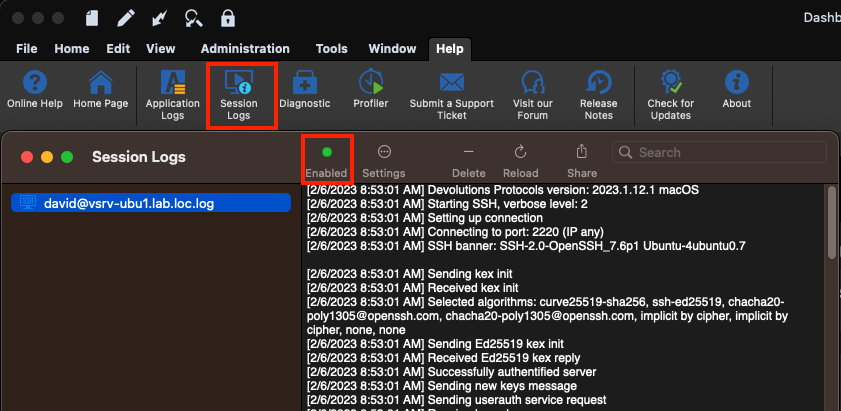
Best regards,
Xavier Fortin
SessionLogs.png
Hi,
did you succeed?
I'm very interested on this topic and any update will be appreciated.
Regards.
Hi,
Are you asking this to the original poster?
In our case, if you have a server configured with Smart Card authentication that does not work, I'd ask you the same think I asked previously. That is to generate a session log and share it with us.
Best regards,
Xavier Fortin
I'm trying to test RDM for Mac, as well, and trying to connect to our servers. Smart card Auth is required on our servers, but I'm not clear on how to configure RDM to support Yubikeys. I've gone into Settings > Security and checked "Require Yubikey authentication, but when I launch a session, I get a regular user account, password, domain login prompt; I do not get a PIN prompt which is typical. I could provide session logs, but that's sensitive information in my environment, and I'm concerned that the issue is more of a RDM configuration issue. I haven't found any configuration documentation for supporting Yubikey. Could you provide configuration documentation so that I know that I'm doing that part correctly? If so, then I would work to get session logs approved to share.
Hi robhartung,
Did you check the Local Resources -> Local Devices and Resources -> Smart cards checkbox in your entry settings?
Also, the Settings -> Security settings really have nothing to do with RDP sessions. Those are security settings for the application as a whole, in this case, this would require a Yubikey auth when unlocking the app.
Best regards,
Xavier Fortin
Yes, "Smart cards" is checked for the RDP configuration. Thanks for the clarification regarding the Yubikey auth in Settings.
Historically, smart card support with FreeRDP on macOS has been inconsistent at best. You might simply be hitting a limitation. That being said, if we want to investigate further, we will definitely need a session log. Session logs should not contain any sensitive data, except maybe the IP and the masked username/domain on the first line, which you can easily remove from the log file. That being said, you can also send me the log directly by email: xfortin@devolutions.net
Best regards,
Xavier Fortin
Hi robhartung,
As of the release of version 2023.2.8.1, we've added a hidden option to try to enable Smartcard logon. Could you try it and see how it goes? In the event that it still does not connect, could you provide a new session logs with the option turned on?
What data source type are you using? If it's not XML (we have an issue with XML data source), you can set the value of the hidden setting by right clicking the entry and selecting Edit -> Edit (Special Actions)... In the next window, select Custom AppleScript and in the script window, enter the following script:
set value of _connection of property "RDP.SmartcardLogonEnabled" to true
save _connection
You can then turn off the setting with the same script but with "false" instead of "true".
Best regards,
Xavier Fortin
I've tested the new version and I'm not seeing any difference. I will send you screenshots and the session logs via email.
With regard to the data source type, I'm not sure what it you are referring to. Can you clarify?
At the top of your entry tree, there should be a datasource selector. What is the icon in it? In the below example, I have a XML data source selected.
As for the log you sent, just to validate, did you turn on the SmartcardLogonEnabled property like I described in my second paragraph?
Best regards,
Xavier Fortin
DatasourceType.png
Yes, I configured for Smart Cards for the server that I'm testing. Screenshot includes my Local Resources settings. And the Data Source selector is set to Local Data Source. 
Screenshot 2023-08-03 at 10.43.34 AM.png
I'm not talking about the "Smart cards" option in the Local Resources tab. I'm talking about the new hidden setting that I've mentioned previously. To set it, you have to follow the steps described earlier:
you can set the value of the hidden setting by right clicking the entry and selecting Edit -> Edit (Special Actions)... In the next window, select Custom AppleScript and in the script window, enter the following script:
set value of _connection of property "RDP.SmartcardLogonEnabled" to true
save _connection
Xavier Fortin
My apologies. I've set the value you detailed, attempted again to connect without success. I will send you the session logs in email.
Thanks for this! I've attached the log to our ticket.
We'll check if we can gleam something out of it.
Best regards,
Xavier Fortin
Hello
I wanted to give a quick follow up to this ticket, this is a frequently requested feature.
First, things work well on Windows because RDM Windows is able to integrate Microsoft's RDP client directly (as an ActiveX control). On other platforms, the embedded RDP engine uses FreeRDP (an open-source implementation of Microsoft's RDP protocol). Although the goal is to have feature parity with Microsoft's implementation, it's a large and complicated specification (and not all of it is truly open, or documented well).
Right now I believe this should work if you disable the NLA requirement on the server and forward the smartcard using the "Local Resources" options. Disabling NLA is a security downgrade and in practice I can't recommend it, but it might serve as a workaround right now. Without NLA, you should land at the Windows logon page of the remote machine with the smartcard forwarded and available to use for login.
Smartcard authentication using NLA is a brand new feature in FreeRDP and we still have work to do to integrate it on our side. I had thought that the new setting Xavier added might be enough to move things forward, but on investigation we have more work to do in how we actually build FreeRDP. This feature requires a working PKCS11 module both at build time and runtime. Unfortunately, Apple does not provide such a module and third party libraries are complicated by licensing (we'll likely need a way for you to provide a module at runtime, similar to how we do for terminal-based connection types).
With that out of the way, they'll still be work within RDM itself to provide a mechanism for you to fulfill the smartcard login (for example, by entering your PIN).
All this is currently hampered by a lack of working test environment on my side. I have started to put something together but the setup is rather complicated and has lots of moving pieces.
So: in summary, we are working on this feature however it's technically complicated and there are several areas that need work. The NLA smartcard login feature is effectively brand new in FreeRDP so it's only now that we're able to start working on this. I wanted to assure you that this has our attention internally, but at this point I can't give a timeframe when that will be available (almost certainly not by the 2023.3 release, but possibly before the end of the year).
Thank you for your patience. If you have further questions or comments, or something isn't clear, please don't hesitate to post back.
Kind regards,
Richard Markievicz
Does this work now?
Hello
This is still a work-in-progress, but we are working on it. It's officially planned for 2024.2 (in about 6 weeks) but I can't guarantee we'll make that, if not perhaps it will be in a point release sometime after 2024.2.1.
Currently I'm blocked on this while another developer works on integrating the smart card APIs into our Kerberos authentication module. The problem is, until that is done, I don't know if there are other blocking issues.
In the meantime, the workaround is (unfortunately) to disable NLA. You will be able to use your smart card with RDP Enhanced Security although this represents a security downgrade that I can't really recommend.
Thanks for your patience. We are actively working on this.
Kind regards,
Richard Markievicz
Hi @Richard,
As 2024.2 has now been released, any updates on this topic? I am eagerly waiting for this to work as we know and love it on Windows.
Thanks,
Stefan
Hello
The short answer is: we're still working on it, but it's not ready yet. The feature will likely be retargeted for 2024.3 (later this year) but there's a chance we might get it done before then.
The long answer: for kerberos to work across platforms (including on the web, which no-one else - not even Microsoft - supports), we provide our own implementation. It's open source and you can see the project here. The developer working on this feature recently finished up support for using system smart card libraries on platforms other than Windows. This work took longer than anticipated, but it's a big and important chunk of the work.
The missing piece is the integration between our SSP (Security Support Provider) and the smart card stack. This is the next sprint for the developer, but again, it's a big chunk of work and likely to take several weeks. The cycle will be longer than that once we include testing, QA, bug fixing, etc.
Once this is done, we can finish up the integration with RDM Mac.
So, thanks for your patience - we are also eager to get this implemented, and you are not the only person asking for it. Progress is being made but things are just taking a bit longer than expected.
Please, let me know if you have any other questions or comments
Kind regards,
Richard Markievicz
Thanks for the update! I imagine, if this was easy to implement, it would have been done a long time ago, so it shouldn't be surprising that it's taking longer than expected. Looking forward to the work when it's done. Thanks.
Hi guys,
as 2024.3 is out now, could you give us an update? I still can't figure out how to use my smartcard on the Mac to log on to RDP sessions. Any update is much appreciated.
Thanks,
Stefan
Hello
I'm sorry for the delay, we are still working on this. We have a developer tasked on this full time and he is making progress, but it is slower than we had expected.
I hope that we should achieve in the next quarter. In the meantime, thanks for your continued patience.
Kind regards,
Richard Markievicz
Hello, I was wondering if much progress had been made to enable this functionality? Thank you!
Hello
I'm sorry for some bad news, but work has somewhat stalled on this. Our developer has had some blocking issues integrating smart card authentication with our SSPI module.
We are still working on it and currently it's retargeted for 2025.2. I do apologize for the inconvenience and thanks for your patience.
Please don't hesitate with further questions or comments in the meantime.
Kind regards,
Richard Markievicz
Hello, is this still targeted for 2025.2?
Hello,
No, this is not included in RDM 2025.2 who has been released yesterday.
I will verify with the development team for an ETA and get back to you when I will have more infos.
Best regards,
Jeff Dagenais
Hello
I'm am sorry for the continued delay here.
Here's the situation: as I mentioned in my earlier post, we had a developer assigned to this for the 2025.1 and 2025.2 release cycles. However he's hit several blocking issues integrating our authentication library (SSP implementation) and the system smart card APIs. It was necessary to reassign him to other blocked issues and this work did not get completed.
The planning for 2025.3 is happening today and tomorrow and when asked for my input, I requested that the developer be reassigned back to this issue, it looks like that will happen.
I'm aware that a lot of people want this and have been waiting for a long time. I'm starting an independent investigation right now to see if we can, in the interim, link FreeRDP with the system or MIT kerberos libraries and unblock this using the "system" SSPI provider option. The integration would not be as nice but for basic scenarios of connecting to RDP, it might be sufficient. I need to check if this is even technically possible (linking to another kerberos implementation, while retaining the option to use a custom SSPI module at runtime).
I will follow up on this post in around a week or so.
Once again, sorry for the inconvenience and thanks for your patience. As @robhartung wrote above, if this was easy, it would have already been done a long time ago.
Best regards,
Richard Markievicz
I’d really like to see support for smart keys so we can use FIDO2 for Entra ID login.
It works on Windows, so it would be great if it also worked on macOS.
Right now, I’m using Parallels with Windows for that kind of access.
Regards,
Darko Bazulj
https://triton-grupa.hr
Hello
I've done some fact finding investigation in the last week to see if I can move this along faster.
The macOS system implementation of Kerberos is not usable. It's neglected by Apple and has outdated headers and is missing key features. So, to use a "system" Kerberos we would need to use MIT Kerberos. That's a challenge: our build system normally wants static libraries, and MIT doesn't really support that very well. I've hacked something together that works, but the pkinit extension (needed for smart card) is a "plugin" and can only be a shared library. This really complicates things on our side. Furthermore, MIT depends on OpenSSL which is something we're working hard to remove as a dependency in our systems. OpenSSL is a security, usability and maintainability nightmare on our side. Finally, the MIT Kerberos is quite hard to control: it depends on local configuration files for realm configuration and so on, which must be managed using a very poor quality API; any mistakes here create significant issues (for example, a misconfigured krb5.conf will cause a two-minute delay on RDP login as it tries and fails to find the KDC before falling back to NTLM). KDC proxying also does not seem to be possible in this scenario.
Even once I have put something together with those pieces that "works" on my side (and by "works", I mean I can login to the server using Kerberos), I've linked the OpenSC pkcs11 module for smartcard integration and enabled smartcard logon, but so far I've been unsuccessful in getting FreeRDP to actually use the smartcard. For some reason, even though it sees my smartcard and finds the valid key, it always tries to pre authenticate with encrypted timestamp instead of X.509.
To take this further will require me to debug into the FreeRDP code and try to determine exactly what is going on.
Our own SSPI implementation gets around all these problems. The only thing missing is the integration between the SSPI and the system smartcard APIs.
So, I'm going to pause the investigation for using system Kerberos and allow our developer to finish the work in sspi-rs. I hope he can achieve this for 2025.3. If there are further issues found, or blockers that make this not possible; we'll dust off the work I've done above and try to get an implementation up-and-running with MIT Kerberos, and just find ways to deal with the issues I've outlined above.
I hope it makes sense, but please don't hesitate to post back with further questions or comments Thanks again for your patience on this.
Kind regards,
Richard Markievicz
Richard,
Thank you for the excellent technical writeup. Unfortunately, Apple's implementation of Kerberos is indeed very poor and I figured this was a large contributing issue.
Hello
I've done some fact finding investigation in the last week to see if I can move this along faster.
The macOS system implementation of Kerberos is not usable. It's neglected by Apple and has outdated headers and is missing key features. So, to use a "system" Kerberos we would need to use MIT Kerberos. That's a challenge: our build system normally wants static libraries, and MIT doesn't really support that very well. I've hacked something together that works, but the pkinit extension (needed for smart card) is a "plugin" and can only be a shared library. This really complicates things on our side. Furthermore, MIT depends on OpenSSL which is something we're working hard to remove as a dependency in our systems. OpenSSL is a security, usability and maintainability nightmare on our side. Finally, the MIT Kerberos is quite hard to control: it depends on local configuration files for realm configuration and so on, which must be managed using a very poor quality API; any mistakes here create significant issues (for example, a misconfigured krb5.conf will cause a two-minute delay on RDP login as it tries and fails to find the KDC before falling back to NTLM). KDC proxying also does not seem to be possible in this scenario.
Even once I have put something together with those pieces that "works" on my side (and by "works", I mean I can login to the server using Kerberos), I've linked the OpenSC pkcs11 module for smartcard integration and enabled smartcard logon, but so far I've been unsuccessful in getting FreeRDP to actually use the smartcard. For some reason, even though it sees my smartcard and finds the valid key, it always tries to pre authenticate with encrypted timestamp instead of X.509.
To take this further will require me to debug into the FreeRDP code and try to determine exactly what is going on.
Our own SSPI implementation gets around all these problems. The only thing missing is the integration between the SSPI and the system smartcard APIs.
So, I'm going to pause the investigation for using system Kerberos and allow our developer to finish the work in sspi-rs. I hope he can achieve this for 2025.3. If there are further issues found, or blockers that make this not possible; we'll dust off the work I've done above and try to get an implementation up-and-running with MIT Kerberos, and just find ways to deal with the issues I've outlined above.
I hope it makes sense, but please don't hesitate to post back with further questions or comments Thanks again for your patience on this.
Kind regards,
@Richard Markiewicz
As always, thanks for the updates and in this case, a much more detailed explanation of the challenges. I'll stay hopeful that you and the team find a successful avenue for this implementation. Thanks for all your work!
I just wanted to add that I tested RDP login with a security key using the Windows App for macOS, and the connection works flawlessly.
App Store link: https://apps.apple.com/us/app/windows-app/id1295203466?mt=12
I followed this guide to configure the connection within the Windows App:
https://swjm.blog/the-complete-guide-to-rdp-with-security-keys-mac-93c62e754253
It might be worth exploring whether this Windows App can somehow be integrated into Remote Desktop Manager (RDM) for launching RDP sessions that require security key authentication.
Regards,
Darko Bazulj
https://triton-grupa.hr
I just wanted to add that I tested RDP login with a security key using the Windows App for macOS, and the connection works flawlessly.
App Store link: https://apps.apple.com/us/app/windows-app/id1295203466?mt=12
I followed this guide to configure the connection within the Windows App:
https://swjm.blog/the-complete-guide-to-rdp-with-security-keys-mac-93c62e754253
It might be worth exploring whether this Windows App can somehow be integrated into Remote Desktop Manager (RDM) for launching RDP sessions that require security key authentication.
Hi @Darko Bazulj
I'm afraid it's not possible to integrate Windows App inside RDM; this is just not possible on macOS like we can on Windows. However you can configure your session in RDM to open in "external" mode which should launch Windows App with your session settings from RDM.
Please let me know If you have any questions
Kind regards,
Richard Markievicz
I tried using Open External, and it does open the Windows App, but the problem is that it tries to use username/password instead of prompting me for web authentication.
I assume the issue is that when I tested the connection directly in the Windows App, I had to modify the connection by changing the following two parameters, which I believe are not transferred when using Open External.
You can see about that in article link about that two parameters.
enablerdsaadauth:i:1
targetisaadjoined:i:1
Do you have any idea how this could be resolved, or is it maybe a feature that would need to be added to RDM?
When it opens as external, it’s not really linked to RDM, so I might have a suggestion for the Mac version when using the Windows App:
Open with external app but with embedded window inside RDM.
Regards,
Darko Bazulj
https://triton-grupa.hr
Hello
Sadly, open external with an embedded window is just not possible on macOS. On Windows, Microsoft provides an RDP control that can be embedded in third-party applications. No such equivalent exists on macOS. Further, on Windows, it's often possible to reparent the window of an external application and make it appear "embedded" but again, macOS prohibits this capability at the system level.
Now, for the Open External and passing the parameters for AAD auth - this should be possible, frankly I was surprised that it doesn't work already. When you "Open External", RDM creates a temporary .rdp file behind the scenes containing your settings and then instructs Windows App to open it. So it seems there is a gap in the implementation here and these settings are not being resolved. It may be a bit more complicated on macOS as we have extra code paths to try and "inject" the credentials when using username / password authentication (again, the macOS RDP client does not allow a third party application to pass the password for the session, which requires extra work on our end).
This seems like a pretty low-hanging thing to fix; I'm making a ticket for that and we'll post back once there's an update.
Thanks and kind regards,
Richard Markievicz
Hello
First @Darko Bazulj I've opened a ticket for your comment above but I see there's been no movement. I am going to look into that.
Next, for the users following this discussion, you'll see that 2025.3 is upon us but we still do not have smart card login for RDM Mac.
However I have exciting progress to report and am confident we can deliver this in an upcoming minor update.
I have a working implementation of this in our SSPI / authentication stack, unfortunately it arrived too late to be integrated for the first 2025.3 release. I've been testing it and working out some bugs, the remaining work is to actually plug it into RDM. I will update this thread once there's been some more progress, but you can expect something soon here.
Thanks again for your patience
Kind regards,
Richard Markievicz
Hello
@Darko Bazulj If you have a recent version of RDM Mac, in the "Authentication" options of the RDP session you should be able to enable "Enable Entra ID SSO". This won't have an effect with the embedded mode, but for external mode it should properly set "enablerdsaadauth". I note from the documentation that "enablerdsaadauth" replaces "targetisaadjoined" so you shouldn't need both.
Let me know if you have any trouble with this
Kind regards,
Richard Markievicz
Screenshot 2025-12-05 at 14.03.03.png
Hello
Thank you all for your patience, I'm excited to say that I've merged the code for smartcard login via RDP-NLA for RDM Mac, and all being well it should be available in the upcoming 2025.3.10 release. This represents an initial integration and I'm sure there is room for improvement so once the update is available, I encourage you to try it out and provide your feedback.
Since it will take a little while for the documentation to catch up, I'm going to provide some detailed instructions in this forum post.
First, it's obviously required that you are a connecting to a Windows domain environment properly configured for Kerberos and smartcard authentication, with a usable X.509 certificate deployed as PIV on your smartcard device. From the RDP side, this can be tricky to evaluate using Windows App on a Mac where Kerberos configuration is non-straightforward. But, if you're able to login using smartcard from another Windows machine, we can assume your infrastructure is set up properly.
Next, in RDM, you'll need to go to the application Settings > Types > RDP > Authentication and enable smartcard logon. You'll also (probably) need to provide the location of your specific smartcard's PKCS11 module (the smartcard middleware). In my case, I'm using a Yubikey so I've install libykcs and given RDM the path to it.
If you click on "Credentials list", we'll talk to the connected smartcard(s) and list all the certificates that are seen as usable for smartcard logon. If your certificate does not show in this list, it won't work for logon.
For the RDP session(s) you want to use, the pre-requisites are:
- Network Level Authentication must be enabled
- SSPI Module must be set to Portable
- Authentication Package should be set to Kerberos
- If your KDC (probably the domain controller) is not reachable by DNS, set the KDC Detection Method to "Explicit" and provide it's address
The above is all required to get a working Kerberos setup, which is a prerequisite for smartcard authentication.
Additionally, in the Local Resources tab, ensure that "Smart cards or Windows Hello for Business" is checked in the "Local devices and resources section".
Now, it's important to understand that our implementation requires us to know which (if any) smartcard you want to use before connecting. RDM Mac currently doesn't have a way to mark a credential as a smartcard, nor does it implement the X.509 Credential type. However I've tried to make this as easy as possible.
- If you leave the credential for the session empty, you'll get a logon prompt asking for username and password. However, there will be "More Options" available which will list the available smartcards and allow you to enter the PIN.
- If you provide a username (and optionally a password/PIN) and it matches the UPN or user/domain hint on an available smartcard, you'll still get the prompt but the smartcard will be pre-selected. You just need to enter the PIN (if you didn't put it as the password) and press "OK".
- If you provide a username and it doesn't match the UPN or user/domain hint on an available smartcard, you won't be able to choose a smartcard. Things proceed as normal for username/password authentication.
Finally, I provide a shortcut for when you know you want to use a smartcard for logon. If you go back to the "Credentials list" in the system settings, you'll see the last column is "Encoding". This value is a prefix ("SC1:") followed by a base64-ish encoding of the certificate thumbprint. If you take this value (you can select the row in the table, copy it, paste it to an intermediate location, then extract the encoded string) and use it as the username either directly in the RDP session or a linked credential, and put the "Password" as the smartcard PIN; RDM will automatically select the smartcard without needing to prompt you. This is a power user feature that I added at the last minute to allow skipping the prompt if you know you want to use a smartcard, but the interface here is subject to change in future versions.
If you experience issues or have suggestions for improvement please post back here. I would encourage you, if things are not working correctly, to enable session logging in Help > Session logs, reproduce the problem and then send me the complete log file by PM or to service@devolutions.net.
Thanks and kind regards,
Richard Markievicz
Screenshot 2025-12-05 at 14.04.16.png
Screenshot 2025-12-05 at 14.04.28.png
Screenshot 2025-12-05 at 14.04.58.png
Screenshot 2025-12-05 at 14.04.05.png
Hi everyone,
I just installed RDM to try this solution, however I was not able to find the 2025.3.10 release for the app for Mac. Could you please let me know when will it be available so I can test this function? It would make my life much easier.
Thank you and best regards,
Mark Misky
Hello
RDM Mac 2025.3.10 is now available, and should contain this functionality. Please let me know if you find any problems or have any questions.
Thanks and kind regards,
Richard Markievicz
Hi Richard,
Kudos for the great work you're doing. I've been waiting for this for ages and immediately downloaded and installed it, then I followed your detailed configuration instructions. I installed libykcs and configured the path in Remote Desktop Manager. After clicking on the button "Credentials list", my Yubikey with certificates on it starts flashing, but I get the error message "No Certificates found" which is weird as I am using this Yubikey as smartcard in my Windows environment on a daily base. Any suggestions?
Kind regards,
Stefan
Hello @sirfene
That's unfortunate. At this point, all we're doing is asking freerdp to list the attached smartcards (and it will only list the smartcards that is considers suitable for smartcard logon, there is some filtering going on there). Unfortunately there's no way (at the moment) to get diagnostics back at this point, although I'll look at adding something.
In the meantime, if you're agreeable to troubleshoot this - do you have homebrew? Since this is all freerdp here, you could:
- Install freerdp with homebrew
brew install freerdp
- You should have xfreerdp in your PATH now (i.e. if you run
xfreerdpit should pint the command line help, orwhich xfreerdpshould point to something like /opt/homebrew/bin/xfreerdp)- If it's not there, you might need to open a new terminal window
- Check the version (
xfreerdp --version). It should be at least a recent 3.x release, ideally the latest (3.22 at the time of writing), otherwise you might need to runbrew updateand thenbrew upgrade freerdp - Set the debug level in the environment
export WLOG_LEVEL=DEBUG
- Ask freerdp to list the smartcards
xfreerdp /list:smartcard:pkcs11-module:/usr/local/lib/libykcs11.2.7.2.dylib- Here you'll replace the path to the pkcs11-module to wherever you installed it
- Post the output here or send it to me by PM
Thanks for your patience and, please, let me know if you have other questions or something isn't clear
Kind regards,
Richard Markievicz
Hi Richard,
Thanks for the troubleshooting steps. No secrets at that point, so I will post the output below, freerdp does not show any certificates. I have also installed Yubikey Manager on my Mac to see if this lists the certificates, all looking fine at that point: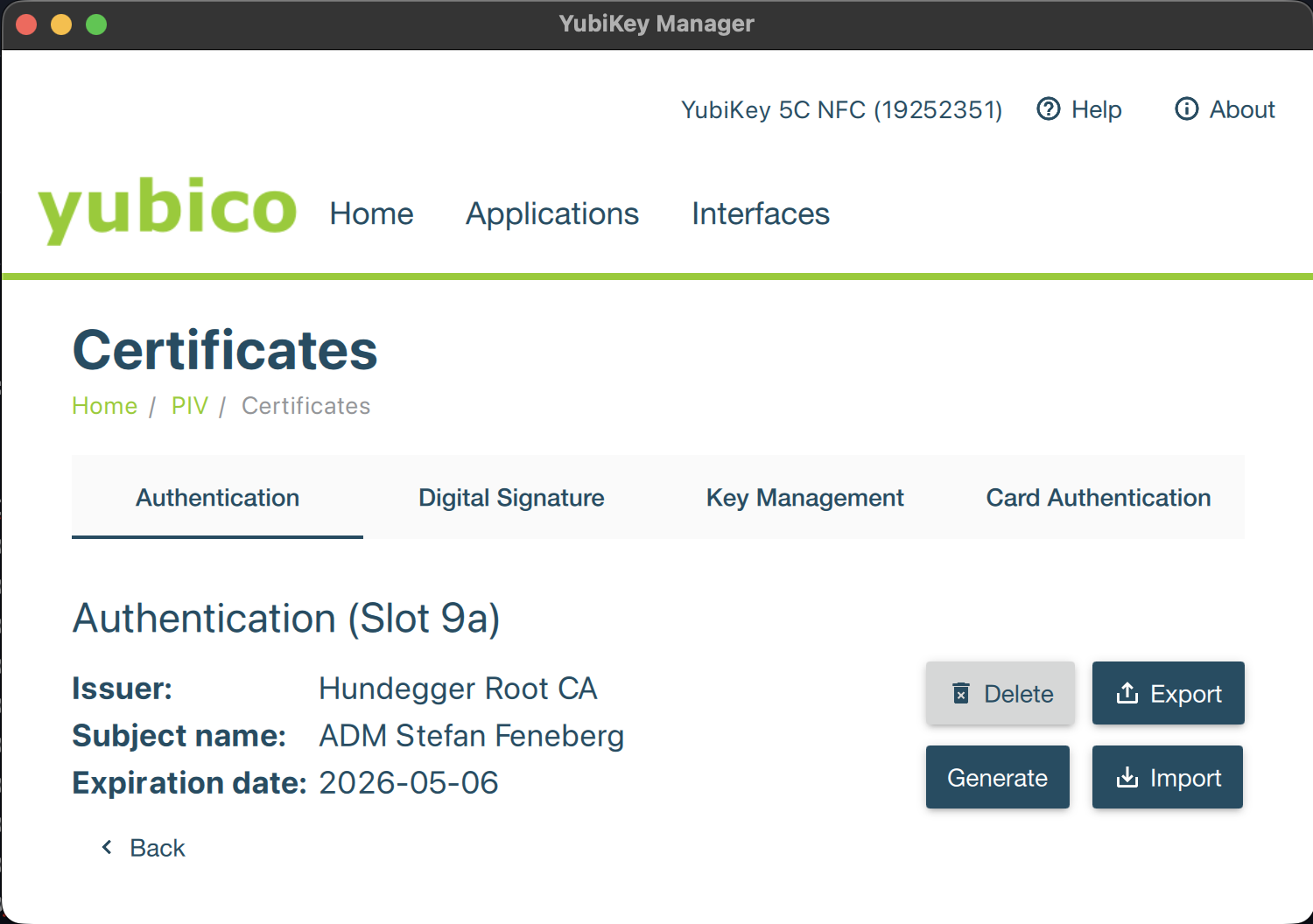
ADMIN-USER@MACHINENAME~ % xfreerdp /list:smartcard:pkcs11-module:/usr/local/lib/libykcs11.2.7.3.dylib
[16:09:38:238] [87244:ff3d7081] [DEBUG][com.freerdp.utils.signal] - [freerdp_handle_signals]: Registering signal hook...
[16:09:38:241] [87244:ff3d7081] [DEBUG][com.winpr.timezone] - [winpr_get_timezone_from_link]: tzid: Europe/Berlin
[16:09:38:241] [87244:ff3d7081] [DEBUG][com.winpr.timezone] - [winpr_get_timezone_from_link]: tzid: Europe/Berlin
[16:09:38:242] [87244:ff3d7081] [DEBUG][com.winpr.timezone] - [winpr_get_timezone_from_link]: tzid: Europe/Berlin
[16:09:38:242] [87244:ff3d7081] [DEBUG][com.winpr.timezone] - [winpr_get_timezone_from_link]: tzid: Europe/Berlin
[16:09:38:254] [87244:ff3d7081] [DEBUG][com.freerdp.client.common.cmdline] - [freerdp_client_detect_command_line]: windows: -2001/1 posix: -1000/0
[16:09:38:364] [87244:ff3d7081] [DEBUG][com.winpr.ncryptp11] - [NCryptOpenP11StorageProviderEx]: Trying pkcs11 module '/usr/local/lib/libykcs11.2.7.3.dylib'
[16:09:38:364] [87244:ff3d7081] [DEBUG][com.winpr.ncryptp11] - [NCryptOpenP11StorageProviderEx]: module '/usr/local/lib/libykcs11.2.7.3.dylib' loaded
[16:09:38:394] [87244:ff3d7081] [DEBUG][com.winpr.ncryptp11] - [collect_keys]: checking 1 slots for valid keys...
[16:09:38:394] [87244:ff3d7081] [DEBUG][com.winpr.ncryptp11] - [collect_keys]: collecting keys for slot #0(0) descr='Yubico YubiKey OTP+FIDO+CCID' flags=0x7
[16:09:38:394] [87244:ff3d7081] [DEBUG][com.winpr.ncryptp11] - [collect_keys]: token, label='YubiKey PIV #19252351' flags=0x40d
[16:09:39:411] [87244:ff3d7081] [DEBUG][com.winpr.ncryptp11] - [collect_keys]: slot has 1 objects
[16:09:40:444] [87244:ff3d7081] [DEBUG][com.freerdp.smartcardlogon] - [list_provider_keys]: opening key \0000000000000000\19
[16:09:40:448] [87244:ff3d7081] [DEBUG][com.freerdp.smartcardlogon] - [set_info_certificate]: discarding certificate without Smartcard Login EKU for key \0000000000000000\19
[16:09:40:448] [87244:ff3d7081] [WARN][com.freerdp.smartcardlogon] - [list_provider_keys]: Microsoft Base Smart Card Crypto Provider [] no certificates found
smartcard reader detected, listing 0 certificates:
ab1c1244-e515-4209-aae3-2e600a0b1a09.png
Hello
Thanks for the troubleshooting. FreeRDP is finding your certificate, but it complains that it doesn't have the Smartcard Logon EKU (extended key usage attribute). This is a requirement for smartcard logon and that's why FreeRDP considers it invalid (and we don't list it in the available certificates). However it doesn't make sense if you're using this setup successfully on Windows.
Would you mind to export the certificate from Yubikey Manager and send it to us, either directly to me by PM or to service@devolutions.net (mentioning this forum thread in your message)?
The export from YubiKey Manager will only contain the certificate, not the private key so there is no danger of leaking your credentials or impersonation here. It might contain identity (e.g. your name, email address and organization) and infrastructure information (e.g. the CA hierarchy and internal server names or DNS structure) which is why it should not be shared publicly.
Let me know if that's not acceptable for you and we'll look at some other ways to troubleshoot this.
Thanks and kind regards,
Richard Markievicz
Hello
Thanks for sending that over. Indeed your certificate looks well-formed. However, in the log output you got from freerdp:
[16:09:39:411] [87244:ff3d7081] [DEBUG][com.winpr.ncryptp11] - [collect_keys]: slot has 1 objects
[16:09:40:444] [87244:ff3d7081] [DEBUG][com.freerdp.smartcardlogon] - [list_provider_keys]: opening key \0000000000000000\19
[16:09:40:448] [87244:ff3d7081] [DEBUG][com.freerdp.smartcardlogon] - [set_info_certificate]: discarding certificate without Smartcard Login EKU for key \0000000000000000\19
It's only finding one key - in slot 19. There's a mapping here from PIV to what Yubico exports in their API, but I think that's the PIV attestation key, which is held separately from the normal PIV user slots. The implication is that the Yubikey doesn't have the private key for your certificate in slot 9a. Actually - that's probably not true, because you have this working in a Windows environment. So perhaps there is something about your private key that prevents FreeRDP from reading it. I remember that back in the day they only supported RSA keys (not ECC) but I'm not sure if it's true any more...
Definitively - could you share the output of yubico-piv-tool -a status? You can send to me by PM.
Please, let me know if something isn't clear or you have further questions
Kind regards,
Richard Markievicz
PM sent, thanks for digging that deep into the topic.
Hello @sirfene
Thanks for sending that through. I agree that your Yubikey holds the private key in the proper slot, which isn't surprising as it works on Windows.
I do note that it's an ECC key. Historically FreeRDP wouldn't work with ECC keys, but I think that was a restriction from KRB5 rather than FreeRDP itself. And I can't see an obvious reason in the code why it wouldn't like an ECC key. I need to dig a little deeper on my side to try and understand where this is failing. I'll be back once I have some more information.
Thanks for your patience
Kind regards,
Richard Markievicz
Hello @sirfene
Ok, I reproduced your issue by using an ECC private key on my side. Digging into the sources for FreeRDP I can see that they're purposefully filtering any non-RSA keys from the smart card.
I've asked the maintainers why that's the case, but actually with a decent understanding of the code I think this is an oversight. I can't see a reason to restrict to RSA keys. The only supposition I have is that their Kerberos backend is built using the MIT Kerberos library which, at least at the time they implemented this feature, didn't support ECC keys. I don't think that's true anymore and it shouldn't be relevant on our side where we use our own Kerberos stack.
I will work on removing that filtering and check if this can work with ECC keys or there's something else I'm not seeing. It will be at least next week before I can work on that and I'm not certain how quickly those changes can be in a release (but I think it should be in the order of a few weeks).
In the meantime the only workaround is to use an RSA key.
I apologize for the inconvenience and thanks again for your patience
Kind regards,
Richard Markievicz
Hi Richard,
totally fine for me - great you found the culprit.
Hi
I wanted to let you know I didn't forget about this, but it's a good news - bad news situation.
I unblocked ECC keys on the FreeRDP side; I also had to modify our SSP component to understand ECC keys. That was sufficient to get NLA login working (I could arrive at WinLogon on the remote machine), but at that point Windows tells me the smart card is not usable. This is almost certainly because the winscard cache is not suitably populated for an ECC backed certificate.
This becomes a research project (albeit not a huge one) as we need to try and determine what Windows is expecting here, by examining what the Windows APIs do in this case. That's outside of my area of knowledge, but I've tasked the developer that handles these things with that project. However he does have some bigger projects to finish up first.
So - we understand the issue, I'm sorry it's not a quick fix, but I would expect to see some improvement here in the next couple of months. For now the workaround is to use an RSA key.
Thanks for your patience and sorry for the inconvenience
Kind regards,
Richard Markievicz