Last Session Keyboard Shortcut?
0 vote

When troubleshooting (an everyday occurrence, especially today), I'm often restarting computers multiple times. It would be great to press a shortcut key to open the last accessed remote session. Is there (or could there be) such a amazing thing, please?
Thanks!
All Comments (14)
Hello,
Could you please verify that the Confirmation at startup option is enabled for the Last opened connections Play List Management?
There is a shortcut available for the Play List Management dialog which is CTRL+G by default in RDM.
Let me know if that helps.
Best regards,
Érica Poirier
Hi, yes, Last opened connections appears on startup. No problem there.
I want to access that list to easily launch a session after startup. Is there a shortcut key to force it to appear again?
Oh, I just noticed something... I've been wondering why my F8, F9, F10 don't work. Turns out, they do, but I can't see affect because my Navigation pane is minimized all the way to the top left, it's not a pinned window, therefore I don't see the Navigation options change focus.
In any case, yes, a shortcut to bring up Last opened connections would be very helpful! :-)
Hello,
Thank you for your feedback.
That's right, using F10 to go to the Recent used entries won't do anything if the Navigation pane is minimized.
After a discussion with an engineer, an improvement ticket has been submitted. For your information, there will be a limitation to this Last opened dialog which will only show the recent entries used in the actual selected vault.
I have moved this thread to the Feature Request section.
Once this will be implemented, we will update this thread.
Best regards,
Érica Poirier
Hello ut,
We might be able to provide you with an alternative solution for your particular requirements. It is possible to keep open a connection tab when disconnected. You can find this option in the User Interface section of an entry's properties or in the contextual menu available in the tab of a launched entry (the option is called Keep tab on disconnect). This keeps the tab opened to be launched quicker, and in this particular window there is a Connect When Available feature which will re-open the connection as soon as the host is detected.
Please let us know if this provides the behavior you're looking for. Below are screenshots for clarity.

Regards,
Jafran Majeau
Hello,
For your information, F10 will now bring up the Navigation pane on the Recent tab even if the Navigation pane is hidden. This is now available in RDM beta 2023.1.8.
Let us know if that works on your end.
Best regards,
Érica Poirier
For your information, F10 will now bring up the Navigation pane on the Recent tab even if the Navigation pane is hidden. This is now available in RDM beta 2023.1.8.
Thank you Érica!
F10 works great to open the Recent list when the Navigation pane is autohidden to the top left side of the RDM program windows . Once open, is there any possibility that, when pressed again, F10 can then close the Recent list or clicking on an entry in the list will autohide the Recent list, in order to maximize screen real estate?
Or, better yet, I'm absolutely loving the enhancement I requested, and you all so graciously implemented, with Ctrl+Spacebar to easily and quickly bring up the Quick Search dialog! To double down on that fabulousness, it would be gobsmacking amazing if the Recent list could also display at the bottom of Quick Search dialog, which would provide everything I need to quickly access computers. And, do so, without (mostly) ever having to touch the Navigation list!
We might be able to provide you with an alternative solution for your particular requirements. It is possible to keep open a connection tab when disconnected. You can find this option in the User Interface section of an entry's properties or in the contextual menu available in the tab of a launched entry (the option is called Keep tab on disconnect). This keeps the tab opened to be launched quicker, and in this particular window there is a Connect When Available feature which will re-open the connection as soon as the host is detected.
Hello Jafran! Thanks for your suggestions. I tried the "Keep tab page open on disconnect, but when the remote computer is restarted, the tab closes and doesn't reopen after the computer finishes rebooting. However, I keep a pretty sparse and clear RDM workspace, and don't display Dashboard or other pages, so when a remote computer is restarted, there's nothing about that computer that's still displaying in RDM.
I just mentioned to Érica that my world would be a much better place if the Recent List would display at the bottom of the Ctrl+Spacebar Quick Search dialog. That would be a convenient way to easily and quickly get back into restarted computers!
Hello,
We will open a ticket and see what we can do.
Regards,
Jafran Majeau
Thanks, Jafran!
Update: Perhaps RDM needed a restart... the "Keep tab page open on disconnect" options now appears when a Windows computer is restarted.
It would be great if RDM Linux SSH remotes had that same feature!
I'm looking forward to more enhancements to the super convenient Ctrl+Space feature!
Hi ut,
I created a ticket and we will implement the "Keep tab page open on disconnect" option in RDM Linux.
Regards,
Gabriel Dubois
Hi.
You say "F10 will now bring up the Navigation...". What about this:
F10 is highlighting + sign on my RDM 2023.3.0.8 (Manjaro KDE, Manjaro Gnome).
All shortcuts are disabled in RDM preferences and system. (Double checked).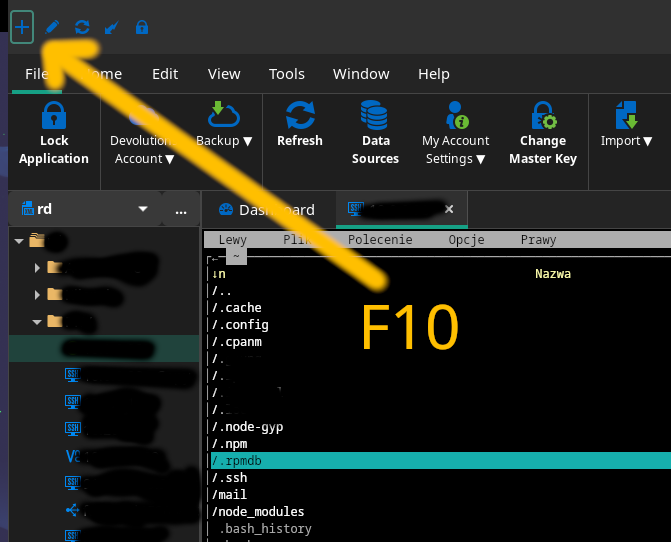
All I want is to hit F10 for close Midnight Commander running under ssh terminal. (F9 works nice, F10 is highlighting "plus").
Do you have any tip for this issue?
thx.
plik1.png
Hello x6543,
I created a ticket and we will investigate this issue. As a workaround, can you try to open your connection in Undocked display mode and tell me if that works for you in the meantime? You can fin this option in the General section of the entry (it is set at "Embedded (tabbed)" by default)
Regards,
Gabriel Dubois
Yes, undocked window did the trick. Works well. Big thanks!
I created a ticket and we will investigate this issue. As a workaround, can you try to open your connection in Undocked display mode and tell me if that works for you in the meantime? You can fin this option in the General section of the entry (it is set at "Embedded (tabbed)" by default)
Regards,