version 2022.3.14.1

i have some vnc sessions set up as view only, which is in their properties, but i don't see a button to turn that off to actually control a remote computer. some of their documentation has that button but it looks like a windows version of the app. am i missing something?
All Comments (7)
Hello lavinnyv,
We do not have the action bar in VNC session on MacOs like we have on Windows although, most of the options in it will be available in the menu if you right click on the VNC tab.
That said, we don't seem to have the View-only option available on MacOs. If you wish I could open a ticket for our engineering team to see if they can add it.
Best regards.
Michel Lambert
a ticket to add view only mode by the menu or button would be great. thanks.
Hello lavinnyv,
I created a ticket so our engineering team can work on it. I can't give you any ETA but I will keep you updated on how it go.
Best regards,
Michel Lambert
thank you
Hi lavinnyv,
As of RDM Mac 2023.1.5.0, it's now possible to toggle on/off the View Only mode of an opened VNC session. This can be done from the embedded menu of the session tab: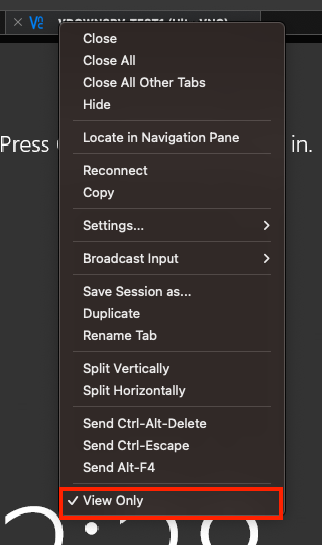
Best regards,
Xavier Fortin
ViewOnly.png
works great!
Glad to hear it!
Do not hesitate if you have any issue/request.
Best regards,
Xavier Fortin