Template Settings Section Missing From Existing Templates

RDM 2022.3.22.0
When creating a new template, there is a Template Settings section. When you edit an existing template, this section is missing.
Adding a new template:
Editing an existing template:
All Comments (4)
Hello,
The option is only available for templates, not template groups. In your case, the template group is "Cisco Device", which is one line up. If you tried to modify the "Active Directory" template, for example, you would see the "Template Settings" options.
Best regards,
Richard Boisvert
Interesting. What's special about template groups that makes this functionality not possible?
Just wrote a 4-paragraph explanation but lost it on the reply when it redirected me to the home page.
In short, prior to RDM v2022.3 you couldn't modify a Template Group whatsoever. With the changes to Entry/Sub-entry we had to, at a very minimum, allow modifying Template Group entries. For now, the only thing specific to the Template Group that you can change is the name. We have it on our to-do list to enable the Template Settings tab.
What's special about template groups that makes this functionality not possible?
The way the entries are stored.
There is, however, a workaround.
- Create an RDP template, set the settings in Template Settings
- Export it
- Export your Template Group
- Copy over the
<Template>segment of the XML value over from the Template to the TemplateGroup - Delete the Template Group
- Import the Template Group
- all should work
I know it's not ideal but should at least allow you to change what you need until we can get the UI built to allow you to do this in RDM.
Best regards,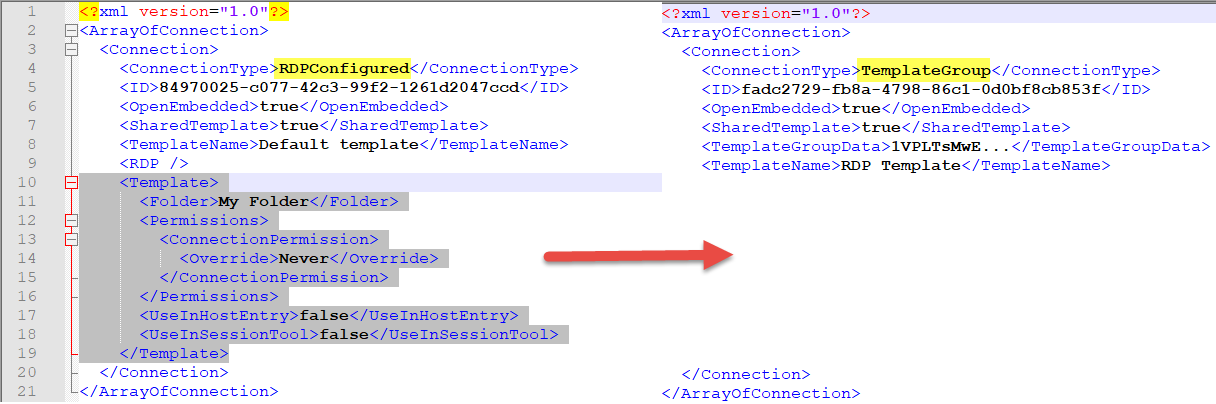
Stéfane Lavergne
2022-12-15_8-54-02.png
Hello,
We've added additional support for template groups, more specifically when creating/editing. You can expect these changes with the upcoming 2023 version.
Regards,
Jafran Majeau