2022.3 Title Bar

Upon upgrading to 2022.3, I have found that one of my two PC's RDM title bar grew about 12px taller. I've always felt the standard title bar was too tall, but this is unacceptable to me. Any ideas? I can tell you the PC with the issue is accessed via RDP.
In the attached pic, 2022.3.27.9 is on the left, 2022.2.29.0 is on the right.
Any help with this would be appreciated. No other apps on this machine are causing or experiencing any issues,
Thanks!
2022-12-14 10_50_25-Window.jpg
All Comments (8)
Hello,
I don't have this huge padding on my machine:
I will check if it's related to the RDP access
Regards
David Hervieux
I can live in full-screen mode, that makes it tolerable.
However I have found the following option has no effect. Sub-connections are always listed in tree view regardless of whether this box is checked or not. That was not the behavior in 2022.2.
Thanks!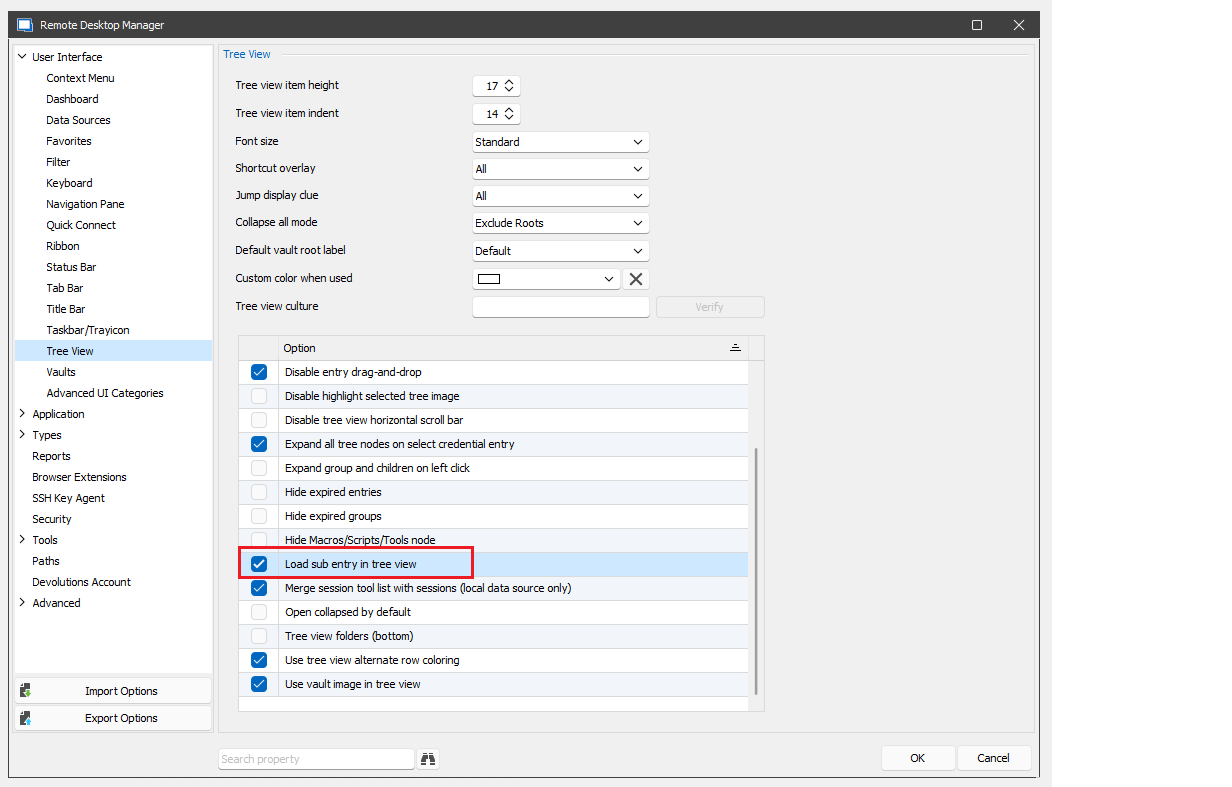
sub.png
Hello,
I'm working on a potential fix for RDP and the bar. I also have transferred the other question to Stefane.
Regards
David Hervieux
Thanks as always, David.
@RcGrnc
As for the Load sub entry in tree view option, you are correct the option is no longer being applied correctly due to the sub entry rewrite in v2022.3.
Sorry for the inconvenience. I will try to fix this ASAP.
Best regards,
Stéfane Lavergne
Thanks Stéfane. Much appreciated.
Both issues now look good on 2022.3.28.0. Thanks again for the quick turnaround.
Load sub entry in tree view has been fixed. The fix will be in v2022.3.30 (or higher)
Best regards,
(changed version for .30 instead of .31)
Stéfane Lavergne