SQLiteException "database disk image is malformed" error

Any attempt to edit a local database (Google Drive file) results in an SQLiteException "database disk image is malformed" error. It began to appear in November. I restored the database from backups to a state from a 3 to 6 months ago, when it worked fine, but the problem remains the same. What should I do? The database is large, I created it for a long time, and now it can only be used in readonly mode. I have sent you a report about this problem many times already, but have not received a response.
Windows 10, Windows 11 with all updates, RDM – latest versions.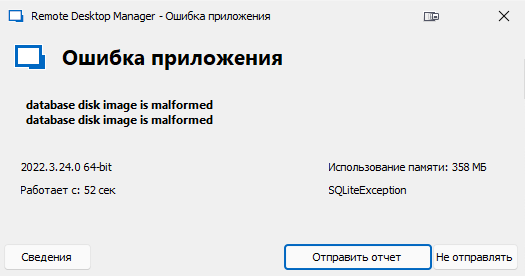
2022-12-01_12-44-11.png
All Comments (4)
Hello,
It looks like your SQLite data source is corrupted.
Do you have a backup of that file that you can try to use in RDM?
You can create a new SQLite data source in File -> Data Sources -> New -> SQLite and point it on your backup file.
Best regards,
Etienne Lord
Hello,
I have a quick question. Do you save your SQLite on a network drive? This is not supported by SQLite.
https://stackoverflow.com/questions/788517/sqlite-over-a-network-share
Regards
David Hervieux
>Do you have a backup of that file that you can try to use in RDM?
The local database file has several identical copies in different repositories, but they are all the latest version, that is, they are all corrupted.
I created a new data source of the same type (personal SQLite), placed the database file on local Google Drive next to the corrupted file, and performed a restore from the Devolution cloud. Your backup system is very complicated, it took half a day to try to get the desired result. However, the restoration eventually succeeded and the new database became editable. In this case, the new file turned out to be 974 KB in size, while the damaged file was 2 MB.
>Do you save your SQLite on a network drive? This is not supported by SQLite.
Not on a network drive, but on virtual drive, created by Google Drive windows application at one PC and on local HDD which mirrored to Google Drive in cloud by the same application at another PC. This works well, but only until RDM is running on more than one PC at the same time. In this case, there is a competing access to the database file and its duplicates can be formed. True, for ten months of use, this has not happened and only happened today after recreating the database with the same filename and a different access password.
Initially, I created the data source directly in the Google Drive cloud, but in this case, RDM is unbearably slow, since it reads every piece of information from the cloud and every change - even if it is only one byte! - writes back there for the same long time (it seems, overwriting the entire file and waiting for the end of the transaction - which is not surprising, since cloud storage does not provide the ability to modify files partially).
Thank you for your advice on repairing a corrupted database!
The same in Russian:
>Do you have a backup of that file that you can try to use in RDM?
Локальный файл базы данных имеет несколько одинаковых копий в разных хранилищах, но все они последней версии, то есть все они повреждены.
Я создал новый источник данных того же типа (персональный SQLite), разместив файл базы данных на локальном Гугл Диске рядом с повреждённым файлом и выполнил восстановление из облака Devolution. Система резервного копирования у вас очень запутанная, на попытки получить искомый результат ушло полдня. Однако в конце концов восстановление удалось, и новая база данных стала пригодна для редактирования. При этом новый файл получился размером 974 КБ, в то время как повреждённый файл был 2 МБ.
>Do you save your SQLite on a network drive? This is not supported by SQLite.
Не на сетевом диске, но на виртуальном, созданном Windows-приложением Google Drive на одном компьютере и на локальном HDD, который зеркалируется на облачный Гугл Диск таким же приложением на другом компьютере. Это работает хорошо, но только до тех пор, пока RDM не окажется запущенным одновременно более чем на одном ПК. В этом случае возникает конкурирующий доступ к файлу БД и могут образовываться его дубликаты. Правда, за десять месяцев использования такое не происходило и случилось лишь сегодня после пересоздания БД с тем же именем и другим паролем доступа.
Первоначально я создавал источник данных непосредственно в Google Drive облаке, но в этом случае RDM работает невыносимо медленно, поскольку каждую порцию информации считывает из облака и каждое изменение - пусть хотя бы в один байт! - записывает обратно столь же долго (похоже, перезаписывая весь файл целиком и ожидая окончания транзакции - что неудивительно, поскольку облачные хранилища не предоставляют возможность изменять файлы частично).
Спасибо вам за совет по лечению повреждённой базы данных!
Hello,
Thank you for the details on your scenario! This can always help another member of our community with the same issue!
Let us know if you have any further questions!
Best Regards,
Etienne Lord