Too long indent now

After updating to 2022.3.24.0 I noticed that indents in Navigation pane became too long for me and my host names got cutoff. How to reduce these indents?
All Comments (11)
Hello,
Do you have a screenshot? Have you enabled the scrollbar?
Regards
David Hervieux
hi!
I think, that we mean the same problem ... please see the screenshot attached.
We noticed earlier, I think with the 1st 2022.3.x versions, that the tree structure in the navigation pane got kind of stretched - or more indents ...
Would be nice, if this change could be fixed or undone ;)
Best regards,
Clemens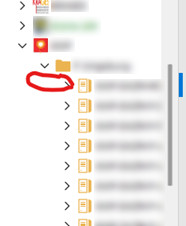
Einrückungen.jpg
Do you have a screenshot? Have you enabled the scrollbar?
I can't remember if I did this but now I see the scrollbar.
Hello,
Make sure this is unchecked:
Regards
David Hervieux
Make sure this is unchecked:
I checked. The option is unchecked.
I tried to check it. The horizontal scrollbar disappeared, as expected, but nothing else changed. Then I unchecked it again.
Hello,
could you try this option?
I've lowered from 18 to 15 and it looks better, any lower though and the text start cutting which I will investigate.
File > Options > tree view > Tree view item height.
Regards,

Alexandre Roy
I've lowered from 18 to 15 and it looks better, any lower though and the text start cutting which I will investigate.
Yes, I've tried this but I didn't like the result.
Solved, we finally figured out how to change the indentation width. We are working at getting this exposed via the UI and released.

Stéfane Lavergne
Hi Stéfane,
yes, looks cool! ;) Can you tell me, nearly when this will be implemented?
Thank you!
Best regards,
Clemens
Most likely sometime next week, will let you know when/if I get a more precise ETA.
Best regards,
Stéfane Lavergne
perfect! Thanks very much!
Best regards,
Clemens