Is there an option to hide the active Window List ?

Hi,
I just upgraded to version 2022.3.24.0.
In this version, when I have 2 RDP sessions open, the names of these sessions appear just above the Dashboard. See the red outlined rectangle in the screenshot.
When I select a session which is not open in the session-list in the lefthand pane, the Dashboard in the righthand pane is visible, but when I select an active session, the view is switched from the Dashboard to the options of that session. Is there a way to prevent this, or to hide the active window list in the red rectangle?
The goal is to keep the Dashboard active, regardless what session I select.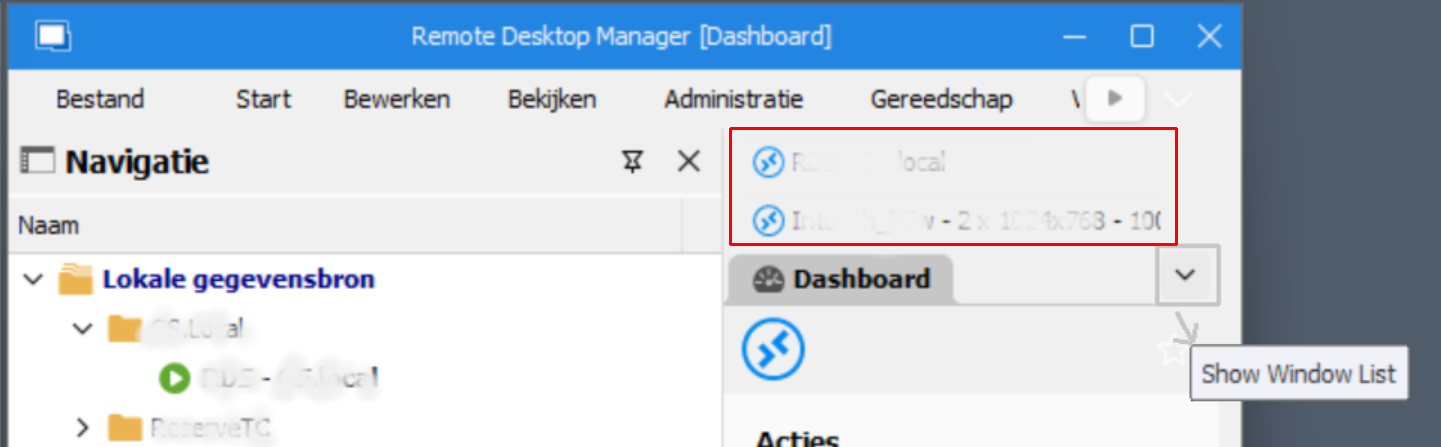
Regards,
Peter
7ad29f3a-4a8e-4b8f-b5c5-e682beec5921.png
Screenshot.png
All Comments (11)
Hello,
If you go in File > Options, you can uncheck "auto focus tab on item select" and it should keep the dashboard visible when you select an entry in the tree, even if it's already opened.
Let us know if this works for you!
Regards,
Hubert Mireault
Thank Hubert,
that did the trick indeed ! :-)
But there are so many options, that sometimes like now, you don't know where to search ...
Thank you for the answer !
Regards,
Peter
Hello Peter,
No problem, glad I could help! As you say, there are a lot of options to customize how RDM works, so it can be difficult to find exactly what you need, but we're always happy to help out.
As a note, there is also a search function to find options, it's available a few places in RDM. For example, in the File>Options menu:
Of course, you still need to have an idea of what text to search for, but it could still help out.
Regards,
Hubert Mireault
Hey, this is a great feature Hubert, thanks for sharing!
And as a matter of fact, if it is not too much off-topic, I tried to find how I can modify the text color of the titlebar when the focus is on another window, but in despite of this great search function I did not find it.
I modified the titlebar color to darkish blue, and when the focus is on a window, the textcolor is white like this ,
which is excellent, but if the window has no focus, the text is hardly readable like this :
Then it is a kind of blurry grey as you can see.
Can I modify this in any way?
Regards,
Peter
Titlebar 2.PNG
Titlebar.PNG
Hello,
I will try try to improve this. This is not obvious as it could look because I have to dynamically update the theme.
Regards
David Hervieux
Ok, David, I'll wait for that.
Maybe an option to manually select both colors like the titlebar color would be possible?
Something like this maybe?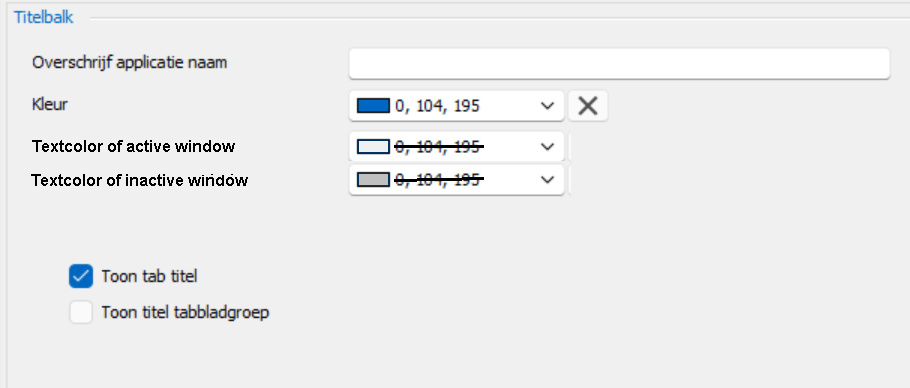
Regards,
Peter
Textcolor.PNG
Hi David,
did you had some time to look into this request, or is it already applied in an update?
Regards,
Peter
Hello,
Could you clarify which request your are talking about because this thread contains different items?
Regards
David Hervieux
Hi David,
it's about this : Maybe an option to manually select both colors like the titlebar color would be possible?
It is the last post before my question with the example screenshot.
Regards,
Peter
Hello,
This will be possible in RDM 2023.3. I have just implemented the forecolor setting.
Regards
David Hervieux
Great David, thanks!
I will wait for this version to be available for download.
Regards,
Peter