Dynamic resolution with embedded (tabbed)

Dynamic resolution doesn't work automatically with these host settings:
Display: Embedded (tabbed)
Screen sizing mode: Dynamic Resolution
Remote Desktop Size: Current work area size
Dynamic resolution kicks in after resizing RDM main window once, for every open hosts. Undock and dock works too.
Is this something that works only in paid version or is there some workaround for this?
All Comments (11)
Hello,
When you say, "after resizing RDM main window once" do you mean to say that the RDM application is initially not in full screen or the embedded session window ?
Best Regards,
Hello,
When you say, "after resizing RDM main window once" do you mean to say that the RDM application is initially not in full screen or the embedded session window ?
Best Regards,
Hi,
RDM application is in full screen and embedded session have sliders. Problem is fixed if you hit restore and then maximize. I noticed now that it doesn't necessarily need to be resized. Dynamic resolution kicks in also if you just move main window abit.
Regards,
Jukka
Hello,
Thanks for the clarification, which version number of RDM are you using ?
Best Regards,
Hello,
Thanks for the clarification, which version number of RDM are you using ?
Best Regards,
RDM 2022.3.23.0. 64-bit
OS Windows 10 22H2
I got one big 4k screen at home and two WQHD screens at work and both are affected with this problem.
Hello,
I would recommend turning off the HDPI by going to File > Options > Type > Remote Desktop > and checking "Disable RDP Scale Factor (HDPI)"

Let me know if this resolves the issue !
Best Regards,
Hello,
I would recommend turning off the HDPI by going to File > Options > Type > Remote Desktop > and checking "Disable RDP Scale Factor (HDPI)"
Let me know if this resolves the issue !
Best Regards,
Hi,
That didn't help, but I found a fix by changing some settings:
rdm
file - options - types - remote desktop - remote desktop size - automatic (was current work area size)
host properties
display - remote desktop size - default (was current work area size)
You can't choose automatic from host settings and I didn't know where from to change default settings.
Thank very much for your help.
Regards,
Jukka
Hello,
I'm glad to read that issue has been resolved !
Best Regards,
I've tried both solutions from @jukkasaarinen and @Zachary Bourgeois but when I connect and try to resize the image is distorted.
The only way to make resolution to fit the screen and look nice is to right click on tab and select "Reconnect"
Is there any other way to make it resize (not distorted) dynamically?
Hello @spaceman117!
Could you please try to set the Screen sizing mode to Dynamic resolution?
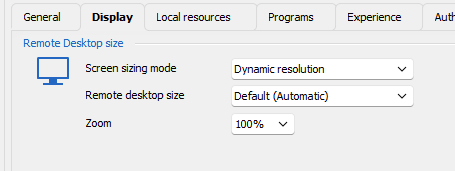
Let us know if that helps.
Best regards,
Érica Poirier