2022.3.24.0 64-bit System.AccessViolationException

Since updating to the latest November 2022 builds, 2022.3.23.0 or 2022.3.24.0, I am unable to open embedded RDP sessions. If I change the RDP session to open in an external window it works fine. Software is set to defaults. I have disabled the "Enable API Hooking" setting. Clean installed the software using Revo. If I roll back to the 2022.2.29.0 build everything works fine again.
------------------
System Information
------------------
Operating System: Windows 11 Pro 64-bit (10.0, Build 22621) (22621.ni_release.220506-1250)
Processor: Intel(R) Core(TM) i9-10850K CPU @ 3.60GHz (20 CPUs), ~3.6GHz
Memory: 65536MB RAM
------------------
Application Error Log:
------------------
System.AccessViolationException: Attempted to read or write protected memory. This is often an indication that other memory is corrupt.
at AxMSTSCLib.LibraryModule.LoadLibrary(String lpFileName)
at AxMSTSCLib.LibraryModule.LoadModule(String filePath)
at AxMSTSCLib.AxHostEx.RdpGetClassObject(Guid clsid, String axName, String rdpExDll)
at AxMSTSCLib.AxHostEx.RdpCreateInstance(Guid clsid)
at AxMSTSCLib.AxHostEx.CreateInstanceCore(Guid clsid)
at System.Windows.Forms.AxHost.CreateInstance()
at System.Windows.Forms.AxHost.GetOcxCreate()
at System.Windows.Forms.AxHost.TransitionUpTo(Int32 state)
at System.Windows.Forms.AxHost.CreateHandle()
at System.Windows.Forms.Control.CreateControl(Boolean fIgnoreVisible)
at System.Windows.Forms.Control.CreateControl(Boolean fIgnoreVisible)
at System.Windows.Forms.AxHost.EndInit()
at Devolutions.RemoteDesktopManager.Frames.Embedded.FreEmbeddedRDP61.InitializeComponent()
at Devolutions.RemoteDesktopManager.Frames.Embedded.FreEmbeddedRDP61.DoInitializeComponent()
at Devolutions.RemoteDesktopManager.Frames.FreBase.Initialize()
at Devolutions.RemoteDesktopManager.Frames.FreBase..ctor()
at Devolutions.RemoteDesktopManager.Frames.Embedded.FreEmbeddedView..ctor()
at Devolutions.RemoteDesktopManager.Frames.Embedded.FreEmbeddedRDP..ctor(EmbededConnectionResult embededConnectionResult)
at Devolutions.RemoteDesktopManager.Business.Connectors.EmbeddedRemoteDesktopConnector.NewFrameUnknown(EmbededConnectionResult connectionResult)
at Devolutions.RemoteDesktopManager.Business.Connectors.EmbeddedRemoteDesktopConnector.CreateFrame(EmbededConnectionResult connectionResult)
at Devolutions.RemoteDesktopManager.Business.Connectors.EmbeddedConnector.Connect(Connection connection, OpenConnectionMode openConnectionMode)
at Devolutions.RemoteDesktopManager.Managers.ConnectionManager.OpenConnection(Connection connection, OpenConnectionParameter parameter)
at Devolutions.RemoteDesktopManager.Managers.ConnectionManager.OpenConnections(Connection[] connectionList, OpenConnectionParameter parameter)
at Devolutions.RemoteDesktopManager.Managers.ActionManager.DoOpenConnection(Connection[] currentConnections, OpenConnectionMode openConnectionMode, IConnectionSource source, Dictionary`2 openingAttributes)
at Devolutions.RemoteDesktopManager.Managers.ActionManager.OpenConnections(Connection[] currentConnections, OpenConnectionMode openConnectionMode, IConnectionSource source, Boolean checkOpenedConnection)
at Devolutions.RemoteDesktopManager.Frames.ConnectionViews.FreConnectionTreeListView.OpenOnDoubleClick(Boolean isEmbedded)
at Devolutions.RemoteDesktopManager.Managers.ThreadManager.PushTimer_Tick(Object sender, EventArgs e)
at System.Windows.Forms.Timer.OnTick(EventArgs e)
at System.Windows.Forms.Timer.TimerNativeWindow.WndProc(Message& m)
at System.Windows.Forms.NativeWindow.Callback(IntPtr hWnd, Int32 msg, IntPtr wparam, IntPtr lparam)
------------------------ extended stack ------------------------
at Devolutions.RemoteDesktopManager.Managers.LogManager.LogError(Exception e)
at Devolutions.RemoteDesktopManager.Managers.LogManager.OnThreadException(Object sender, ThreadExceptionEventArgs t)
at System.Windows.Forms.Application.ThreadContext.OnThreadException(Exception t)
at System.Windows.Forms.Timer.TimerNativeWindow.OnThreadException(Exception e)
at System.Windows.Forms.NativeWindow.Callback(IntPtr hWnd, Int32 msg, IntPtr wparam, IntPtr lparam)
at System.Windows.Forms.UnsafeNativeMethods.DispatchMessageW(MSG& msg)
at System.Windows.Forms.UnsafeNativeMethods.DispatchMessageW(MSG& msg)
at System.Windows.Forms.Application.ComponentManager.System.Windows.Forms.UnsafeNativeMethods.IMsoComponentManager.FPushMessageLoop(IntPtr dwComponentID, Int32 reason, Int32 pvLoopData)
at System.Windows.Forms.Application.ThreadContext.RunMessageLoopInner(Int32 reason, ApplicationContext context)
at System.Windows.Forms.Application.ThreadContext.RunMessageLoop(Int32 reason, ApplicationContext context)
at Devolutions.RemoteDesktopManager.Program.Main(String[] args)
All Comments (19)
Hello,
It looks like you're using RDP version 6.1. Could you go in your entry settings, tab Advanced, and set the RDP Version to "latest".
Just to confirm whether or not this issue is version specific.
Regards
Jonathan Del Signore
If I set it to latest it says 6.1 but I just manually changed it to RDP (8.1) and get the same error:
System.AccessViolationException: Attempted to read or write protected memory. This is often an indication that other memory is corrupt.
at AxMSTSCLib.LibraryModule.LoadLibrary(String lpFileName)
at AxMSTSCLib.LibraryModule.LoadModule(String filePath)
at AxMSTSCLib.AxHostEx.RdpGetClassObject(Guid clsid, String axName, String rdpExDll)
at AxMSTSCLib.AxHostEx.RdpCreateInstance(Guid clsid)
at AxMSTSCLib.AxHostEx.CreateInstanceCore(Guid clsid)
at System.Windows.Forms.AxHost.CreateInstance()
at System.Windows.Forms.AxHost.GetOcxCreate()
at System.Windows.Forms.AxHost.TransitionUpTo(Int32 state)
at System.Windows.Forms.AxHost.CreateHandle()
at System.Windows.Forms.Control.CreateControl(Boolean fIgnoreVisible)
at System.Windows.Forms.Control.CreateControl(Boolean fIgnoreVisible)
at System.Windows.Forms.AxHost.EndInit()
at Devolutions.RemoteDesktopManager.Frames.Embedded.FreEmbeddedRDP81.InitializeClient(RDPVersion rdpVersion)
at Devolutions.RemoteDesktopManager.Business.Connectors.EmbeddedRemoteDesktopConnector.NewFrame(EmbededConnectionResult connectionResult, RDPVersion rdpVersion)
at Devolutions.RemoteDesktopManager.Business.Connectors.EmbeddedRemoteDesktopConnector.CreateFrame(EmbededConnectionResult connectionResult)
at Devolutions.RemoteDesktopManager.Business.Connectors.EmbeddedConnector.Connect(Connection connection, OpenConnectionMode openConnectionMode)
at Devolutions.RemoteDesktopManager.Managers.ConnectionManager.OpenConnection(Connection connection, OpenConnectionParameter parameter)
at Devolutions.RemoteDesktopManager.Managers.ConnectionManager.OpenConnections(Connection[] connectionList, OpenConnectionParameter parameter)
at Devolutions.RemoteDesktopManager.Managers.ActionManager.DoOpenConnection(Connection[] currentConnections, OpenConnectionMode openConnectionMode, IConnectionSource source, Dictionary`2 openingAttributes)
at Devolutions.RemoteDesktopManager.Managers.ActionManager.OpenConnections(Connection[] currentConnections, OpenConnectionMode openConnectionMode, IConnectionSource source, Boolean checkOpenedConnection)
at Devolutions.RemoteDesktopManager.Frames.ConnectionViews.FreConnectionTreeListView.OpenOnDoubleClick(Boolean isEmbedded)
at Devolutions.RemoteDesktopManager.Managers.ThreadManager.PushTimer_Tick(Object sender, EventArgs e)
at System.Windows.Forms.Timer.OnTick(EventArgs e)
at System.Windows.Forms.Timer.TimerNativeWindow.WndProc(Message& m)
at System.Windows.Forms.NativeWindow.Callback(IntPtr hWnd, Int32 msg, IntPtr wparam, IntPtr lparam)
------------------------ extended stack ------------------------
at Devolutions.RemoteDesktopManager.Managers.LogManager.LogError(Exception e)
at Devolutions.RemoteDesktopManager.Managers.LogManager.OnThreadException(Object sender, ThreadExceptionEventArgs t)
at System.Windows.Forms.Application.ThreadContext.OnThreadException(Exception t)
at System.Windows.Forms.Timer.TimerNativeWindow.OnThreadException(Exception e)
at System.Windows.Forms.NativeWindow.Callback(IntPtr hWnd, Int32 msg, IntPtr wparam, IntPtr lparam)
at System.Windows.Forms.UnsafeNativeMethods.DispatchMessageW(MSG& msg)
at System.Windows.Forms.UnsafeNativeMethods.DispatchMessageW(MSG& msg)
at System.Windows.Forms.Application.ComponentManager.System.Windows.Forms.UnsafeNativeMethods.IMsoComponentManager.FPushMessageLoop(IntPtr dwComponentID, Int32 reason, Int32 pvLoopData)
at System.Windows.Forms.Application.ThreadContext.RunMessageLoopInner(Int32 reason, ApplicationContext context)
at System.Windows.Forms.Application.ThreadContext.RunMessageLoop(Int32 reason, ApplicationContext context)
at Devolutions.RemoteDesktopManager.Program.Main(String[] args)
I manually set it to RDP (FreeRDP Latest) and the error changes, but still an error:
System.TypeInitializationException: The type initializer for 'Devolutions.RemoteDesktopManager.Frames.Embedded.FreEmbeddedFreeRDP' threw an exception. ---> System.AccessViolationException: Attempted to read or write protected memory. This is often an indication that other memory is corrupt.
at Devolutions.RemoteDesktopManager.WinAPI.LoadLibrary(String path)
at Devolutions.RemoteDesktopManager.Frames.Embedded.FreEmbeddedFreeRDP..cctor()
--- End of inner exception stack trace ---
at Devolutions.RemoteDesktopManager.Frames.Embedded.FreEmbeddedFreeRDP..ctor(EmbededConnectionResult embededConnectionResult)
at Devolutions.RemoteDesktopManager.Business.Connectors.EmbeddedRemoteDesktopConnector.CreateFrame(EmbededConnectionResult connectionResult)
at Devolutions.RemoteDesktopManager.Business.Connectors.EmbeddedConnector.Connect(Connection connection, OpenConnectionMode openConnectionMode)
at Devolutions.RemoteDesktopManager.Managers.ConnectionManager.OpenConnection(Connection connection, OpenConnectionParameter parameter)
at Devolutions.RemoteDesktopManager.Managers.ConnectionManager.OpenConnections(Connection[] connectionList, OpenConnectionParameter parameter)
at Devolutions.RemoteDesktopManager.Managers.ActionManager.DoOpenConnection(Connection[] currentConnections, OpenConnectionMode openConnectionMode, IConnectionSource source, Dictionary`2 openingAttributes)
at Devolutions.RemoteDesktopManager.Managers.ActionManager.OpenConnections(Connection[] currentConnections, OpenConnectionMode openConnectionMode, IConnectionSource source, Boolean checkOpenedConnection)
at Devolutions.RemoteDesktopManager.Frames.ConnectionViews.FreConnectionTreeListView.OpenOnDoubleClick(Boolean isEmbedded)
at Devolutions.RemoteDesktopManager.Managers.ThreadManager.PushTimer_Tick(Object sender, EventArgs e)
at System.Windows.Forms.Timer.OnTick(EventArgs e)
at System.Windows.Forms.Timer.TimerNativeWindow.WndProc(Message& m)
at System.Windows.Forms.NativeWindow.Callback(IntPtr hWnd, Int32 msg, IntPtr wparam, IntPtr lparam)
------------------------ extended stack ------------------------
at Devolutions.RemoteDesktopManager.Managers.LogManager.LogError(Exception e)
at Devolutions.RemoteDesktopManager.Managers.LogManager.OnThreadException(Object sender, ThreadExceptionEventArgs t)
at System.Windows.Forms.Application.ThreadContext.OnThreadException(Exception t)
at System.Windows.Forms.Timer.TimerNativeWindow.OnThreadException(Exception e)
at System.Windows.Forms.NativeWindow.Callback(IntPtr hWnd, Int32 msg, IntPtr wparam, IntPtr lparam)
at System.Windows.Forms.UnsafeNativeMethods.DispatchMessageW(MSG& msg)
at System.Windows.Forms.UnsafeNativeMethods.DispatchMessageW(MSG& msg)
at System.Windows.Forms.Application.ComponentManager.System.Windows.Forms.UnsafeNativeMethods.IMsoComponentManager.FPushMessageLoop(IntPtr dwComponentID, Int32 reason, Int32 pvLoopData)
at System.Windows.Forms.Application.ThreadContext.RunMessageLoopInner(Int32 reason, ApplicationContext context)
at System.Windows.Forms.Application.ThreadContext.RunMessageLoop(Int32 reason, ApplicationContext context)
at Devolutions.RemoteDesktopManager.Program.Main(String[] args)
Hello,
Thank you for your swift reply!
Would it be possible for you to provide us with a screenshot of the following locations:
1- The "Advanced" section of one of your RDP entry
2- File -> Options -> Type -> Remote Desktop
Also, what type of data source are you currently using?
Best regards,
James Lafleur
I am just using a Local Data Source. I have tried completely deleting the DB file located at "C:\Users\USERNAME\AppData\Local\Devolutions\RemoteDesktopManagerFree\Connections.db" and created a completely new one, but same issue.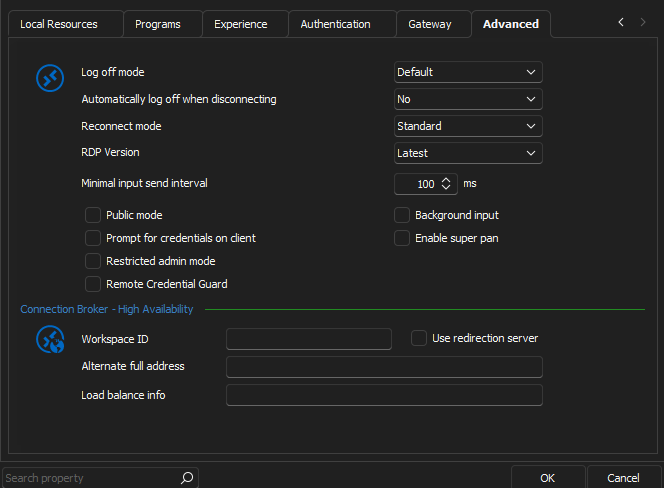
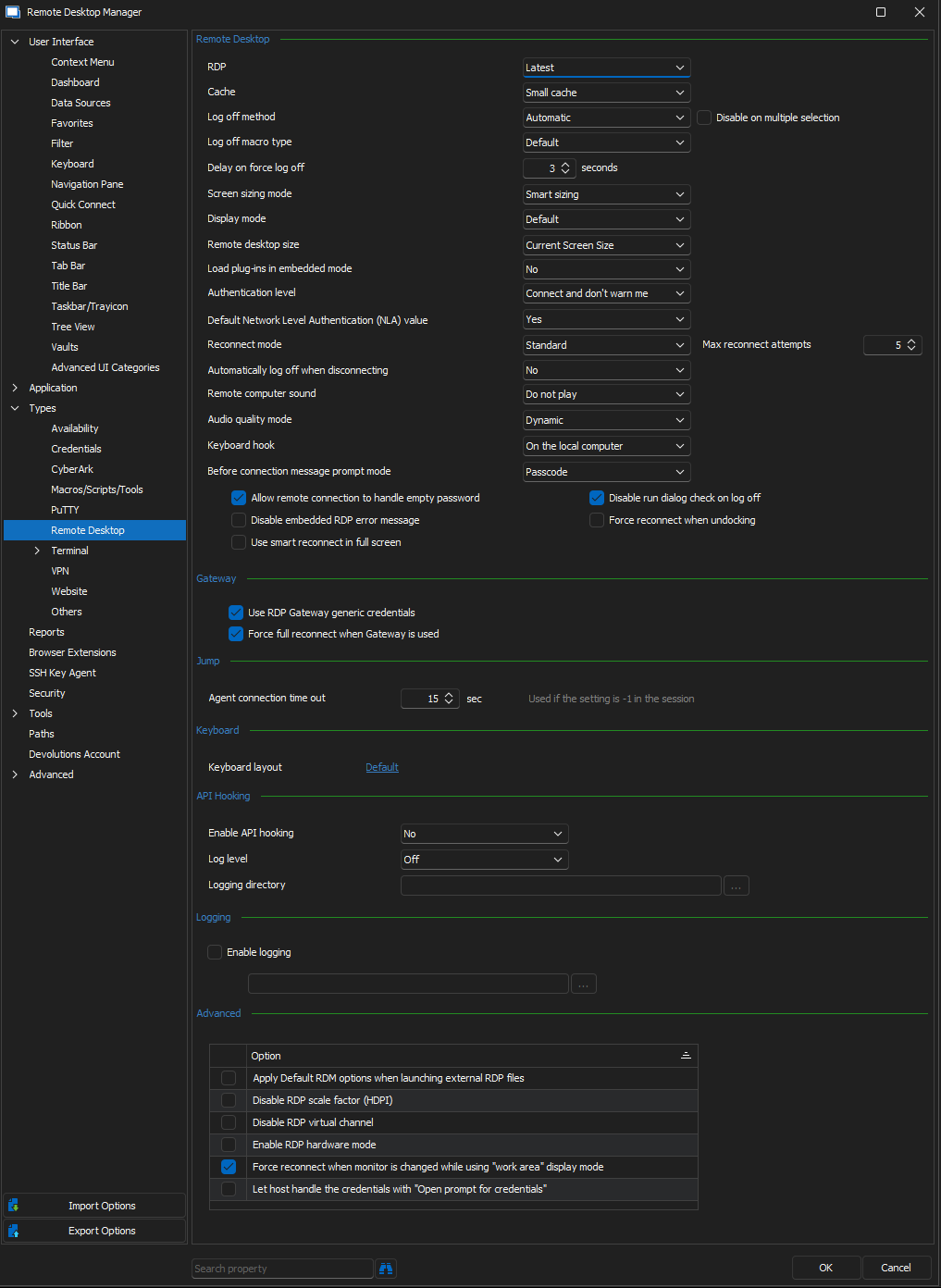
RDP_Options.png
Advanced_RDP_Properties.png
Hello,
Thank you for these screenshots.
As a test, would it be possible for you to install RDC Manager and see if the same issue occurs if you launch an RDP connection with it? We are using the same ActiveX used by Microsoft to establish our RDP connections and this test would allow us to see if this issue is tied to this.
This tool can be downloaded here: https://kb.devolutions.net/rdm_rdc_manager.html
Best regards,
James Lafleur
RDC Manager seems to work fine:
Hello,
Thank you for your quick reply!
I will transfer this information to our engineering department and get back to you shortly.
Best regards,
James Lafleur
Hello
I'd just like to confirm one thing - in your earlier post, you tested with RDP 8.1 and then FreeRDP. Did you try one immediately after the other, or did the RDM error dialog force you to close the application in-between?
If you didn't close RDM between those two tests, can you please try again with the "FreeRDP (latest)" but please make the test immediately after starting Remote Desktop Manager.
All the crashes are occurring in the same Windows API function, but it's not clear if it's an issue isolated to the MS RDP ActiveX control, or a more general issue loading native libraries. Once you hit a crash of this nature the application might be in an unstable state, so testing other functions without restarting RDM might give further strange results.
Please don't hesitate to post back if you have some questions, or if something isn't clear
Thanks and kind regards
Richard Markievicz
Actually Latest (FreeRDP) worked this time. I switched the RDP version in the properties of the saved session, closed RDM, reopened it and launched the session and it worked. I tried the same steps with multiple versions of Windows RDP and none of them worked. So it does seem to be an issue with Windows RDP. BTW I did update RDM to the latest version 2022.3.26.0 64-bit.
Hello again
Thanks for confirming that. If possible, I'd like you to check a few more things to help isolate the issue:
- After starting RDM, please create a new "VNC" connection with the following settings:
- Display: Embedded (tabbed)
- VNC Application: "UltraVNC"
- Host: Any valid IP address (we don't expect to connect to a VNC server, just for RDM to load the control and fail to connect). For example, just "192.168.254.254".
Try to connect to the session. What's the result? Does it fail gracefully or crash? The embedded UltraVNC entry loads a similar module, this will help us isolate the issue to just RDP.
2. If you open the System control panel (this is a bit tricky to find in Windows 11; the easiest way I found is to right-click on "This PC" in Windows Explorer and choose "Properties". This takes you to the System > About settings page, where you can click "Advanced System Settings"); under Advanced > Performance click "Settings", then go to "Data Execution Prevention". Is DEP turned on for "essential Windows programs and services only", or for all programs? If it's turned on for all programs, are there entries in the whitelist?
3. Do you use any kind of third party antivirus or security software?
Again, please don't hesitate to ask if something is not clear or you have any questions.
Thanks and kind regards,
Richard Markievicz
The VNC connection worked and it wanted to connect to my server, so it didn't crash at all. Also just to make it clear, I never actually get any crash windows or anything. The RDP session when it doesn't work, there is no type of response from the software at all. It wasn't until I went looking for the Application logs that I found the error.
DEP status is set to 2 which is Windows default. You just run the command: wmic OS Get DataExecutionPrevention_SupportPolicy
I use Malwarebytes and this has never been an issue with previous versions of RDM.
Hello again
Thanks for confirmation and the tip for checking DEP.
The reason for asking (and regarding AV / security software) is that a major change in RDM 2022.3.x is renaming the application executable (RemoteDesktopManager64.exe > RemoteDesktopManager.exe) and relocating the install directory (Program Files (x86) > Program Files). While I wouldn't expect this problem from an AV necessarily, it's worth checking because you may have whitelisted the prior application name or path in some piece of security software, which would no longer apply of course.
We will perform some further investigation on our side and post back with further updates or questions.
I appreciate your patience and apologize for the inconvenience
Kind regards,
Richard Markievicz
I have not whitelisted the application. I have used Revo uninstaller to uninstall the RDM software to remove any trace of it but that does not work either. I also use RDM on a laptop with Windows 10 and it is working fine.
Hello again
Thanks for the update. We're narrowing down the issue on our side.
One more thing to try, if you don't mind: how about if you re-enable API hooking and try an "External" connection with MSTSC (meaning - RDP 8.1 or latest).
Let me know if something isn't clear.
Thanks again and kind regards,
Richard Markievicz
Opening the RDP session in an External window has always worked. Even with API Hooking enabled. I just tested RDP 8.1, with API hooking, and in an External window and it worked. The only MSTSC fails is when it is an Embedded session.
Hello again
Thanks for the update, I will continue investigating this on our side
Kind regards,
Richard Markievicz
Hello again
We're working on a fix that will prevent your crash in the general case (embedded connections with API hooking disabled).
I'll update this thread as soon as that's available.
In the meantime, if possible, I'd ask if you can generate a diagnostic log file for me. In Options > Types > Remote Desktop, please re-enable API Hooking ("Enable API Hooking" > "Yes") and configure the "Log Level" to "Trace". You'll also need to provide a log directory path.
You can then restart RDM and attempt an embedded MS RDP connection.
Note that it's possible that the log directory you configured will be disregarded, in this case you will find the diagnostics in %userprofile%\AppData\Local\MsRdpEx.
If you are able to perform these steps, please send the log file either by PM or to support@devolutions.net (you can mention this forum thread so that the files get routed to me).
As always, any questions or if something isn't clear let me know
Thanks and kind regards,
Richard Markievicz
The latest version 2022.3.27.0 64-bit has resolved the issue. I just have to keep the API hooking disabled.
Hello
Thank you for the update. I apologize for not updating the thread yet, I wasn't aware that the 2022.3.27 update had been released yet.
We would like to improve the robustness of API hooking, and if you have the opportunity I'd ask you to test one more thing for me.
Under Options > Types > Remote Desktop, configure "Enable API Hooking" to "Enabled" and "Log Level" to "Off".
Relaunch RDM and try an embedded RDP connection using MS RDP latest. What is the result?
Once again, I apologize for the inconvenience.
Thanks and kind regards,
Richard Markievicz