Synology automated login DSM 7

Hi,
Has anybody any info on how to automate the login with DSM 7?
The login method in DSM 7 has changed. It first asks your for your username, after confirming that it asks you for the password on a second page. So username and password are not on the same login page anymore.
Depending on the DSM 6 version this worked perfectly in the DSM 6:

Thank you, Sasha
Regards, Sasha
All Comments (9)
Hello Sasha,
Thank you for contacting us on that matter!
Have you retrieved these IDs manually by inspecting the website or were they added automatically using the "Discover" button? If it is the latter, could you please follow the steps shown in this link: https://kb.devolutions.net/rdm_web_browser_web_authentication.html#method-2 and see if it works for you?
Best regards,
James Lafleur
Hi James,
thank you but that's not the problem.
The problem is that the username is on one site and the passwort on a second site / page:

So the question ist, what can i do to make the RDM input the username (Enter and go to second page) and input the password (and Enter again to login)
Regards, Sasha
Hello Sasha,
If the proper HTML Control IDs are entered, the username and the password fields should be recognized and the credentials sent. In order to move to the second page automatically, the IDs of the "arrow button" should be added as well. The regular "Enter" option might not work.
It is also possible that the changes that were made in DSM 7 login method might prevent credentials from being auto-filled. More and more websites are getting updated to prevent this kind of injection.
Best regards,
James Lafleur
Hello,
I am struggling with the same problem, however I have discovered that the Username ID is username and the password is password. Login button ID is [ENTER]. However, the whole login is not done as the procedure is that the user enters the login first, clicks the arrow then enters the password and clicks the arrow again, in RDM language it would be username-[ENTER]-password-[ENTER]. At the moment I have a problem with the fact that username-[ENTER] is executed automatically, however the password entry and confirmation no longer happens.
Is there any way to set this?
Thank you,
Best regard,
Jakub
Hello Jakub
Thank you for your reply,
I see, in this case, you could launch the entry externally and use our Devolutions Web Login browser extension to autofill the credentials.
Alternatively, you may be able to achieve the desired results by using a typing macro under the "Events" -> "After Open" section of your entry "Properties". We have the following knowledge base article regarding typing macros: https://docs.devolutions.net/kb/remote-desktop-manager/how-to-articles/entry-types-events-settings/event-auto-typing-macro/#typing-macro
Let me know if this helps,
Best regards,
Samuel Dery
In case someone is looking at this.
Autologin with Synology is possible:
I use a Website Entry that is set to use Google Chrome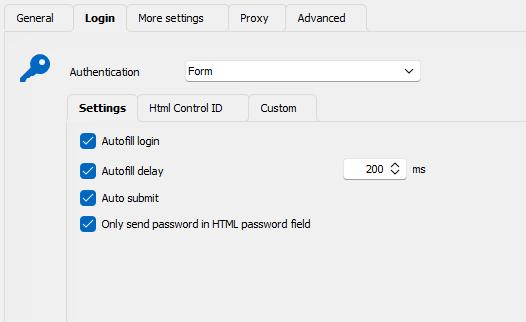
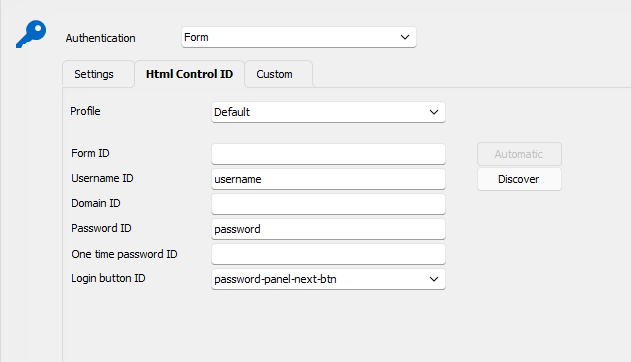
and also you need a Macro for stepping through the User and Password Page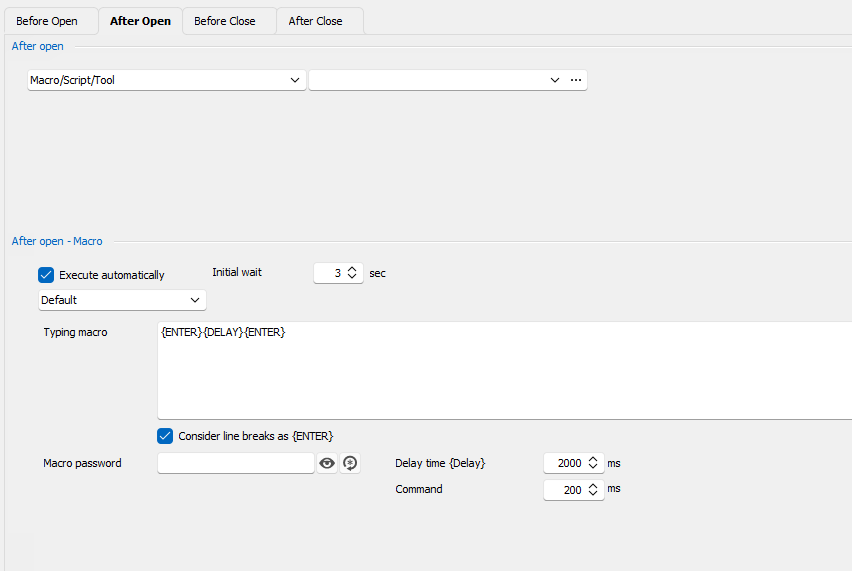
Hope this helps somebody.
BR
Lukas
16b24a01-cb1a-4ae6-8cb4-524879356b6c.png
55b86b7a-5148-45e7-810c-25d2acdbc20f.png
5014d78d-cd8d-41d2-9136-41676399683d.png
Hello Lukas,
Thank you for your feedback,
Hopefully, it will be helpful for others!
Best regards,
Samuel Dery
Lukas NAILED it, thank you.
FYI, all are in the WebSite type.
On the left hand side there is a selection under Connection called Events, that is the 3rd screen he is using.
Hello Brett,
Thank you for your feedback!
Best regards,
Samuel Dery