Support for FIDO / USB Redirect like we have it with the mstsc.exe?
Support for FIDO / USB Redirect like we have it with the mstsc.exe?

Hello,
I just realized that USB redirection and FIDO support is not working within RDM as it is with mstc.exe. I am on Windows 11 currently and run the latest RDM Version (free though!).
When using mstsc.exe to connect to a RDS Session host while a YubiKey 5 NFC is plugged in, I have no issues using Webauthn / FIDO within the RDP Session. Whenever such a feature is used, the locally plugged in YubiKey lights up.
When using RDM though, nothing of that happens. I use the same settings as I do with mstsc.exe and I also tried the various RDP versions you can select with in RDM. While doing so I realized that the highest version we can select within RDM is 8.1, while mstsc.exe reads as Version 10 in Windows 11. Maybe RDM is not using W11 native RDP client / api to connect here?
All Comments (17)
Hello!
When you try within Remote Desktop Manager, are you trying with the session in Embedded display (tabbed within Remote Desktop Manager) or in External mode (MSTSC)
Also, what would be your Remote Desktop Manager version?
Best Regards,
Etienne Lord
Hello,
Thanks for asking. I did not think about the External mode. I usually only use Tabbed. So I tried external and it is the same for me. Right after that test I just fired up mstsc.exe and tried with that and it works. So it does not seem to matter if I use tabbed or external, as long as I use RDM, I can not get it to work. And it also makes no difference if I use Quick Connect or a saved, configured RDM session
Could it be that RDM is capable of doing it, but is just missing the options in the RDP settings? If I configure a RDP session within RDM and in the properties go to the "Local Resources" tab, I do not see RemoteFX USB Redirect there. When using the mstsc.exe directly, the option is there and it HAS to be activated for Webauthn and other YubiKey features to work within the RDP session.
Sorry for the Screenshot being in German, but I hope you get the idea of how it looks within mstsc.exe.
Hello,
Thank you for the details! I will look into it!
Best Regards,
Etienne Lord
Hello,
Just to confirm, did it stopped working for you after an update or you were never able to make it work?
Best Regards,
Etienne Lord
Unfortunately I only started using YubiKeys very recently, so I never had an opportunity to test it with earlier versions of RDM. Sorry :-(
Hello,
If you head over to the Local Resources tab of your session and check the "Smart Cards" option, does it then work? 
Best Regards,
Etienne Lord
That works fine for the Smartcard function of the YubiKey, but for the other functions you need to forward the USB device itself via RemoteFX USB Redirect. That is the bottom option in my Screenshot above. That is why I thought RDM can do it, but is just missing the option to activate it like it is possible in the mstsc.exe.
Hello,
Thank you for the details, I will look into it!
Best Regards,
Etienne Lord
Hi,
I'm having trouble seeing the same RemoteFX USB redirection show up in mstsc.exe. I see there's a GPO to enable on the client, but that doesn't seem to be enough to make it appear for me. Could you export a .RDP file with the correct options set? This should help us figure out what the corresponding .RDP file option is.
The WebAuthn redirection option is very recent, and we do not expose it yet (redirectwebauthn:i:1). Do you use it with Azure AD? I saw some people mention the new enablerdsaadauth:i:1 .RDP file option but it doesn't seem to be exposed in mstsc.exe, and it may be useful only for Azure AD SSO.
Marc-André Moreau
Hi :-)
I think your GPO Setting is correct. But I think 2 other factors need to be true for the option to show up in the mstsc.exe:
- After setting the GPO I think a Reboot is necessary.
- It only shows up if a Device supported bei USB RemoteFX is plugged in.
For 2 in my case it works for my Webcam and USB Headset. For the YubiKey, I had to add the VID/PID manually into the registry as mentioned here. But since you are doing product development and hacks do not help here, using a Webcam or USB Headset should be enough for the option to show up.
I will attach 2 RDP files for you. One where I had plugged in the YubiKey and one where I plugged in a Headset additionally. I think the last line in the .rdp file is the one that makes the USB Redirect feature show up.
And good point with the redirectwebauthn:i:1 option. That is indeed set also in the RDP files, so probably WebAuthn (FIDO?) does not really need the USB Redirect, but just the WebAuthn feature itself to work?
So in summary, having redirectwebauthn:i:1 set might help with WebAuthn and USB Redirect might help with redirecting all supported USB devices into the RDP session (Webcams, Headsets...), but is a bit "picky" regarding the VID/PID to show up at all.
YubiKey_and_Headset.rdp
YubiKey.rdp
Hi,
I did some more research, and aside from camera redirection, we currently do not expose "generic" RDP RemoteFX USB redirection. The RDP ActiveX API documentation are not very helpful about this, so it's going to take more digging before I figure out how to properly set the USB devices to redirect from RDM.
First, I would like to confirm that the current method for redirecting the Yubikey really is USB redirection: can you set the following and see if it still works?
redirectsmartcards:i:0
redirectwebauthn:i:0
If it's using RemoteFX USB redirection, it *should* still work. I will inquire if it's possible to try the opposite (proper API redirection rather than USB-level redirection) since it's a fairly new feature and it would be a lot better than generic USB redirection. Which version of Windows are you using on the client and server? I am more concerned about support on older versions of Windows server-side for WebAuthn redirection.
I found a few list of GUIDs in the RDP ActiveX you may find useful - they appear to be used for the default device filtering behavior:
CUsbPrivateDeviceDisallowClassGuidList:
{4d36e96b-e325-11ce-bfc1-08002be10318} Keyboard / Keyboards
{4d36e972-e325-11ce-bfc1-08002be10318} Net / Network adapters
{4d36e968-e325-11ce-bfc1-08002be10318} Display / Video adapters
{4d36e967-e325-11ce-bfc1-08002be10318} DiskDrive / Hard drives
{4D36E965-E325-11CE-BFC1-08002BE10318} CDROM / CD/DVD/Blu-ray drives

CUsbDeviceOptionalClassGuidList:
{4d36e96c-e325-11ce-bfc1-08002be10318} Media / Audio and video devices
{4D36E979-E325-11CE-BFC1-08002BE10318} Printer / Printers
{50dd5230-ba8a-11d1-bf5d-0000f805f530} SmartCardReader / Smart card readers

CUsbDeviceOptionalList:
USB\\Class_01
USB\\Class_07
USB\\Class_0B
As for exposing settings in RDM, I feel like internally the best would be to have the equivalent of "usbdevicestoredirect", even if it's not very user friendly:
usbdevicestoredirect:s:USB\VID_1050&PID_0407\5&CFF49EB&0&1;USB\VID_046D&PID_0A01\5&CFF49EB&0&2
This list is updated with cameras to redirect when enabled, but the class used for this filters camera devices specifically, so we'll need a way to handle generic devices.
Are strings like "USB\VID_1050&PID_0407\5&CFF49EB&0&1" the "best" way to configure this, in a list of additional USB devices to redirect? I guess the easiest way to find this string for the device you want is to use the device manager in Windows? I'm open to ideas
Best regards,
Marc-André Moreau
Hi,
sorry for the delay, but I wanted to give you the most precise answers possible :-)
If I understand you correctly, implementation is not only complex because of the topic, but also because of the lack of documentation. While doing some tests for this reply, I think I realized that probably even at Microsoft (or within mstsc.exe) not all is always clear. So I fully understand that this is a very difficult topic to work on.
The Operating systems involved are:
- Windows 11 22H2 Build 22621.819
- Windows Server 2022 21H2 Build 20348.1249 with enabled RDS Services and RDS User CALs
And while on that topic, I had to switch from Windows Server 2019 to 2022 for Webauthn / FIDO to work. Older Server Versions seem to lack the functionality that comes with the later Server 2022 version (which probably builds on a newer W10 technology?). So for testing it makes sense to use one of the latest W10/11 and Server 2022 builds.
Regarding the tests with Webauthn / Smartcard redirect off / on vs. RemoteFX USB Redirect, I had to create an Excel Spreadsheet to be able to keep an overview ;-)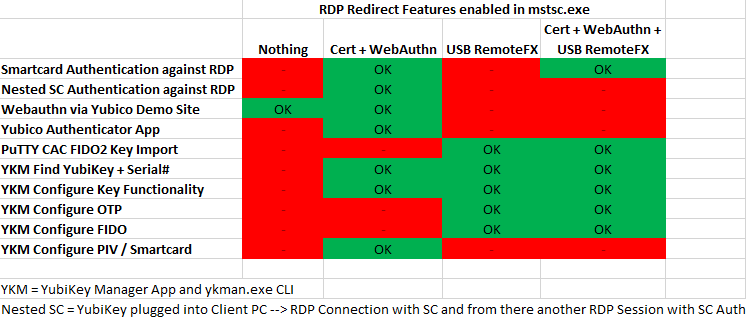
Remarks to the picture above:
- Webauthn working with nothing being redirected: I have no idea. Maybe one of the things not implemented "correctly" because of the lack of Documentation? ;-)
- USB RemoteFX: We have to consider here that as soon as you enable USB RemoteFX, the USB device gets taken away from the PC it is plugged in! This is just how it works and it is documentated like that from Microsoft. That is also the reason why Smartcard Auth works in the last column, but not for nested RDPs, because once logged in into the RDP session, the USB device is taken away from the local PC and that makes the SmartCard "disappear". This makes it look that there is no perfect solution to get "everything" working. But when using mstsc, there is. It is a bit cumbersome, but it works because they add a new UI element to the RDP Session which looks like that:
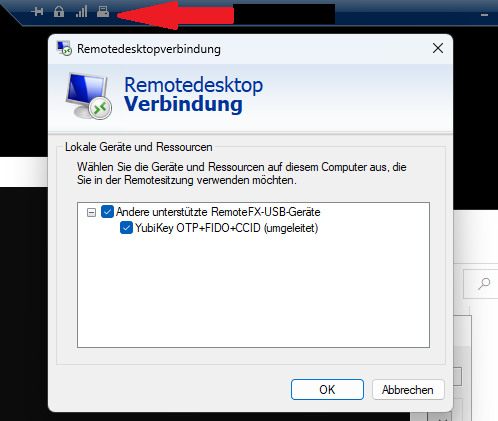
That UI element allows you while the RDP connection is active, you can dynamically enable / disable USB redirection and so can decide if the Device is available locally or via RDP.
This is in no way something I would expect in RDM, but I wanted to show you how it works and it probably explains a bit what works / doesn´t work in the table above.
Configuration with USB VID/PID Strings: I think it is pretty much the most flexible way, but not very user friendly. On the other hand, I think at this point we are talking about a very niche function here that might only get used by IT professionals until the implementation in Windows / Windows Servers gets more traction as more companies transition to the new technology. And even then... I think it will be a pretty special case for quite some time. So an implementation where it can be made working in a non-comfortable way is something I would prefer than the implementation not happening at all because doing it comfortably with UI elements that anyone can work it seems to be a LOT of work for something used by only some people.
I appreciate very much that you are looking into this, but of course I do not expect to see it working soon because it is a very special request. And as we can see above, even in the native implementation there are drawbacks, so maybe the whole thing has to get better (and better documented) from Microsoft first.
USBRemoteFXRedirectButton.png
RDPRedirectFeatureTesting.png
Hi,
Thanks for the exhaustive testing and research! I wish Microsoft would document this more explicitly, so this is valuable information that should help us. I got my hands on a YubiKey 5 and followed the instructions you linked to in order to see it listed in mstsc.exe for RemoteFX USB redirection. In my case, it apparently picked up a few additional devices automatically.
In terms of usability, I agree we could avoid overthinking it and just add a text field mapped directly to the "usbdevicestoredirect" .RDP file option. It would always be possible to add a USB device enumerator in RDM later to help select which devices to redirect, such that manually figuring out the USB device id strings would not be required.
Even without a GUI, we'll still need to implement a compatible USB device enumerator in RDM, as I suspect this functionality is implemented by mstsc.exe rather than the RDP ActiveX. But for now, let's say we already have the "usbdevicestoredirect" string to save some work. If we just pass the string as-is, an mstsc.exe integration should be simple, as we wouldn't even process it ourselves.
The real deal comes with the embedded mode with the RDP ActiveX. I probably won't come as a surprise that the API documentation on how to enable specific devices for USB redirection is fairly thin. I have a list of possible APIs, and they'll require some experimentation, trying to either pass the full strings as-is to build objects, or split it into parts to construct objects with separate parameters. Anyhow, this part is where I think we'll be spending the most time.
I will open a ticket on our side, such that we at least do the simplest thing: store the usbdevicestoredirect value as a string, and export it in the .RDP file for mstsc.exe integration. The second step will be to try and inject the USB devices to redirect into an embedded RDP session, since that's where the "fun" begins.
I noticed something during my testing - the usbdevicestoredirect string contains "-" entries to exclude those currently shown in mstsc, but filtered out. The other thing I noticed is that the string doesn't match exactly the one I can find in the device manager. I'll have to research more how to obtain the exact same strings processed by mstsc.exe for USB device enumeration.
Marc-André Moreau
Hi,
I think I found a good-enough way of enumerating the USB devices in the same way as mstsc. I spent some time digging into the Microsoft RDP client internals, and was knee-deep into making undocumented calls to a special USB filter device to get the information when someone mentioned to me that Get-PnpDevice may return the correct information. I've got a PowerShell code snippet that returns the correct USB device strings for all devices except cameras, but that's fine because camera device enumeration is treated differently by mstsc:
$RdpUsbDeviceExcludedClassGuids = @(
    '{4d36e96b-e325-11ce-bfc1-08002be10318}', # Keyboard
    '{4d36e972-e325-11ce-bfc1-08002be10318}', # Net
    '{4d36e968-e325-11ce-bfc1-08002be10318}', # Display
    '{4d36e967-e325-11ce-bfc1-08002be10318}', # DiskDrive
    '{4d36e965-e325-11ce-bfc1-08002be10318}', # CDROM
    '{e0cbf06c-cd8b-4647-bb8a-263b43f0f974}', # Bluetooth
    '{745a17a0-74d3-11d0-b6fe-00a0c90f57da}', # HIDClass
    '{36fc9e60-c465-11cf-8056-444553540000}'  # USB
)

Get-PnpDevice |
    Where-Object { $_.InstanceId.StartsWith("USB\") -and $_.Status -eq 'OK'} |
    Where-Object { -Not $RdpUsbDeviceExcludedClassGuids.Contains($_.ClassGuid) } |
    Select-Object -Property FriendlyName,Class,ClassGuid,InstanceId

FriendlyName                              Class           ClassGuid                              InstanceId
------------                              -----           ---------                              ----------
Goodix fingerprint                        Biometric       {53d29ef7-377c-4d14-864b-eb3a85769359} USB\VID_27C6&PID_533C\5&338395B4&0&1
Generic Billboard Device                  USBDevice       {88bae032-5a81-49f0-bc3d-a4ff138216d6} USB\VID_1D5C&PID_7102\5&338395B4&0&2
Microsoft Usbccid Smartcard Reader (WUDF) SmartCardReader {50dd5230-ba8a-11d1-bf5d-0000f805f530} USB\VID_1050&PID_0407&MI_02\6&5A35C8D&0&0002
Integrated Webcam                         Camera          {ca3e7ab9-b4c3-4ae6-8251-579ef933890f} USB\VID_0C45&PID_6D14&MI_02\6&4B5DF06&0&0002
Integrated Webcam                         Camera          {ca3e7ab9-b4c3-4ae6-8251-579ef933890f} USB\VID_0C45&PID_6D14&MI_00\6&4B5DF06&0&0000
USB-C to DisplayPort Cable in 4K 60Hz     USBDevice       {88bae032-5a81-49f0-bc3d-a4ff138216d6} USB\VID_0BDA&PID_5442\123456789ABCDEFGH
I will need to take into account the various registry keys affecting the filtering done by mstsc, but I think I have enough to plan the work for USB device redirection with the embedded mode as well. I'm not making any promises, but I'm hoping we could have it done in 2023.1. We'll see if a backport is worth it once we've made progress on it.
Best regards,
Marc-André Moreau
Hi,
Another quick update: I just finished the initial research for WebAuthn API redirection and took some notes for a ticket, including the method for enabling it for the embedded mode. That one was tricky, since unlike most other redirection types, it's not really a bool which you set as an internal property. It's interesting, they've decided to make it an optional plugin which you need to optionally load based on the WebAuthn redirection setting.
Regarding the mysterious WebAuthn redirection that occurred for you despite being disabled, I found a registry key to disable it globally on the client. I wonder if the webauthn.io test page would still work if you try force-disabling it:
Set-ItemPropertyValue -Path "HKLM:\SOFTWARE\Microsoft\Terminal Server Client" -Name "DisableWebAuthnRedirection" -Value 1
Get-ItemPropertyValue -Path "HKLM:\SOFTWARE\Microsoft\Terminal Server Client" -Name "DisableWebAuthnRedirection"
As for the RDP USB redirection, I improved the reference code snippet and found the real source of the display names from mstsc. I've put a copy here: https://gist.github.com/awakecoding/5fb42c3ea06f35134c7125267630c09c
Besides RemoteFX USB redirection and WebAuthn API redirection, was there any of the newer RDP options we might be missing that you may need?
Best regards,
Marc-André Moreau
First, sorry for the delay!
I am blown away by the amount of research you did and what you found. I absolutely did not expect that!
Also Thank you for the Gist. I ran the ps Snippet over here and found out that the PNPDeviceId reported is different than what is in my .rdp file: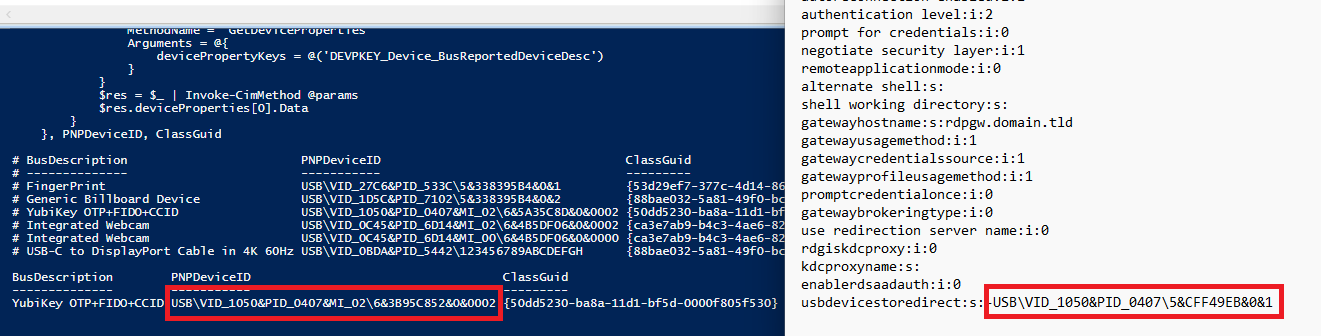
The string is a bit longer and the last part differs (6&... vs 5&...). I think I spotted the same behaviour in your pictures above. If WMI / Get-PnpDevice delivers a different value than what mstsc.exe writes into the .rdp files, then there may still be a problem, right? I ask because I am concerned you invest a lot of time into implementing it and then it turns out to still have the wrong values. On the other hand, you digged so deep into the whole topic, it is near impossible you missed something ;-)
WebAuthn: I can try to disable it in the registry and report back. On the other hand: If it is working, I have no problem. If a functionality is there I can still decide to not use it :-) But I will try to test this ASAP.
Edit: Yup! Setting the Registry Key made Webauthn stop working, deleting the Key made it working again, despite having Webauthn deactivated in the RDP session. And there is no reboot necessary.
Regarding any newer RDP options, I do not really have anything on my list I would miss at the moment. The whole YubiKey / Smartcard / Webauthn topic just came up in the last few weeks, because it is something I started to use... the years (decades ;-)) before, I never missed anything in RDP :-)
Thanks again for diving so deep into the topic. With the lack of documentation I am sure it is a very difficult one and it requires a lot of dedication to make progress here. I appreciate that very much :-)
PNPdeviceID.png
Hello,
The option to redirect RemoteFX USB devices has been implemented. It will be included in version 2023.1.10.0.
Regards
Jonathan Del Signore