Insert an OTP that will be saved in credentials until you changed it.
Insert an OTP that will be saved in credentials until you changed it.

Hi,
I will try to explain. We are going to implement Cyberark (i know there is a module but you have to pay, so that is out of the question). So i'v created one credential entry (and template) with VAULT credential username CYBERARK and password blank.
I have apply that credential on some of RDP entries so if i go to the credential and select properties and insert the generated cyberark password then the RDP will connect successfully.
But that requires for me to go to credential=>right-click=>properties=>enter password for every time the password expires
So my question, is there an easy way to add this. A macro, button, something that i can create so ι can enter once the password and that be applied to the credential entry.
I just hought also Powershell, is this possible ? can i update a specific credential entry via powershell, that will solve everything.
Or if you understand what i'm asking, any other idea on how to accomplish that more easily.
Best Regards,
Vassilis
RDM for Windows 11
Purchased Enterprise Edition v2024.x
All Comments (56)
Hello Vassilis,
Thank you for contacting us on that matter!
Unfortunately, it seems that the workaround you have found is the quickest way to achieve this, other than opting for our CyberArk integration.
Best regards,
James Lafleur
Hello Vassilis,
I have contacted our sales department on your behalf and they provided me with a special offer just for you.
I will send it to you via PM.
Let us know what you think!
Best regards,
James Lafleur
Thank you James, this shows great after sales support and a great respond to my rant about the increase of prices.
I have trouble entering the key, i replied to your DM
But just to be on the safe side, cause the cyberark is on the mother company and we have access via web and i do not know if it will work properly.
Can i have a working code in powershell on how to change a passowrd on a credential entry named "cyberark"
Best Regards,
Vassilis
RDM for Windows 11
Purchased Enterprise Edition v2024.x
You are more than welcome! Thank you for your fantastic feedback, I will reply to your DM shortly.
James Lafleur
Hello Vassilis,
I succeeded through a Macro/Script/Tool entry (that makes it more generic...) - I'll attach the session it self here, but will also provide the HowTo
The entry itself is a PowerShell(Local)
I set the "Run" to Embeddded Script, then Edit Embedded Script :
$newcreds = Read-Host -AsSecureString "new password"
$sess = Get-RDMSession | where-object {$_.ID -eq "$ID$"}
Set-RDMSessionPassword -Session $sess -Password $newcreds
Set-RDMSession $sess -Refresh
Then, back in the Advanced Tab, juste make sure that the "Load RDM CmdLet" checkbox is ticked
I personally like the "Open embedded/tabbed" option, but it's up to you.
Also, make the Macro/Script/Tool entry "Available in dashboard" (From the description Section)
The way it will work, simply Right Click your credential entry > Macro/Script/Tools > <the name of your macro/script/tool entry>
Make sure to refresh your navigation pane before using (CTRL+F5)
I hope this helps.
Best regards,
Alex Belisle
ChangePassword.rdm
Wow Alexander and team fantastic reply!!!!
i drooled a little 😀
I will try it at in the weekend!
Thank you James as well.
Best Regards,
Vassilis
RDM for Windows 11
Purchased Enterprise Edition v2024.x
Hello,
You're very welcome, have a great one.
Best regards,
Alex Belisle
ok, played a bit
For what i'm understanding this is for a specific session that you select thus the _$ID$ parameter.
Is is possible to do it for a specific credential entry called "cyberark" something like this (don't know the exact syntax of your command):
$newcreds = Read-Host -AsSecureString "new password"
$sess = Get-RDMSession | where-object {$_.Name -eq "Cyberark"}
Set-RDMSessionPassword -Session $sess -Password $newcreds
Set-RDMSession $sess -Refresh
Also i get this error, i think i read somewhere that this is a bug and does not affect the connection ?
I can run commands afterwards but on the first line i get the unable to load the datasource
RDM for Windows 11
Purchased Enterprise Edition v2024.x
Hi!
Is there any update on how to perform the PS script as stated above ?
RDM for Windows 11
Purchased Enterprise Edition v2024.x
Hello,
Sorry for not keeping you posted, I have to test with the SQLite data source with a master key, maybe you've hit a bug, I'll keep you updated.
Thanks for your patience
Best regards,
Alex Belisle
Hello,
Sorry again for the delay, but even on a SQLite Data source, I don't experience any issue...
- Are you using the latest version of RDM? (2022.3.23)
- Are you using the latest version of the PowerShell module? (2022.3.0.1) (Through Get-RDMInstaance)
Thanks for letting me know.
Best regards,
Alex Belisle
Does your SQLite data source has a key ?
I'm asking cause i'm almost positive that this error was long before and was a bug, i think i read it somewhere in here.
No, i'm using 2022.2.21.0 64 bit. I do not want to update (i'm the if it aint broke don't fix it) as maybe something else more important for me breaks on the new version.
The powershell is 2021.2.0.40, ok that is very old. Isn't these upgraded on every new installation of RDM ? how can i manually update it and check again ?
RDM for Windows 11
Purchased Enterprise Edition v2024.x
ok ip update powershell using update-module, now it is version 2022.3.0.1
I tried the login and i do not get the error on sql lite but i get a weirder message on every command i enter in powershell. The user is the same.
Also why the APP is on (x86) folder since it is a 64 bit installation ????
RDM for Windows 11
Purchased Enterprise Edition v2024.x
Hello,
The RDM PowerShell Module is no longer part of the RDM Client for quite some time (somewhere around 2021.2 if I'm not mistaken)
It makes sense that 2022.3.0.1 doesn't work with a data source on 2022.2 (even a SQLite...)
I suggest you remove the latest module and install the matching version
Install-Module -Name RemoteDesktopManager -RequiredVersion 2022.2.3.0 -force
This should get you going.
Since 2022.3, RDM is in the Program Files folder, If I'm now mistaken, it was for backward compatibility since we still had the 32 bits available...
I hope this helps, thanks for keeping us posted.
Best regards,
Alex Belisle
Ok, i have the latest version, the master key for SQLite error is still there.
Can you please confirm that the error exists on the 2022.2.21.0 version so that i know it is my version and then i can upgrade to the .3 cause i do not want to mes anything else up for something that is not the version number problem and it is another bug that carries on.
RDM for Windows 11
Purchased Enterprise Edition v2024.x
Hi!
Yes I will test and get back to you.
Best regards,
Alex Belisle
Hello,
I could no replicate the issue (neither with 2022.2 nor 2022.3). Would you mind sending an email to service@devolutions.net so we can plan a call for me to take a closer look?
We'll post the solution afterward.
Thanks for your cooperation.
Best regards,
Alex Belisle
Hi everyone!
I'm back with this since it is now mandatory to make this work as we have OTPs for our password and I want to make an entry that will give a new password manually every hour so i can make my life a bit easier 😀
Ok, i want to make the following happen:
I have a credential entry in Linked (Vault) named "MyPassword"
I need a script that will ask for a text entry and place it as password on the "MyPassword" credential entry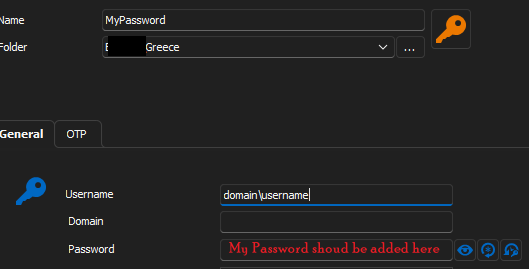
A PowerShell something like this
clear-host
# insert any prerequisites for PowershellRDM

$MyPassword = Read-Host "Please enter the new Password "

#insert script that will add this to the password entry for the credential "MyPassword"
Looking forward for your ideas.
Regards,
Vassilis
RDM for Windows 11
Purchased Enterprise Edition v2024.x
52494a7b-d8d7-49f0-b07e-e61b1417a5aa.png
499f47b2-090c-41a8-9cb4-dc0551236240.png
Hello Vassilis,
please try the following:
$session = Get-RDMSession | Where-Object {$_.Name -match 'MyPassword'}
$np = Read-Host -Prompt 'Please enter the new Password' -AsSecureString
Set-RDMSessionPassword -Session $session -Password $np -Refresh
Set-RDMSession $session
Update-RDMUI
Please let me know!
Regards,
Min
Thanks Min for the quick reply, but it seams i still have issues with the SQLite datasource like 2 major versions ago
now i am on 2023.18.0
if i click on the powerhsell (RDM cmdlet) from inside RDM i get the inside dashboard of powershell with error
from server powershell i get the same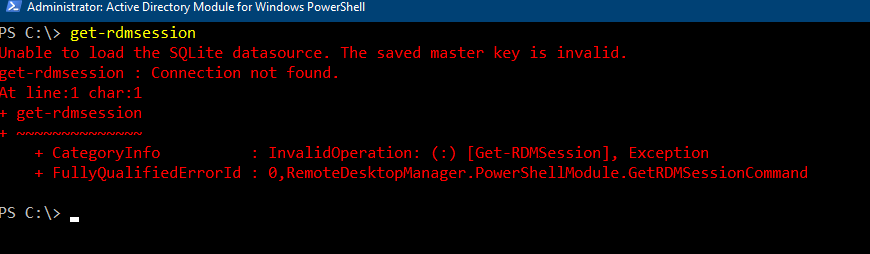
can we help with this, if i need to open a ticket let me know, i want this definitely resolved.
Many thanks.
RDM for Windows 11
Purchased Enterprise Edition v2024.x
490a003e-dc34-4249-9a68-bcc07f347711.png
91a47862-6828-4a72-abab-2e5be5ff626e.png
Hello Vassilis,
which PS version do you get with
Get-RDMInstance
?
You're using RDM 2023.2.18.0 ?
Contains your master key perhaps special character?
Regards,
Min
Yes
but clearly that has never been updated or something

RDM for Windows 11
Purchased Enterprise Edition v2024.x
ced64478-1170-467d-aa21-8381d05e0b42.png
818644d0-0ef4-488b-b307-8fba8ae678f3.png
Hello,
Could you please update the PS version with the following command and give it a try:
Install-Module Devolutions.PowerShell -force
I'll try to reproduce the issue with the invalid master key on my side.
Regards,
Min
ouch!!
PS C:\> Install-Module Devolutions.PowerShell -force
PackageManagement\Install-Package : The following commands are already available on this system:'Add-RDMPrivateSessionA
ttachment,Add-RDMRoleRepositoryAccess,Add-RDMRoleToUser,Add-RDMSessionAttachment,Add-RDMUserRepositoryAccess,Close-RDMS
ession,Copy-RDMSession,Edit-RDMUserTemplate,Export-RDMOptionFile,Export-RDMSession,Get-RDMCommand,Get-RDMCurrentDataSou
rce,Get-RDMCurrentRepository,Get-RDMDataSource,Get-RDMDatasourceProperty,Get-RDMDiagnostic,Get-RDMInstance,Get-RDMLicen
se,Get-RDMOffline,Get-RDMOnline,Get-RDMOpenedSession,Get-RDMPackage,Get-RDMPersonalCredentials,Get-RDMPlaylistLocal,Get
-RDMPlaylistShared,Get-RDMPowerShellOverride,Get-RDMPrivateSession,Get-RDMPrivateSessionAttachment,Get-RDMPrivateSessio
nCredentials,Get-RDMPrivateSessionDocumentStoredInDatabase,Get-RDMPrivateSessionDomain,Get-RDMPrivateSessionPassword,Ge
t-RDMPrivateSessionProperty,Get-RDMPrivateSessionStatus,Get-RDMPrivateSessionUserName,Get-RDMPrivilegedAccount,Get-RDMP
rocess,Get-RDMRegistrationInfo,Get-RDMRepository,Get-RDMRole,Get-RDMRootSession,Get-RDMSecurityGroup,Get-RDMSession,Get
-RDMSessionAttachment,Get-RDMSessionCredentials,Get-RDMSessionDocumentation,Get-RDMSessionDocumentStoredInDatabase,Get-
RDMSessionDomain,Get-RDMSessionPassword,Get-RDMSessionProperty,Get-RDMSessionStatus,Get-RDMSessionUserName,Get-RDMTask,
Get-RDMTemplate,Get-RDMUser,Get-RDMUserSpecificSettings,Get-RDMVersion,Import-RDMDataSource,Import-RDMSession,Install-R
DMPackage,Invoke-RDMCreateDataSourceDatabase,Invoke-RDMLoadFromInventorySession,Invoke-RDMParentSession,Invoke-RDMUnpar
entSession,Invoke-RDMUpdateDataSourceDatabase,New-RDMDataSource,New-RDMLicense,New-RDMLogComment,New-RDMPlaylistLocal,N
ew-RDMPlaylistShared,New-RDMPort,New-RDMRandomPassword,New-RDMRepository,New-RDMRole,New-RDMSecurityGroup,New-RDMSessio
n,New-RDMSSHKey,New-RDMTask,New-RDMTemplate,New-RDMUser,Open-RDMQuickConnect,Open-RDMSession,Open-RDMSyncSession,Read-R
DMSession,Register-RDMFromDataSource,Remove-RDMDataSource,Remove-RDMLicense,Remove-RDMPrivateSession,Remove-RDMReposito
ry,Remove-RDMRole,Remove-RDMRoleRepositoryAccess,Remove-RDMRoleToUser,Remove-RDMSecurityGroup,Remove-RDMSession,Remove-
RDMSessionAttachment,Remove-RDMSessionDocumentation,Remove-RDMTask,Remove-RDMTemplate,Remove-RDMUser,Remove-RDMUserRepo
sitoryAccess,Remove-RDMUserSpecificSettings,Rename-RDMGroup,Restart-RDMProcess,Set-RDMCurrentDataSource,Set-RDMCurrentR
epository,Set-RDMDataSource,Set-RDMDatasourceMasterKey,Set-RDMDatasourceProperty,Set-RDMDatasourceRepository,Set-RDMLic
ense,Set-RDMPersonalCredentials,Set-RDMPlaylistLocal,Set-RDMPlaylistShared,Set-RDMPowerShellOverride,Set-RDMPrivateSess
ion,Set-RDMPrivateSessionAttachment,Set-RDMPrivateSessionCredentials,Set-RDMPrivateSessionDocument,Set-RDMPrivateSessio
nDomain,Set-RDMPrivateSessionPassword,Set-RDMPrivateSessionProperty,Set-RDMPrivateSessionStatus,Set-RDMPrivateSessionUs
ername,Set-RDMPrivilegedAccount,Set-RDMRegistrationInfo,Set-RDMRepository,Set-RDMRole,Set-RDMRoleGroupRights,Set-RDMRol
eProperty,Set-RDMRootSession,Set-RDMSecurityGroup,Set-RDMSecurityGroupProperty,Set-RDMSession,Set-RDMSessionAttachment,
Set-RDMSessionCredentials,Set-RDMSessionDocument,Set-RDMSessionDocumentation,Set-RDMSessionDomain,Set-RDMSessionPasswor
d,Set-RDMSessionProperty,Set-RDMSessionStatus,Set-RDMSessionUsername,Set-RDMSQLiteDatasourcePassword,Set-RDMTask,Set-RD
MTemplate,Set-RDMUser,Set-RDMUserGroupRights,Set-RDMUserProperty,Set-RDMUserSecurity,Set-RDMUserSpecificSettings,Set-RD
MUserVaultSessionUsername,Start-RDMInstance,Start-RDMProcess,Stop-RDMProcess,Uninstall-RDMPackage,Update-RDMPackage,Upd
ate-RDMRepository,Update-RDMSessionAttachment,Update-RDMUI'. This module 'Devolutions.PowerShell' may override the exis
ting commands. If you still want to install this module 'Devolutions.PowerShell', use -AllowClobber parameter.
At C:\Program Files (x86)\WindowsPowerShell\Modules\PowerShellGet\1.0.0.1\PSModule.psm1:1809 char:21
+ ...          $null = PackageManagement\Install-Package @PSBoundParameters
+                      ~~~~~~~~~~~~~~~~~~~~~~~~~~~~~~~~~~~~~~~~~~~~~~~~~~~~
    + CategoryInfo          : InvalidOperation: (Microsoft.Power....InstallPackage:InstallPackage) [Install-Package],
   Exception
    + FullyQualifiedErrorId : CommandAlreadyAvailable,Validate-ModuleCommandAlreadyAvailable,Microsoft.PowerShell.Pack
   ageManagement.Cmdlets.InstallPackage

PS C:\> UnInstall-Module Devolutions.PowerShell -force
PackageManagement\Uninstall-Package : No match was found for the specified search criteria and module names 'Devolution
s.PowerShell'.
At C:\Program Files (x86)\WindowsPowerShell\Modules\PowerShellGet\1.0.0.1\PSModule.psm1:2194 char:21
+ ...        $null = PackageManagement\Uninstall-Package @PSBoundParameters
+                    ~~~~~~~~~~~~~~~~~~~~~~~~~~~~~~~~~~~~~~~~~~~~~~~~~~~~~~
    + CategoryInfo          : ObjectNotFound: (Microsoft.Power...ninstallPackage:UninstallPackage) [Uninstall-Package]
   , Exception
    + FullyQualifiedErrorId : NoMatchFound,Microsoft.PowerShell.PackageManagement.Cmdlets.UninstallPackage

PS C:\>
What is strange is that it says commands are already installed. Then when i try to uninstall so i can maybe create a fresh installation it says no module available
RDM for Windows 11
Purchased Enterprise Edition v2024.x
Hello,
The Uninstall-Module does additionally need the -Name parameter
Uninstall-Module -Name Devolutions.PowerShell
If this doesn't work, could you please try the manual installation like this kb article?
Regards,
Min
Hi Min
The command has the same output.
I followed the KB.
On the KB it says to unzip in cd c:\program files\WindowsPowerShell\modules\devolutions.powershell\
The "devolutions.powershell" was not there, i created, also the path version was not there i created and entered the one from tha .nupkg file
so i have 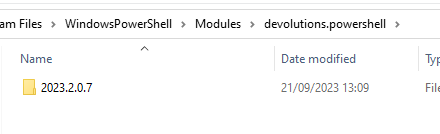
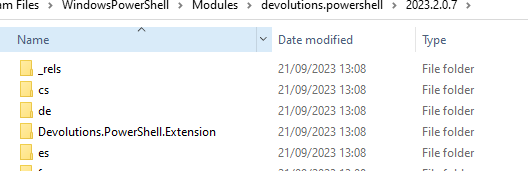
i tried the command i got an error of need powershell 7.2 as minimum.
I installed it.
Tried the get-intance again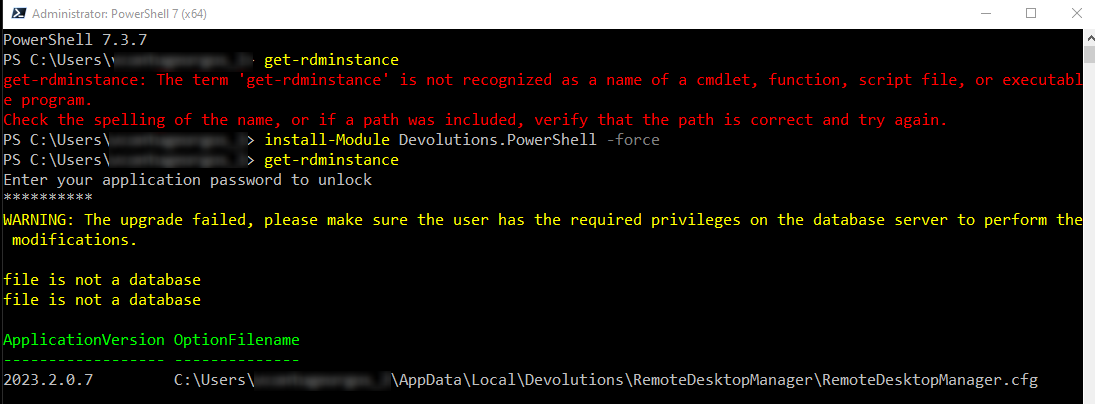
something different now on the outcome, feeing closer.
tried the .ps1 as you have it above, the out put is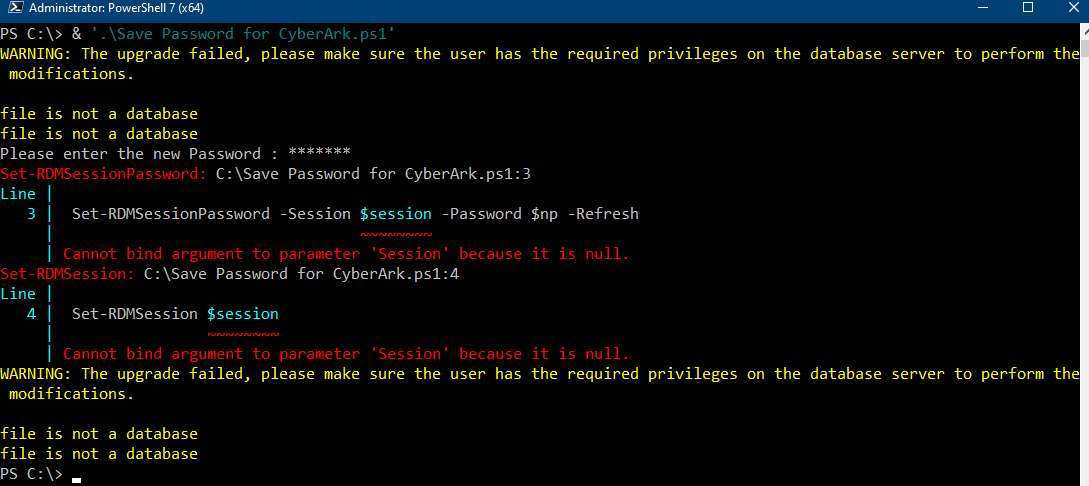
it seams we are close but something is wrong, i think some mixed up with versions and paths or something
RDM for Windows 11
Purchased Enterprise Edition v2024.x
5b947773-1d82-4cb9-a55a-0c238607347f.png
4fa958c2-6c2e-4c00-9759-669cb94b529a.png
510b46b6-469d-4d2b-bfb6-98ea5a14e2ff.png
5da6168c-ed3b-44f7-a32f-24226cc34b26.png
Hello,
Lets focus first on the Upgrade failed messages.
Are you able to connect with RDM to the data source?
Do you get an update message?
In File => Data Sources => Select your data source => Edit => Advanced => Manage File => Analyze ; which Database version is shown there?
Regards,
Min
No i didn't get an update message. I mean now or previous date, the only update message i get in on every major release that it says upgraading database
I do not se the database version on the menu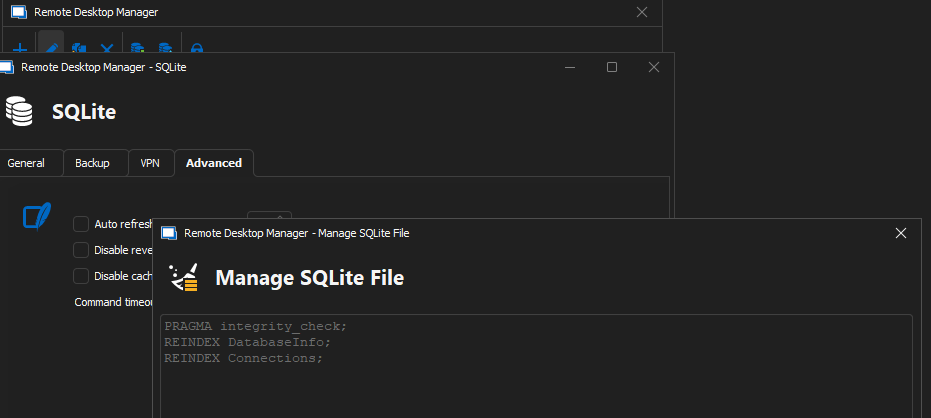
RDM for Windows 11
Purchased Enterprise Edition v2024.x
5ecc6d59-ea4b-408d-96b2-1ba2442f72b9.png
Hello,
Please click at the bottom from this windows on Analyze.
Regards,
Min
i'm sending you the output in DM as it contains private information
i cannot send you a direct message, i click on create the dm but it stucks there
can you please try to send me one and see if i can reply
many thanks
RDM for Windows 11
Purchased Enterprise Edition v2024.x
Hello,
Which Database version do you get? 147?
Regards,
Min
I'm so sorry for my ignorance in this but where i find my database version ? It is a local datasource sqlite
RDM for Windows 11
Purchased Enterprise Edition v2024.x
Hello,
No worries, there is no need to say sorry! 😉
The database version is listed at the 7th line of the following procedure:
In File => Data Sources => Select your data source => Edit => Advanced => Manage File => Analyze
Do you get any errors there?
Regards,
Min
I have replied above tried to send you a DM but i cannot with all the analyse
PRAGMA integrity_check;
REINDEX DatabaseInfo;
REINDEX Connections;
Information
===========
Connections rows : 431
Database version : 147

Sessions
========
Id
i get the above and then we have the list of entries, i do not see any error or warning
RDM for Windows 11
Purchased Enterprise Edition v2024.x
Hello,
OK, the database version looks good, do you have multiple data sources configured in RDM?
Which output do you get with
Get-RDMCurrentDataSource
Regards,
Min
i guess only one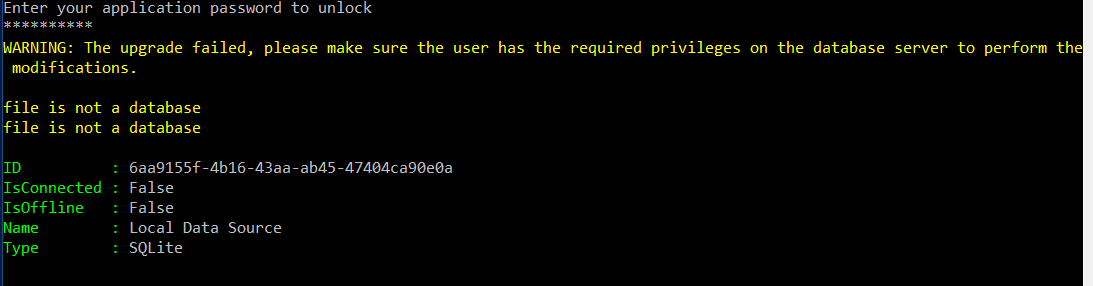
RDM for Windows 11
Purchased Enterprise Edition v2024.x
c3c28011-8cb2-476a-bedf-c8dd8e92b39d.png
Hello,
Could you please try the portable version? I'm curious if you receive the same message there.
Regards,
Min
🤬🤬🤬🤬🤬🤬
Same
PowerShell 7.3.7
PS C:\Users\l> get-rdmsession
Enter your application password to unlock
**********
WARNING: The upgrade failed, please make sure the user has the required privileges on the database server to perform the modifications.

file is not a database
file is not a database
WARNING: The upgrade failed, please make sure the user has the required privileges on the database server to perform the modifications.

file is not a database
file is not a database
PS C:\Users\l> cd\
PS C:\> & '.\Save Password for CyberArk.ps1'
WARNING: The upgrade failed, please make sure the user has the required privileges on the database server to perform the modifications.

file is not a database
file is not a database
Please enter the new Password : ******
Set-RDMSessionPassword: C:\Save Password for CyberArk.ps1:3
Line |
   3 |  Set-RDMSessionPassword -Session $session -Password $np -Refresh
     |                                  ~~~~~~~~
     | Cannot bind argument to parameter 'Session' because it is null.
Set-RDMSession: C:\Save Password for CyberArk.ps1:4
Line |
   4 |  Set-RDMSession $session
     |                 ~~~~~~~~
     | Cannot bind argument to parameter 'Session' because it is null.
WARNING: The upgrade failed, please make sure the user has the required privileges on the database server to perform the modifications.

file is not a database
file is not a database
Portable edition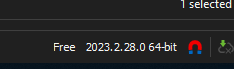
RDM for Windows 11
Purchased Enterprise Edition v2024.x
b02b92f7-862f-4df7-ac67-0968bbe4c93d.png
Hello,
Alright thank you for the verification! Now, we switch back to your primary (installed) RDM version and give the following a try:
- Create a new SQLite data source called SQLite-test - please use the same password as for you existing data source
- Create a password entry called MyPassword
- Run the following PowerShell command
Set-RDMCurrentDataSource -DataSource (Get-RDMCurrentDataSource -Name "SQLite-test")
Get-RDMInstance
Get-RDMSession | Where-Object {$_.Name -match 'MyPassword'}
And post the output.
Regards,
Min
ok we got something here. we are definetely on another sql source
as you can see the id is different
ok this
PS C:\Users\v> Set-RDMCurrentDataSource -DataSource (Get-RDMCurrentDataSource -Name "Local Data Source")
Get-RDMCurrentDataSource: A parameter cannot be found that matches parameter name 'Name'.
did not work, but the rest gave no error
but i edited the .ps1 to change the "MyPassword" Entry
i get no errors on get-rdminstance
but it seams that i do not get the info on "mypassword" entry, maybe the command is wrong
the $session is empty.
PS C:\> Get-RDMCurrentDataSource
ID          : 7bab9a5e-28de-405e-bfa8-510216750d8c
IsConnected : True
IsOffline   : False
Name        : Local Data Source
Type        : SQLite


PS C:\> & '.\Save Password for CyberArk - Test.ps1'
Please enter the new Password : 123456test!@
Set-RDMSessionPassword: C:\Save Password for CyberArk - Test.ps1:3
Line |
   3 |  Set-RDMSessionPassword -Session $session -Password $np -Refresh
     |                                  ~~~~~~~~
     | Cannot bind argument to parameter 'Session' because it is null.
Set-RDMSession: C:\Save Password for CyberArk - Test.ps1:4
Line |
   4 |  Set-RDMSession $session
     |                 ~~~~~~~~
     | Cannot bind argument to parameter 'Session' because it is null.
PS C:\> get-rdminstance

ApplicationVersion OptionFilename
------------------ --------------
2023.2.0.7         C:\Users\v\AppData\Local\Devolutions\RemoteDesktopManager\RemoteDesktopManager.cfg

PS C:\> Get-RDMSession | Where-Object {$_.Name -match 'MyPassword'}
PS C:\> $session = Get-RDMSession | Where-Object {$_.Name -match 'MyPassword'}
PS C:\> write-host $session

PS C:\>
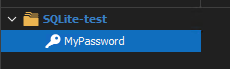
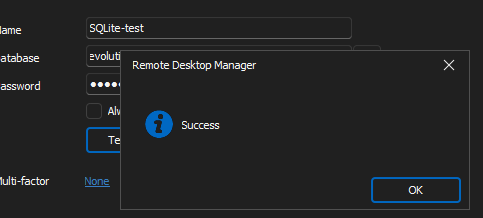
RDM for Windows 11
Purchased Enterprise Edition v2024.x
95d070bb-4ca1-42b8-84a5-6221128b3a1d.png
3d337b24-e125-4ca5-b775-71111a18891b.png
064fa6dd-2819-4d36-a027-03b637904112.png
Hello,
My bad! Please try this command to connect to your new data source and get the session name.
Set-RDMCurrentDataSource -ID (Get-RDMDataSource -Name 'SQLite-test').ID
Get-RDMSession | Where-Object {$_.Name -match 'MyPassword'} | select Name
Regards,
Min
Yes this worked !
Notice one thing
here when i selected the data source it asked for the passphrase as well.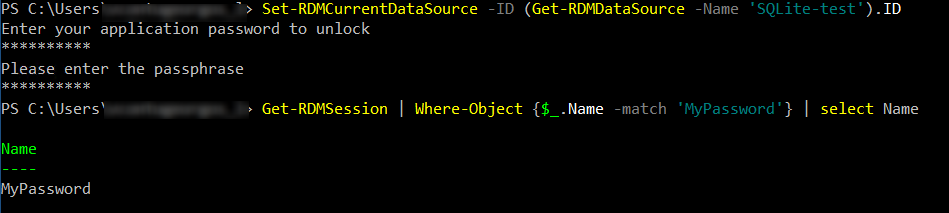
Then run the .ps1
PS C:\> & '.\Save Password for CyberArk - Test.ps1'
Please enter the new Password : **********
no errors
and voila !!!!!!!!!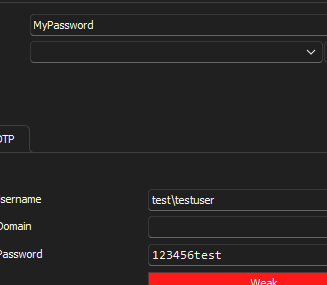
i tried to be smart then and play a bit with the default data source but again the same errors.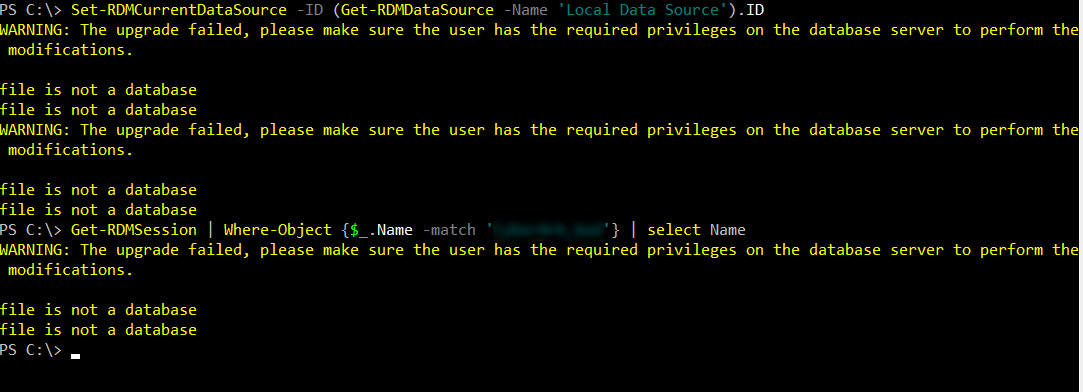
Since it is clear that the issue is on the datasource. We get the upgrade failed. Probably due to some security issues before, cause i have the installation and same .db years now since i first become member. Is there a command to upgrade it manually or check the permissions or what the file is not a database means ?
RDM for Windows 11
Purchased Enterprise Edition v2024.x
7604331b-74c9-4140-baf0-9679dc13a767.png
12bb5700-6edb-4b77-b5cd-ed1ec399f3b1.png
712195fa-6c06-44e7-9e04-769b0408f96f.png
Hello.
Yes, it seems like the issue is related to your data source. If you want to dive deeper in this specific issue, I would suggest to create a ticket as Alex mentioned in a previous post.
Otherwise you can easily Ex- and Import the entire vault from your old to a new data source.
Regards,
Min
ok, so i did that
created a new DataSource, restore, works!
yes it works!
THANK YOU VERY MUCH FOR YOUR HELP!!
One question, just one, is there any way i can avoid the prompt password window (both) and pass it inside the ps1 ?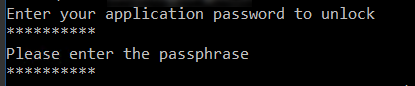
RDM for Windows 11
Purchased Enterprise Edition v2024.x
b34992d4-f138-4857-a222-568fca4133ef.png
Hello skoupidaki,
Unfortunately, the application password and the passphrase cannot be included in a script; you only receive the prompts once connected to the data source.
Best regards,
Richard Boisvert
Sorry i'm back ☺️
i'm trying to reproduce the powershell on my compuyter at home so i can make a .net application to interact with the window of powershell and enter application and datasource password.
I have downloaded the portable edition, run the .exe, created a datasource with password and the application to use password.
But even with the RDM application closed, if i run the powershell 7 and execute the command
Get-RDMSession | Where-Object {$_.Name -match 'vassilis'} | select Name
It will return the result withoud asking the
!!!!!!!!!!!!!!!!!!!!!!!!!!!!
How is this possible ? i mean i want that !!!!!! is this a thing of portable ? something missing on the configuration ? can we make the application in the powershell to ask for these two passwords so i can build my custom app correctly.
Right now i have two different behaviours!
Many thanks
RDM for Windows 11
Purchased Enterprise Edition v2024.x
Hello,
Which Options are configured at the data source (Always ask for passphrase as example) and at File => Options => Security ? Are there any differences between this 2 computers?
Regards,
Min
No "ask for password" is selected and the security options are the same
this is so weird !!!!!
RDM for Windows 11
Purchased Enterprise Edition v2024.x
Since i got this working, is it possible at the end of the day to run the script and insert an empty password to my user.
So next day do not have the cyberark password but just prompt for one until i run the powershell again. At the moment of course i get a password cannot be Null even though in RDM you can have a blank password (it will pop up the credentials every time)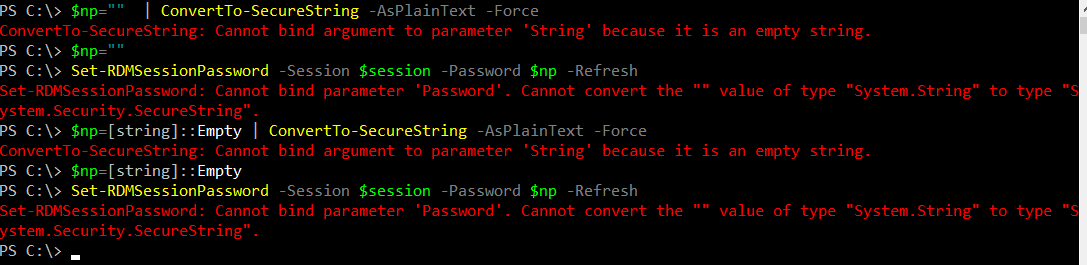
The password can be empty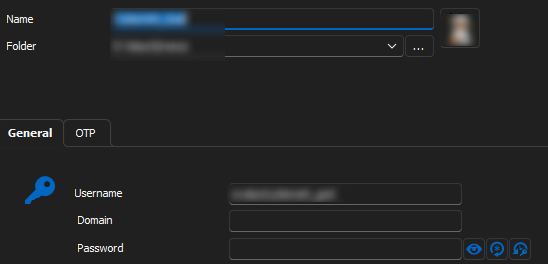
any ideas ??
RDM for Windows 11
Purchased Enterprise Edition v2024.x
4a30cd75-5ade-4168-9a9e-a06c63049998.png
98278a71-911f-4cd5-87e1-1efea8f6c068.png
Hello my Lovely Support.
Do you have any tip for the above question ?
RDM for Windows 11
Purchased Enterprise Edition v2024.x
Hello,
maybe this could be a possible solution for you:
$session = Get-RDMSession | Where-Object {$_.Name -match 'MyPassword'}
$np = Read-Host -Prompt 'Please enter the new Password' -AsSecureString
Set-RDMSessionPassword -Session $session -Password $np -Refresh
Set-RDMSession $session
Update-RDMUI
At the end of the day you can just leave the password empty and the PLACEHOLDER value will be used for.
Let me know if it works!
Regards,
Min
No it didn't work
i do not understandthe "PLACEHOLDER"
first i got an error that was a plain text or something
then i ix that on the credentials i god the word "PLACEHOLDER"
When then i open an entry i get not a prompt for password like it is empty empty but the normal, wrong password please try again.
RDM for Windows 11
Purchased Enterprise Edition v2024.x
Hello,
So you just want to clear at the end of the day the current password and insert an empty one, right?
I've updated the script above, if you just hit Enter without any input it should be work and the password value is empty: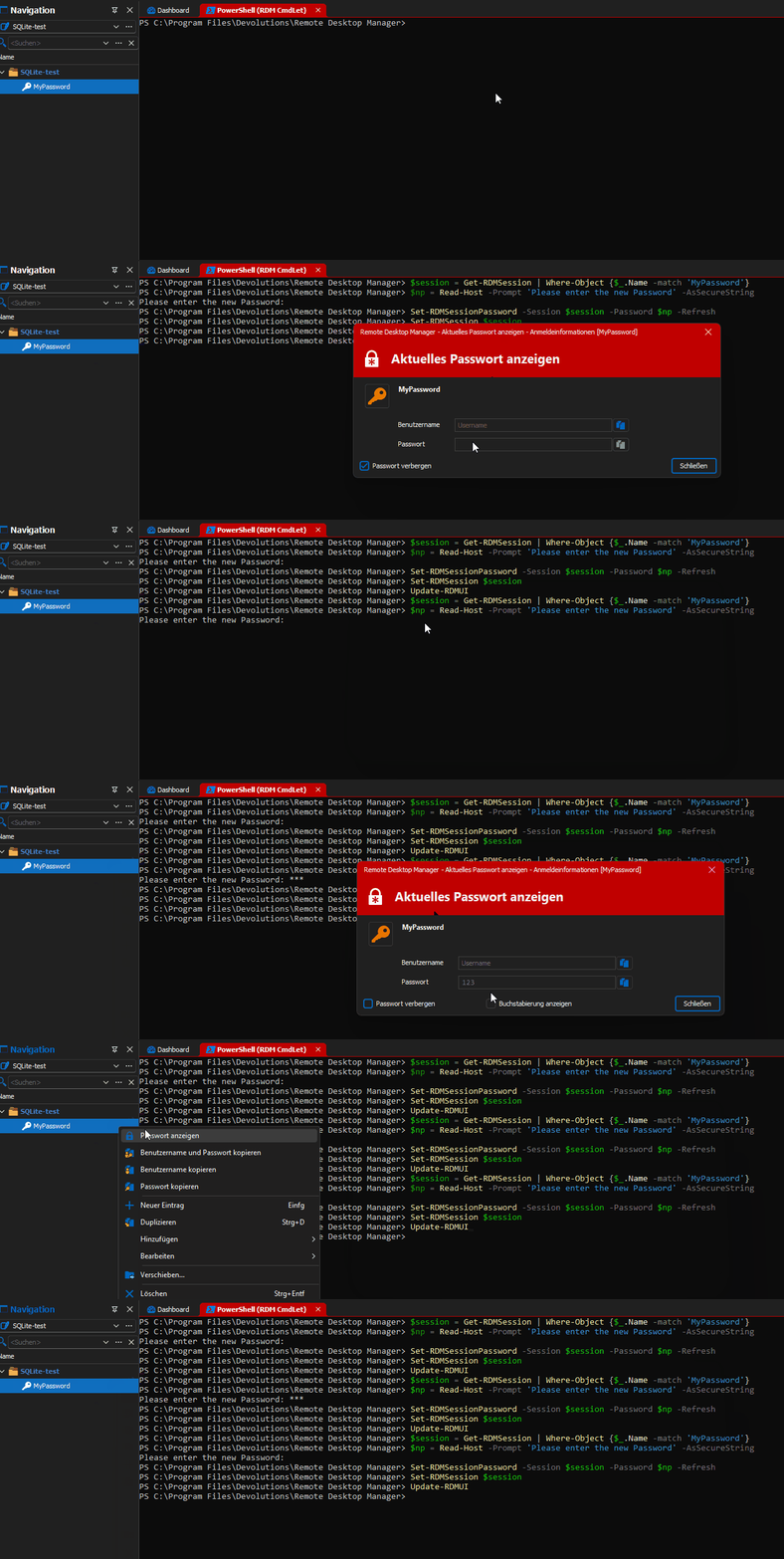
Regards,
Min
empty-pass.gif
Yes here comes another weird stuff !
If i enter command by command in the shell it works like your .gif
if i put it inside a .ps1 and run it, you get no error, but it keeps the old password.
Try it 🙂
RDM for Windows 11
Purchased Enterprise Edition v2024.x
Hello,
Unfortunately I can't reproduce it on my side - it works without any issues: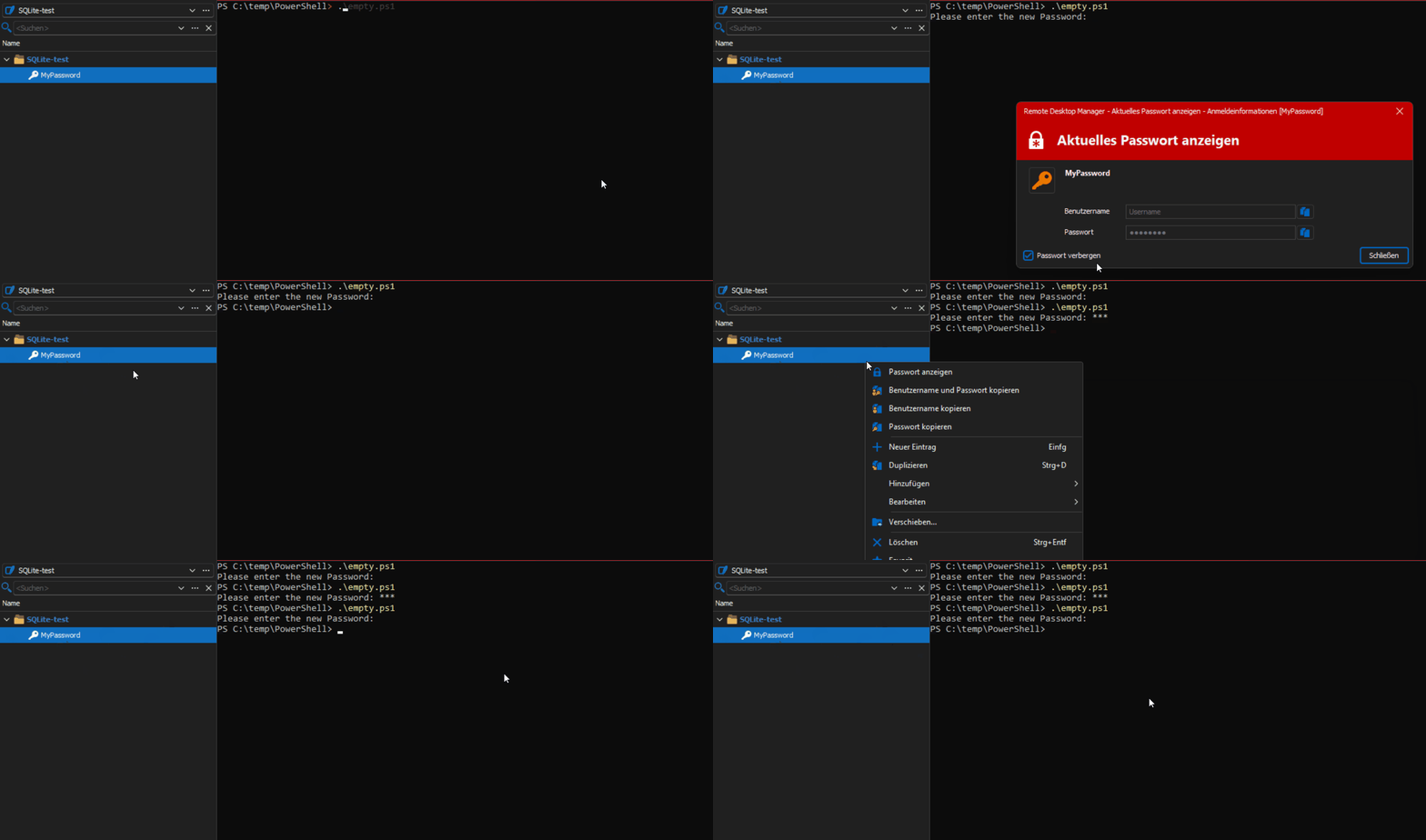
Regards,
Min
empt-pass-ps1.gif
ok thanks Min, don't want to bother you with that. i will check on my end.
Thank you very much for the support!
RDM for Windows 11
Purchased Enterprise Edition v2024.x