Sub connections missing?

We've just updated to the latest version (2022.3.18.0 64-bit) and Sub Connections are missing in the property pages. They're in the tree and you can still parent/unparent, but you can't manage them in the parent entry. What happened?
All Comments (23)
Same here. And the variable $PARENT...$ is still not available.
Hi all,
Can each please post screenshots of your issue? Where is the $PARENT...$ variable not available or not substituted properly. Also what data source type?
Everything looks good on my end (see image below). I'm trying to figure out what is going on so that we can fix it. RDM v2022.3 has had a major overhaul of the Parent/Child (sub-connections) connections make sub-connections full fledge connections. The result is that we can now support things like Logs/Attachments/Documentation/... at the sub-connection but visually other than the new features available should be identical as before.
Best regards,
Stéfane Lavergne
I have a case number: 00012655
Unfortunately, the problem was not fixed after the update.
Here are my sub-connections.
The parent entry was deleted after/from the update.
If I manually create an entry and a sub-connection, it looks like this:
Parent:
Child:
@thomas11 This is very odd. The migration steps included with v2022.3 takes the old parent/child format, extracts the children from the parent and saves them individually. The process, extract the children from the parent, save the parent and then saves each child. I'm curious understand where/how the parents got deleted during this process.
Do you have any deleted parents in the Administration > Delete Entries?
I'm thinking a remote session might be our best bet going forward here. I can get Etienne to set that up for us if you like.
Best regards,
Stéfane Lavergne
For me it's just that the section is missing. I'll see if I can post an image this time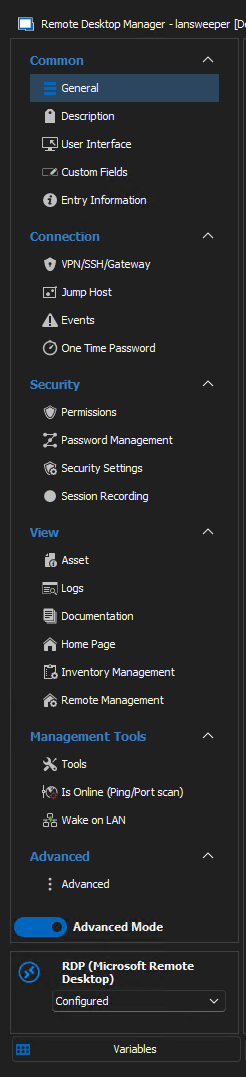
2022-11-10_15-10-26.png
@thomas11 This is very odd. The migration steps included with v2022.3 takes the old parent/child format, extracts the children from the parent and saves them individually. The process, extract the children from the parent, save the parent and then saves each child. I'm curious understand where/how the parents got deleted during this process.
Do you have any deleted parents in the Administration > Delete Entries?
I'm thinking a remote session might be our best bet going forward here. I can get Etienne to set that up for us if you like.
Best regards,
Yes, there are a lot of deleted entries. All parents i think:
rdm.png
@thomas11, can you please try to revert one of the delete parent entries (as a test). Once reverted, the tree view UI should display the sub-entries properly. I've also asked Etienne to setup a remote session. I would really like to understand how it came about that you have deleted parent entries so that we can fix.
@krishaven The "Sub Connections" tab is no longer available. It's a design decision with the "sub connection migration" (now sub-entries) that came with v2022.3. The reason is since the data structure has changed we no longer require you to modify a sub-connection within the parent. That is, before if you edit parent, edit sub, click OK (on sub), click Cancel (on parent) the result is that both sub & parent changes are discarded. With the new structure since the sub-entries are no longer within a parent entry the behaviour would change, in the scenario above the sub entry change would have been persisted even if you cancel the parent.
If this is causing confusion or if the workflow can be improved let us know. In theory we could add a system option to display the sub entry tab and allow you to add/edit/delete sub entries from the parent entry. We could also, make the save of sub entries conditional of saving the parent or not. Just like before but simulated.
Give me your feedback and we will discuss internally.
Best regards,
Stéfane Lavergne
How do I create a sub connection directly, rather than creating a normal entry and assigning it a parent?
Hello,
just select an entry and click + or right click => Add then you can choose if you want to add a new entry or a sub connection.
Regards,
Min
@thomas11, can you please try to revert one of the delete parent entries (as a test). Once reverted, the tree view UI should display the sub-entries properly. I've also asked Etienne to setup a remote session. I would really like to understand how it came about that you have deleted parent entries so that we can fix.
Hi,
yes i can revert one or more entires and it displays the sub-entries proberly. But after few seconds they are deleted again. (I think by synchronizers)
@thomas11,
Good catch. Can you please tell me more about the synchronizer(s)? Which one? How is it configured?
I will ask QA to try to reproduce the issue internally.
Best regards,
Stéfane Lavergne
I sync from ActiveDirectory, it is an old setting.
It's empty here. I don't know anymore if it has always been like this
What other information do you need?
How can I create a connection and sub-connection via the template?
What other information do you need?

Are you configured to create entries using a template?
How can I create a connection and sub-connection via the template?
File > Templates > Entry Templates, your template should look something like this:
The template in this example is called "AD - sync", contains a parent RDP with 3 sub-entries (RDP, SSH, SSH))
Did your template get converted correctly?
Stéfane Lavergne
Yes, I use templates.
Did your template get converted correctly? I think so.
The template call AD-Import - PCs.
The ones crossed out in red are only for testing purposes.
I figured it out... with the changes to sub-entries, the template "rename" rules have changed (read improved). The rename rules is causing a bug with the synchronizer. In other wors, the synchronizer is creating all entries with the name "AD-Import -PCs" (instead of the AD name) and thinking everything is a duplicate and delete the entries.
I will get QA to confirm my hypothesis and will look at the code to see how to fix this.
Stéfane Lavergne
@thomas11,
I'm working to resolve the synchronizer issue with template group (entry/sub-entry).
For now, you might want to disable the synchronizer and restore the parent connections so that at least you can work.
I will let you know when it's resolved. It's my number 1 priority.
Stéfane Lavergne
Ok. great.
Do I still need the remote session with Etienne?
No, not at this time. We can reproduce the issue and have all the information we need without a session.
Once resolved if your data is still bad and you need assistance to recover it we can have a remote session at that time.
Best regards,
Stéfane Lavergne
Hi good morning,
it seems like the problem is not resolved with the last update :-(
@thomas11,
I'm still hard at work resolving the issue. I've made good progress but like with most complex fixes it's two steps forward one step back. As of now I've the synchronizers working properly with Template Groups on first run but then on subsequent run(s) the "duplicate detection" code has issues and it deletes sub-entries that it shouldn't.
I will let you know when a version is released that contains the fix.
Sorry for the inconvenience.
Best regards,
Stéfane Lavergne
Thank you very much for the feedback.
I will wait patiently.
@thomas11,
Quick update, after rushing on this all week. I had to temporarily abandon the "real" fix and create a temporary (very much acceptable) fix that will unblock you and the release. The build should be available early next week.
While I was working to fully support template groups with our synchronizers. I came to the conclusion that was impossible for anyone to have successful used template groups in any RDM release. So that got me thinking about the workaround, where in code, I was able to fool RDM into processing the synchronizer entries using the old entry/sub-entry format and, like magic, RDM can now process synchronizers like before. *as long as the template group is simple (entry/sub-entry)
The full fix will take weeks to complete and test properly but at least you will soon be able run your synchronizers with the next minor release.
Best regards,
Stéfane Lavergne
Hi,
now with the Version 2022.3.24.0 it works.