Bitwarden Integration

We're testing Remote Desktop Manager in our company. We use bitwarden as our password manager and would like to integrate it. I see from here you can https://blog.devolutions.net/2021/01/new-bitwarden-now-integrated-in-remote-desktop-manager/
But, I don't see the option anywhere. Then, within the online help, there is another option for Dynamic Folders, but this is also not there.
I'm sure I'm doing something wrong, but not sure what.
All Comments (12)
Hello Andy,
The Enterprise/Team version of RDM is required to integrate with an external password manager. You can request a trial key from our website: https://devolutions.net/remote-desktop-manager/trial
Once you have the trial key, you can add it in RDM to unlock the feature: https://help.remotedesktopmanager.com/installation_registration_enterpriseedition.html
For more information on the dynamic credential linking: https://help.remotedesktopmanager.com/credentials_dynamiccredentiallinking.html
Please let us know if you encounter any issues!
Best regards,
Richard Boisvert
Thanks. Again I may be missing something, a search of the knowledge base doesn't say where to input the trial key?
Edit: Don't worry. Found it under Administration tab
Hello,
The second link I provided shows you how to add the license key under Administration > Licenses - https://help.remotedesktopmanager.com/installation_registration_enterpriseedition.html
Since the 2022.3 release, it is required to configure the serial in the data source, you can no longer register RDM directly. Could you please specify what type of data source you are using? For example, if you are using XML as a local data source, you would not be able to license it. You would instead need to use a SQLite, or an advanced data source.
Best regards,
Richard Boisvert
I'm using SQLite for testing. I've added the license, so now see the Bitwarden credentials. I've added that via API, but I don't see any Credential Repository option in the dropdown, for either a folder or for the rdp session.
I did find under Linked (Vault) an option to pick the Bitwarden credential, but I get
Hello,
Thank you for your swift reply!
The "Credential Repository" feature has been renamed "Linked (Vault)". That being said, would it be possible for you to provide us with a screenshot of the properties of your Bitwarden entry along with one of the connection entry that uses it to fetch its credentials?
Best regards,
James Lafleur
Hello. See below

On clicking the browse button, I get the error.
I just tested the same on Windows and it works. I can't get it working on a Mac.
Hello,
We have opened a ticket to our engineering team about the issue.
We will keep you updated if we found anything or if we have questions.
Best regards,
Michel Lambert
Hello,
We have three questions for you:
- Can you access the Bitwarden entry itself by doing View password on it.
- When you are unable to connect does the application logs in the help menu give back any messages?
- Just to be sure, Your tests on Windows and Mac are being done with the same Bitwarden entry?
Best regards.
Michel Lambert
I just updated to Version 2022.3.6.0 and it's working.
Thanks
Just to follow up with a related question. What is the recommended settings for shared credentials? If I add the bitwarden vault, which uses my login API details. How do you deal with sharing this out? Or is there another API I should use that can only access the Organisation data in Bitwarden? Or does each Remote Desktop Manager user add their own credentials outside the Password Hub?
Thanks
Hello,
If an entry is shared, you can use the option Use "My Account settings".
First you go in the My Account Settings in the File menu and select the entry type you want to have your account settings and enter them.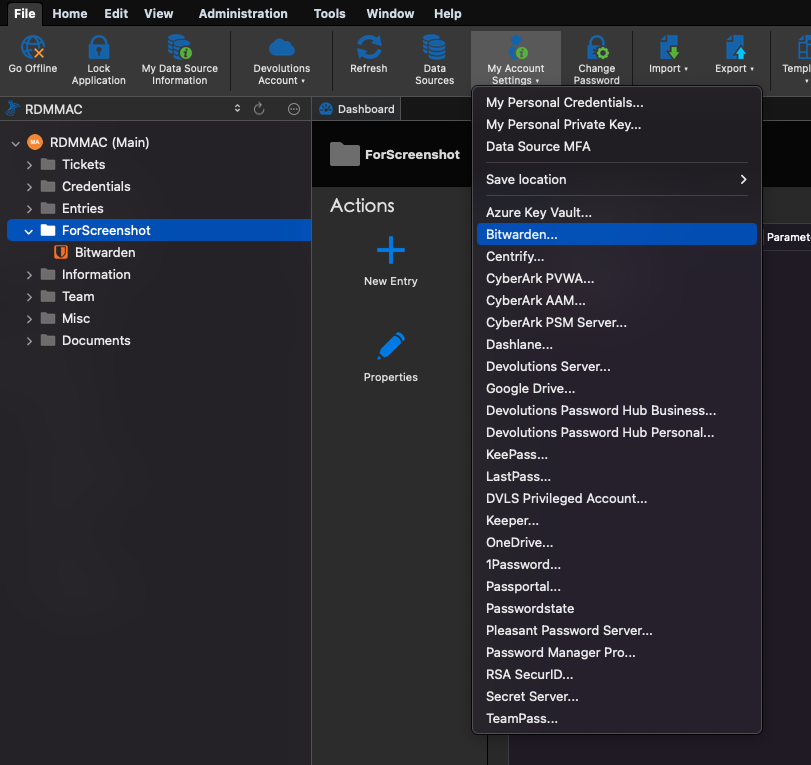
Then you go into the entry you want to use with your account settings and click on the checkbox Use "My Account settings"
My account settings is basically credential saved to a specific User (datasource) or RDM (local). So you can share an entry between many user and each one will be able to use his own API key to access the Bitwarden credentials.
Best regards,
Michel Lambert
Screen Shot 2022-11-10 at 8.28.24 AM.png
Screen Shot 2022-11-10 at 8.26.14 AM.png