SSH with private key in vault and no password

Hi,
when I put a private key in a credential entry object, and use that in a SSH connection object (Linked (Vault) credential), it asks me first the passphrase, and after that a password.
I do not have a password, nor do I want to use it.
When I do not use the vault, and put the private key file straight into the SSH connection object (on the private key tab), it does not ask me for the password after the passphrase, and so it works ok.
Can I get this to work with the private key object (+ Linked (Vault) credential), so that it will also not ask for a password ?
All Comments (9)
Hello,
Could you confirm your Remote Desktop Manager version? I will see if I can get the same behavior on my side.
Best Regards,
Etienne Lord
2022.2.29.0 64-bit
Hello,
Thank you! I will look into it :)
Best Regards,
Etienne Lord
Hello,
It doesn't seem like I'm able to re-create the issue on my side, could you send a screenshot of your credential entry object that you link to your SSH Session? (You can blur any sensitive information)
Best Regards,
Etienne Lord
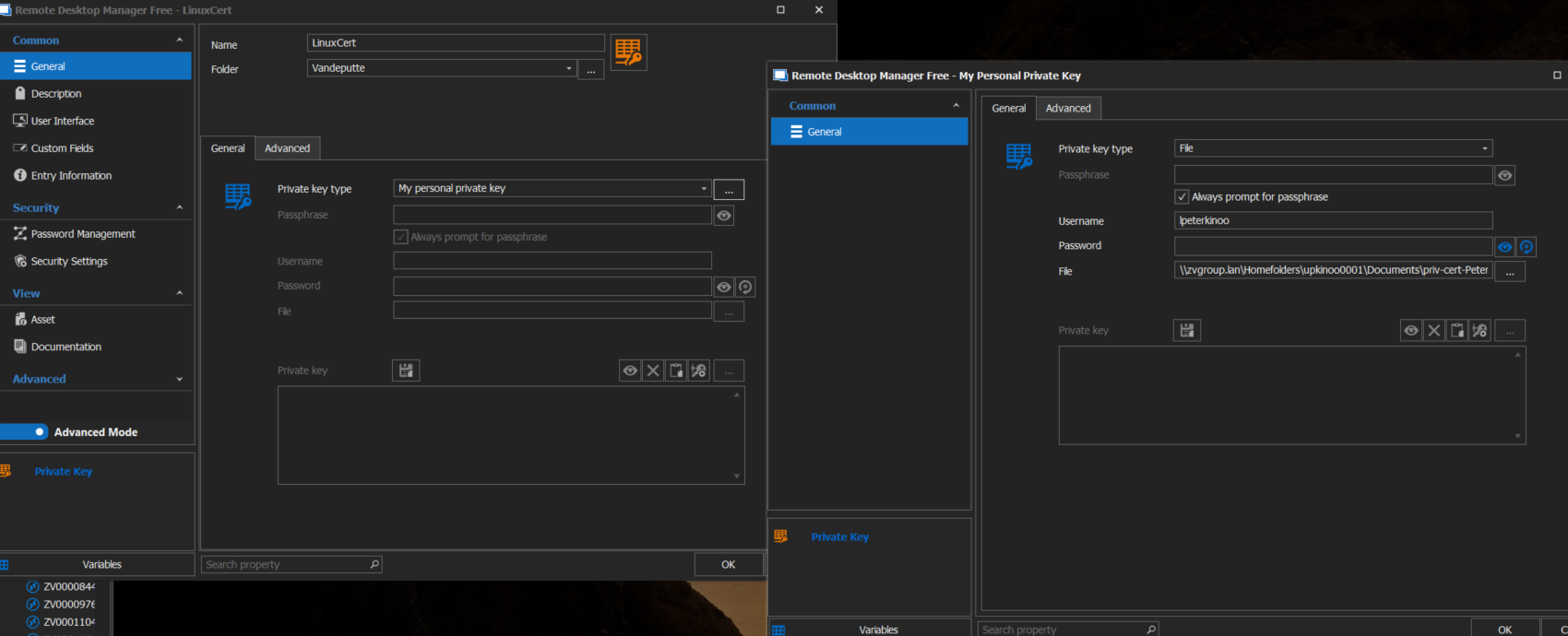
rdmcert.png
Hello,
Thank you, I will continue to investigate with the engineering department!
Best Regards,
Etienne Lord
Hello,
Could you enable your Logs and verbose (2) on your SSH Session, recreate the issue and then send the result files using the link I will send you in Private Messages : https://kb.devolutions.net/rdm_send_ssh_logs.html
Best Regards,
Etienne Lord
Hi,
I've uploaded the requested log.
I was laso able to resolve the issue:
instead of using private key type "my personal private key", I changed that to "file".
Instead of having an extra window for entering username and filename, those parameters can be set on the same window as the type selection.
When using that, it does not ask for the password...
No idea what the difference is with the "my personal private key" option...
Hello,
Glad to hear that it's now working for you! It would most likely depend on how you've set up your Personal Private Key, was it also set to File or was it set to Data?
Best Regards,
Etienne Lord