Pasting into ssh terminal

When in an ssh terminal, Command-C works fine to copy, but pressing command-V seems to paste the copied text in but the text isn't actually recognised, ie, the word appears but the cursor remains at the prompt and pressing return ignores the pasted text. Right clicking on the screen and choosing paste works fine but I'd much prefer a shortcut. Any ideas how I can modify this behaviour? Thanks.
Also, copy/paste works fine in Windows RDP sessions.
All Comments (6)
Hi louiek,
I don't think I can reproduce your issue. If I copy text in a terminal with the shortcut (⌘C) and paste it with a shortcut (⌘V), it works as I would expect it, pasting the text at the input symbol, pressing enter would then attempt to execute whatever was pasted in such a matter.
Could you post a small video of the issue, to see if I'm misunderstanding something?
Best regards,
Xavier Fortin
Thanks Xavier. Video of copy/pasting a couple of commands. Also, it seems to be pasting on the line that the mouse is on, instead of the cursor, I've included a video of that too.
Archive.zip
Thanks louiek!
We will look at the video and comes back to you if we need further information.
Best regards,
Xavier Fortin
Hi louiek,
Could you validate with me what value you have set in the "Use legacy engine" setting? It can be found in Preferences -> Types -> Terminal -> Advanced):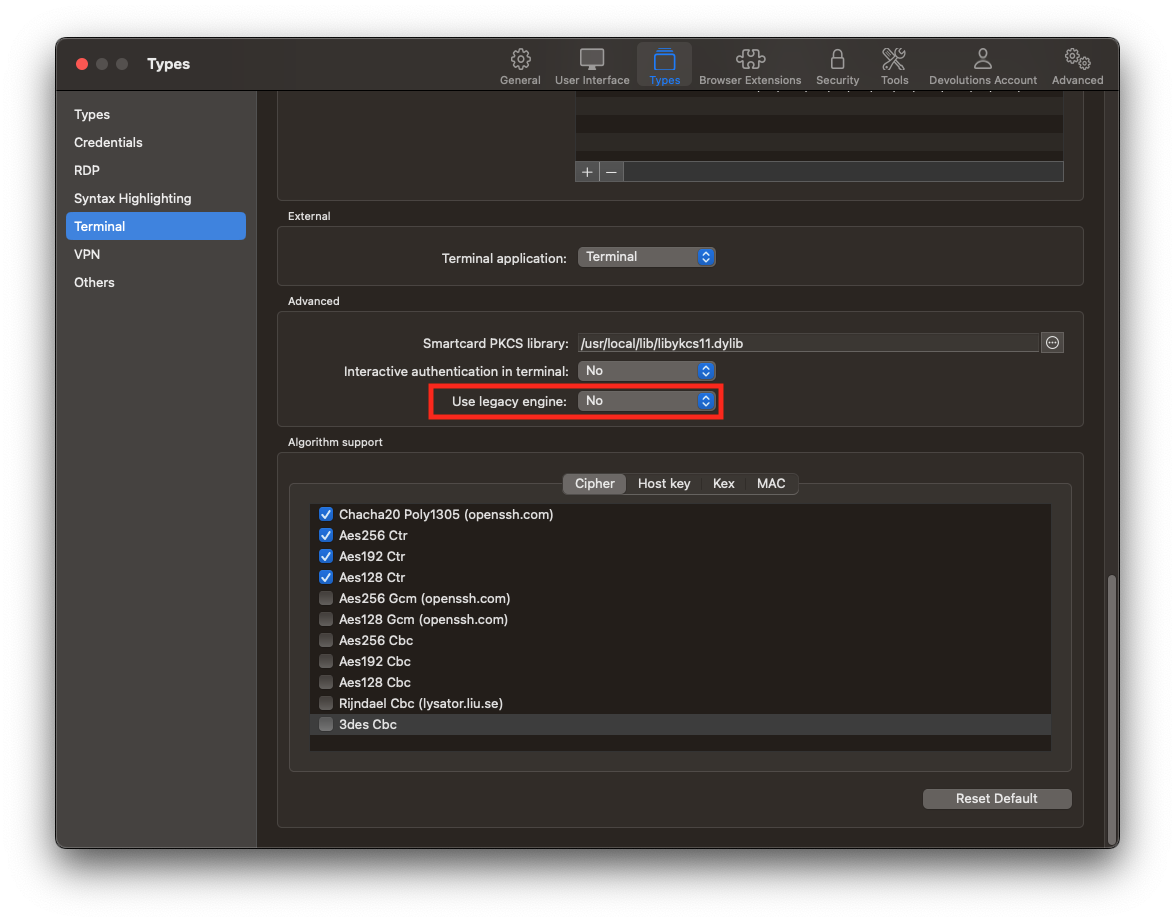
Best regards,
Xavier Fortin
UseLegacyEngine.png
Hi Xavier. It was set to 'YES'. I changed it to 'NO' and copy/paste is now working exactly as expected. Thank you very much for resolving the issue so quickly.
Hi,
Glad to hear it!
Do not hesitate if you have any other issues.
Best regards,
Xavier Fortin