Better management of credential entries when using for connection (RDP)
Better management of credential entries when using for connection (RDP)
0 vote

Hello everyone
I structured RDM with a folder for each Company, subfolder Credential, subfolder Servers and so on.
I have many templates i use to start RDP sessions with different resolutions, and i set to ask for credential "linked(vault)" and prompt for connection.
This option show me a window with the ability to search the credentials entry on ALL the vault, searching by name. But if the name of the entry does't have the company name it become hard to find the correct credential entry.
Assumed that each connection entry can potentially open with more credential entry, i propose this feature requests (they can be alternatives to each other):
1) the search engine of credential now only search into name of credential : expand the search also in name of folders that contain a credential, perhaps representing them in a tree view (folder\credentials)
2) the ability to search only in credential folder(s) in same parent folder or to show only parents - credentials
3) the ability to link a credential entry to one or more connection entry and use it automatically if only one otherwise show a windows to choose from.
I don't love the ability to save the credential into single connection entry.
Many thanks
All Comments (10)
Hello,
To be sure I correctly understand your environment, would it be possible to show a few screenshots of the structure you have and what you would like to achieve?
From reading your post I'm thinking that maybe the entry type "Password List" could work for you: with one credential entry, it allows you to store one or more credentials within it, and it will prompt you when there is multiple stored. You're also able to configure one specific password if you desire with "dynamic credential linking".
Regards,
Hubert Mireault
Hello Hubert
thanks for the reply.
Password list are useful to manage in one item many combination of username/password but they do not offer a view detailed of username without open the item itself.
One question about password list is if there are the ability to combine single credential into one password list.
With or without password list, the lack of efficiency that I detect is in the execution of an RDP session (open with template) and search the correct password credential (o list): can be a possibility to show (and search) only the credentials available into a folder of parent company folder? 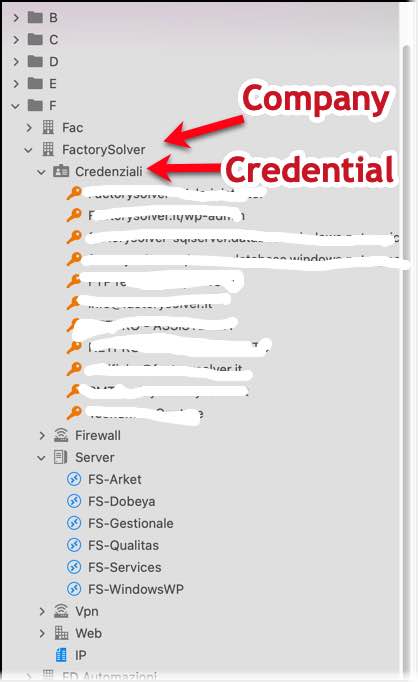
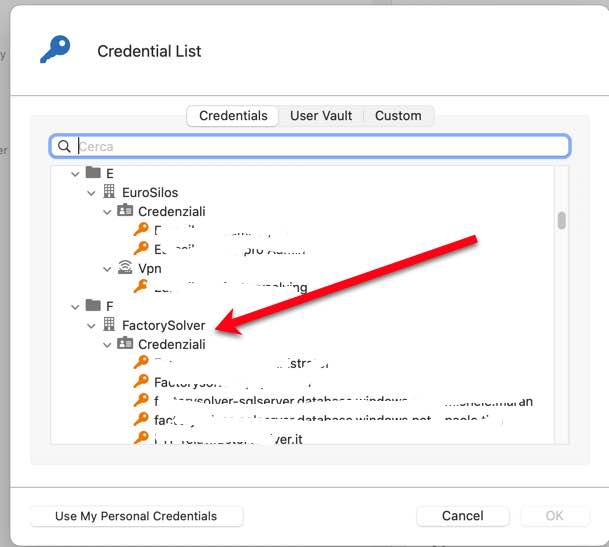
Thanks
2.jpg
1.jpg
Hello,
>One question about password list is if there are the ability to combine single credential into one password list.
Yes, there is a batch action to merge multiple credentials into one password list entry. You can do this by selecting all of the entries you want to merge, then Right click > Edit > Edit (special actions) > Convert To Password List. Just note that you will have to reassign your entries to point to that password list entry manually. You will also need to do this for each company in your infrastructure. If you want to try it out, I suggest making a backup of your database in case there is an issue in the manipulation or you don't like the end result.
As for the scenario itself, did you try using the "dynamic folder linking"? I made a folder structure similar to yours:
All the RDP entries are configured with their credentials in Inherited, same with the folders called Servers:

Then, in the Company folders, I configured the credentials to be in "Linked (vault)" with the choice "Prompt on connection", which I think is what you already did.
The difference is I also specify with the blue clickable link which folder will be used in the prompt: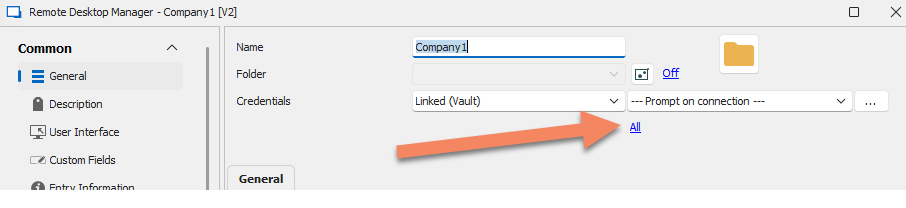
Then I select the appropriate folder:
Then the linking is done.
As you can see it shows "Company1\Credentials".
Then, when I open the RDP entry, I'm prompted only for the credentials located in Company1\Credentials:
Can you let me know if this workflow works for you? If not, let me know where it wouldn't work and we will see what we can do. Maybe I'm missing something.
Regards,
Hubert Mireault
1.png
Hello Hubert
dinamic folder linked work like a sharm!
REQUEST: batch edit cannot have the "inherited" option for the override credentials.
I try to use the batch edit to change all RDP connection but does't work.
Thanks
Hello,
I believe the issue may be that you're going into your User Specific Settings, which would only affect the entries when logged in to your user account in the database, rather than modifying the main entry within the database. Instead, the actual path to configure your credentials to "Inherited" in a batch edit, after selecting the entries you wish to modify, should be:
Edit > Batch Edit > Change Saved Credentials
Once the option is selected, click "Save" and the entries should all be set to "Inherited" at once.
Best Regards,
I agree, it's as you say.
Now i see a difference in behavior between the MAC version versus the WINDOWS one.
I open RDP with the command "open with template" to switch between different resolutions.
Example of template:
RDM Database is AZURE, same of RDM in windows and in mac.
in MAC the Open with template ask for credential, showing only inerithed credentials.

But in Windows doesn't work, the form of credential selection doesn't appear, it jump directly on windows login credential form.

thanks
Hello,
Just to be certain, could you make sure that "Use credentials from template" is not checked when using the template ?
Let me know if this helps !
Best Regards,
This is precisely the problem. In both cases the "use credentials from template" checkbox is active but the behavior is not the same between Win and Mac.
The template is configured with Inherited, like the RDP connection i launched.
Hello,
I will speak to our engineers regarding this issue, and see what they have to suggest.
I will give you news as soon as I receive word.
Best Regards,
Hello,
I've tried reproducing your issue in RDM Windows version 2022.3.35.0 and unfortunately wasn't able to do so.
I was wondering if I could get a screenshot of how the template is configured, you sent me one with the General settings which I validated were the same as your settings in my test template. However, I'd like to be sure that the settings in the RDP (Microsoft Remote Desktop) section are the same as well.
Best Regards,