Devolutions web login(DWL), MFA code copy to clipboard after credentials paste
Devolutions web login(DWL), MFA code copy to clipboard after credentials paste

I’m looking for at way to get DWL to automatically copy the MFA code/OTP to clipboard, after I paste in the username and password.
Since the functionality to save the OTP key to the credentials entry is already there, hopefully it's possible :)
A program that I use privately that has this functionality is Bitwarden. It’s also a Chrome add-in, and it does this.
They describe is as follows(probably better than I ever could):
Premium Bitwarden accounts can use the Bitwarden Authenticator to generate timed one-time passcodes (OTP) for multi-factor authentication (MFA) for websites. When logging in, autofill will copy this six digit OTP code to the clipboard for easy pasting, so authenticating is fast and effortless!
Thank you for RDM, great tool!
All Comments (21)
Hi,
With RDM and DWL, you can actually fill the OTP code directly on the website using the “One time password ID” attribute in tab “Login -> Html Control ID” tab from the edit Website form:
All you need to know is the field id/name where you want the OTP to be filled, which would the field where you paste the OTP code with the clipboard. To know the field id/name you can follow the “Method 2” from the help page below:
https://kb.devolutions.net/rdm_web_browser_web_authentication.html
That way, DWL will fill your username, password and OTP without even having to use the clipboard and pasting it yourself.
Best regards,
Olivier Désalliers
In my experience that functionality is only as good as the website is. Many sites i have not been able to make it work correctly, hence why i just want to do it manually by pasting it from the clipboard. :D
Hi,
Yes, there are always edge cases because of some websites. We will open a ticket for your feature request. Thank you for your feedback.
Best regards,
Olivier Désalliers
Hello,
We are also waiting for this feature as the autofill often does not work at all on specific websites.
We currently use Lastpass for the passwords and RDM for the connections. We are planning to migrate the passwords to RDM and this feature already exists in Lastpass.
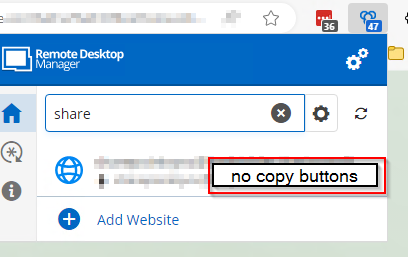
LASTPASS.png
DWL.png
Hi,
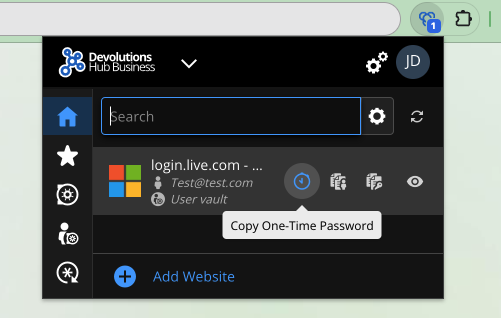
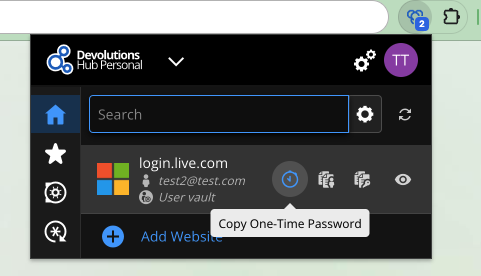
If you are using Devolutions Hub Business/Personal or Devolutions Server, you can connect to them directly to Devolutions Workspace and you will have a copy button for the OTP.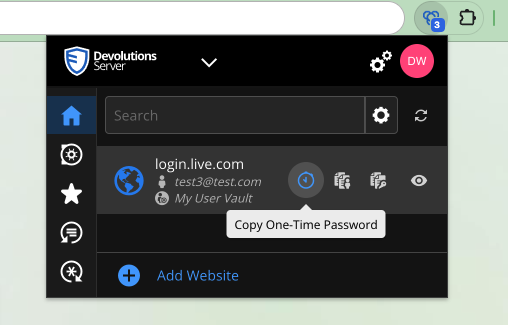
Best regards,
Olivier Désalliers
CopyOTPHP.png
CopyOTPHB.png
CopyOTPDVLS.png
Hello,
Thanks for the info, is it planned to introduce this for RDM as well?
Best regards
Hi,
Yes, it is planned to add it when connected to RDM.
Best regards,
Olivier Désalliers
Yes please, we would love to see this, also on macos :)
I have seen that DWL looks completely different and a fill button has been added. Hope the Copy OTP button is not forgotten for RDM Datasource
Hi,
I want to reassure you that it has not been forgotten. We will keep you informed of any updates.
Best regards,
Olivier Désalliers
I confirm, that the feature request has been implemented in version 2025.3
Best Regards
Is there an option to enable copying the OTP to the clipboard after filling the username/password?
Just checked it, and I have the option, that it should copy the OTP to the clipboard enabled in the devolutions plugin:
But it does not copy it to the clipboard.
How I open a Website: I go into the Workspace Plugin, select the entry, it opens the page, fills out the login, I hit enter, and after that, there is no OTP in the clipboard.
5473ac92-d7ae-4dc8-9ad4-efb54dca55c9.png
Hi,
Does it copy the OTP when you are already on the tab where you are autofilling the entry?
We will investigate this and try to reproduce it based on your steps.
Best regards,
Olivier Désalliers
Hi
When I open the page via a tab, it autofills it but also does not copy the OTP into the clipboard.
I was not able to get any combination working where it would copy it.
Best regards
Patrick
Hi,
At the moment, the OTP is not copied to the clipboard when credentials are filled using the “Automatically fill in credentials on load” option. For the OTP to be copied, the user must select the entry directly from the tab where the filling will occur.
This is an improvement planned for the next minor version.
Best regards,
Olivier Désalliers
Hi
I also tried to open it via the add-in which opens the website and fills it, but no lock either.
I could not figure out any way to get it copied to the clipboard. In which combination does it work for you exactly?
Best regards
Patrick
Hi,
I sent you via direct message a demo showing how to use the “Automatically copy one-time password after auto-fill” option at the moment.
Best regards,
Olivier Désalliers
Hi Olivier
Thanks a lot.
OK we never open a website first and go to the entry after that. 99% of the time we search for the entry in the workspace plug-in and hit open which opens the site and fills it in. Would be nice to have the OTP copied to the clipboard as well when going this way?
In which version are the improvements planned?
Best regards
Patrick
Hi,
Yes, it should be available in the next minor version.
Best regards,
Olivier Désalliers
Hi,
Versions 2025.3.3.4 has been released. The “Automatically copy one-time password after auto-fill” is now supported with credentials filled on load.
Best regards,
Olivier Désalliers