User remain open in Task manager after RDM closed.

Hello, we use RDM to access virtual server with Windows, users only open Internet browser on Server. The problem is if User closes RDM without pressing Logout in the Windows Interface it stays as Disconnected and application remain open in RAM. In the attachment you can see that there are three User2 disconnected. And each new session creates another login session with the same user name and then applications do not be open because teehnically they remain open in RAM. The only way is for Admin to open task manager and end disconnected user sessions. I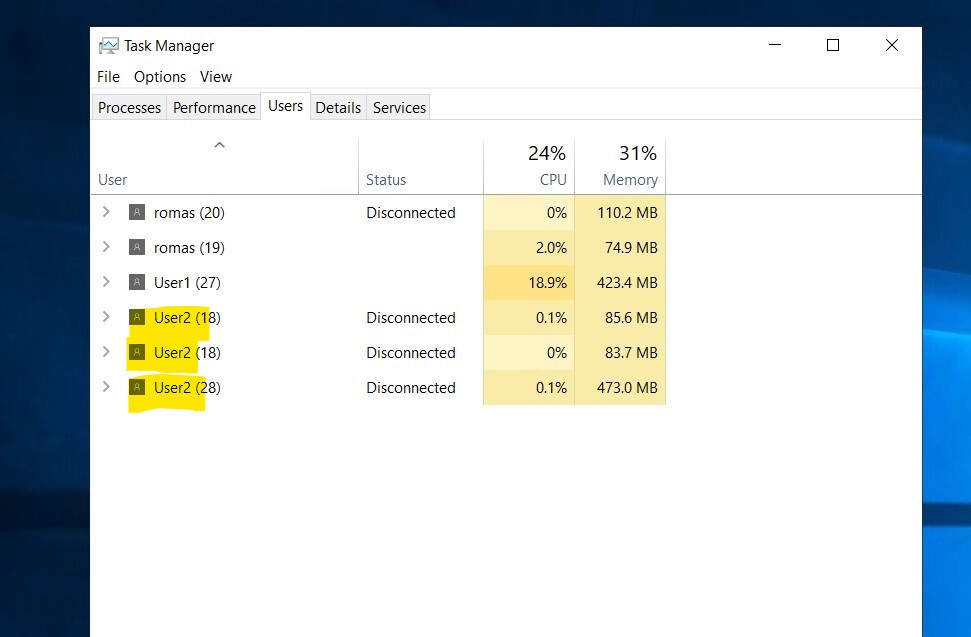
Task manager.jpg
All Comments (2)
Hello,
Thank you for contacting us on that matter!
Which version of RDM and what type of Data Source you are currently using?
Since you are using RDP connections to establish these connections, you could use the "Automatically log off when disconnecting" feature to have your users log off when they close the connection.
This option can be enabled by going into the properties of your RDP entries, under the "Advanced" section, and setting the "Automatically log off when disconnecting" to "Yes":
Please note that this setting can also be enabled globally by leaving this option at "Default" and instead going under File -> Options -> Types -> Remote Desktop and setting the "Automatically log off when disconnecting" to "Yes".
Let us know if that helps!
Best regards,
James Lafleur
Hello, thank you, we will try this solution.