RDM Icon on Taskbar eventually turns blank...

Hello,
Aesthetic only, but one that has annoyed me for a few years - the RDM icon on the taskbar turns blank eventually. I have just seen why. Screenshot included....
Cheers,
Mark.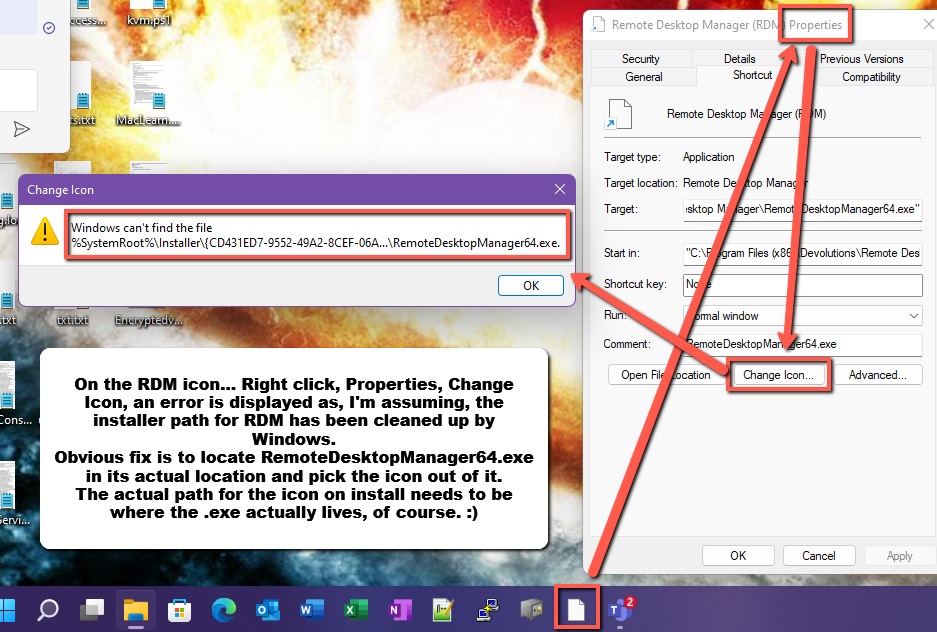
rdmiconerror.jpg
All Comments (10)
Hello,
Thank you for contacting the Devolutions Support Desk !
This is a bug that we are well aware of however unfortunately there is no fix.
You'll need to unpin the application from the task bar and repin it until the icon is normal.
We're sorry for the inconvenience.
Best Regards
Hello,
There is no way for and installer to automatically pin an application to the toolbar. This means that you did that manually. I still don't know why when you pin it it's not the actual executable. I agree with that this is annoying.
Regards
David Hervieux
Ok. Has only ever happened to RDM. I'm sure I'll cope.
There is no way for and installer to automatically pin an application to the toolbar. This means that you did that manually. I still don't know why when you pin it it's not the actual executable. I agree with that this is annoying.
David,
We think we gave a possible explanation somewhere else on this forum. The issue is not within the pin itself, the issue is that your installer creates the start menu shortcuts pointing to the icon provided by your installer framework, which is located under %SystemRoot%\Installer\<GUID>\<Fake Executable Name>
GUID changes with every update, which implies the previous GUID is voided and its files are removed as well, hence the icon in the pinned shortcut points now to an invalid path and it's shown blank. Indeed, as reported, running the application and quickly unpin and pin back the app in the taskbar updates the pinned shortcut, but it's really annoying.
What in our opinion should be done is to have the shortcut's icon pointing directly to the real executable, as the shortcut's target already does, instead of using the icon provided by the fake executable located in the Installer directories. As long as the real executable doesn't change location or name, the pinned shortcut would remain valid even after an update.
Thanks.
Edit: Typos.
100%! I'd press the Like button if there was one!
Hello,
Unfortunately the shortcut must be changed by Windows because it's not what we have in the Installer:
Regards
David Hervieux
Hello David,
I see. With my limited knowledge of installer frameworks, I can't exclude 100% what you write. I know for a fact that what occurs with RDM shortcut occurs also with other applications, but they are the minority. If I should bet, I'd say that it's an issue with the installer framework you are using, i.e. the MSI file it outputs, but it's just my guess.
Thanks anyway.
An hint for those who are struggling with the same issue, while Devolutions eventually finds a permanent fix.
Apparently by modifying the shortcut installed in the Start menu by the RDM installer, changing its icon so that it points to the real executable (see other posts above), the icon is retained upon an update. We have tested it updating version 2022.2.24.0 (using the free version of RDM) to version 2022.2.26.0: the icon hasn't changed this time. We don't know if it was just a case or it can be considered a viable workaround.
Either that, or Devolutions has silently fixed the issue, we can't say for sure.
Hello techreg
I did some investigation into this very long-standing problem. As you've observed, when you right-click and choose "Pin to Taskbar", Windows creates the shortcut and targets the icon at one held in the Windows installer cache (C:\Windows\Installers\{some-guid}\RemoteDesktopManager64.exe). I don't know enough about Windows internals to understand why it uses this approach instead of pointing at the application icon itself.
What I see is that the installer cache is not persistent, although I don't quite understand that behaviour either - every install of RDM is a "major upgrade" in Windows Installer parlance; that means the application is fully uninstalled-and-reinstalled on every update (rather than patching individual components). The installer has an "upgrade code" that is consistent between versions, and a "product ID" that changes on every version. In my testing, I saw that the installer icon cache was retained when updating from e.g. 2021.2.29 -> 2022.2.20, but lost when updating from 2022.2.20 -> 2022.2.29 - and at that point, my taskbar icon was lost. I don't know if this is an artifact of Windows Installer behaviour, our own installer framework, a bug on our side, or simply related to how Windows caches installer data.
or Devolutions has silently fixed the issue, we can't say for sure.
Sadly not, it's likely that in this upgrade the installer cache remained and your icon link was still valid.
Based on this knowledge, I've modified the finalization phase of the installer to check pinned taskbar RDM shortcuts and rewrite the icon link to point at the installed executable itself. In my testing that works well to retain the application icon and prevent the need for this "unpin-repin" dance every so often.
I note that desktop and Start menu shortcuts created by the installer itself should not have this issue, as they should be recreated by the upgrade (and hence, always point to a valid icon). However, desktop and Start menu links created manually (e.g. "Pin to Start Menu") probably *do* exhibit this behaviour. If our fix is successful, we could likely apply the same logic to these links as well.
That fix should be available in the upcoming 2022.3 release, and I hope it resolves the issue finally. This release also renames "RemoteDesktopManager64.exe" to "RemoteDesktopManager.exe", and that link will be rewritten too so your pinned shortcut should continue to work.
Please don't hesitate to post back with further questions or comments.
Kind regards,
Richard Markievicz
Oooh nice! Thanks for your persistence on this! :)