browser extension search and wildcards

Disabled
is there a way to allow the browser extension to search all entries? The new Find Quickly I have been using as back stop, but it doesn't have keyboard shortcuts at the moment so it is a little clunky. So when the browser extension doesn't find the match but i know the title or username. I would like to be able to search and fill on that entry instead.
Also is there an effective way to wildcard domains? Or handle multiple domains/websites like the examples below. We happen to have sites that are across similar domains. However, certain sites require tighter matches. In my old password manager I would just create addtional fields marked URL-2, URL-3 etc..
example:
www.theAsite.com
www.theBsite.com
I have an entry that applies to both. But i have separate entry for something like this
another.theAsite.com/blah
additional one:
another.theAsite.com
All Comments (6)
Disabled
oops this was suppose to be in the mac forum.
Hello,
No problem, I just moved your post inside the mac section as requested.
Best regards,
Jeff Dagenais
Hi georgesnow,
For your first point, I will need the Devolutions Web Login team to confirm, but I believe this is not supported.
For the second, are you referring to the search in the browser extension? In RDM? Find Quickly or the filter bar?
At the moment, the only thing that might come somewhat close to what you describe in RDM is the filter bar: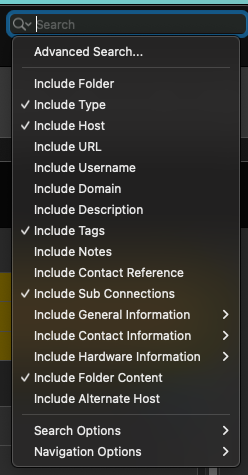
The Find Quickly window only does a standard Contains on the Name property of the entries.
But I'm not sure I understand your case, wouldn't having additional field (URL-2, URL-3, etc.) widen, and not tighten, a search (i.e. the same entry would come out for more searches)?
Best regards,
Xavier Fortin
FilterOptions.png
Oh, for the second point, I just got informed by the DWL team that we already have something similar for this, the Equivalent URL: https://kb.devolutions.net/dwl_how_to_use_urls_matching_types.html
Best regards,
Xavier Fortin
Disabled
within the browser extension. If I am searching for entry and don't have domain set ( or apparently need to add one). I still want to fill an the correct entry which I know the title of. Within the browser filter:
you can't search across your entire user vault to find an entry to use. I mean then to the second point if you used that entry it might ask "hey you want to add this as URL to this entry?"
---
ok, equivlent url is the supported method. I will use that. thanks!
Please, do tell me if it doesn't work as expected!
Best regards,
Xavier Fortin