Switching data sources: navigation pane empty

Hi
We are using 2 data sources in RDM, 1 Azure SQL and 1 AWS RDS SQL. Since the update to 2022.2.17.0, a few of our colleagues are experiencing issues when they change data source in the navigation pane (using the dropdown). When they switch, the switch happens, but the navigation pane remains empty for the 'new' data source.
When they do a hard refresh (ctrl-f5), items do appear. When they switch back to the first data source, the issue re-occurs but now for the first data source.
Deleting the local cache file for both data sources for these users does not help.
Yesterday we updated to 2022.2.20.0, but that also doesn't help.
Weird thing is this only occurs for a few people, not everyone (let's say 5 out of 20 people).
Any other things these users could try to fix this?
Thanks!
All Comments (14)
Very odd and annoying indeed. I'm assuming the users in question are not administrators of the data sources.
We will investigate.
Stéfane Lavergne
Hello,
Could you please try to reset the layout in Windows - Reset Layout?
Let me know if that helps.
Best regards,
Érica Poirier
"reset layout" does not solve the issue unfortunately.
Users experiencing the problem are indeed not administrators of any of the data sources.
Hello, Fredericc
I know Its alot of question but those would really help isolating the issue.
What version did you jumped from before updating to 2022.2.17?
For both datasource.
What is your offline mode settings in Administration > System settings > Cache/Offline ?
What the user offline mode setting in Administration > Users > Edit the user experiencing the issue > Settings ?
And for the last section, when you edit your datasource > File > Data sources > Advanced what is the caching mode selected ?
Do you have the view permissions set to never in the root of your treeview?
It would look like this when you edit your root.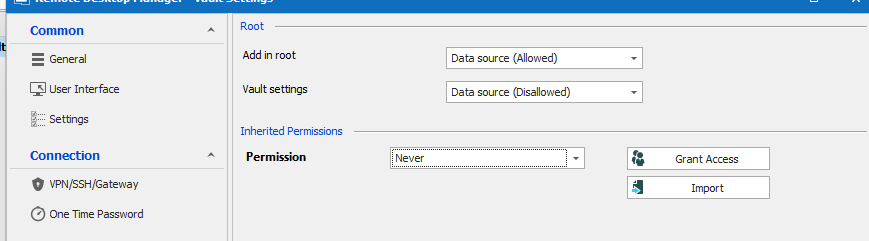
Thank you in advance
Best regards
Alexandre Roy
image_2022-08-19_115552282.png
- Version: don't know by heart anymore, I think maybe 2022.1.26 or the likes?
- System settings > Cache/Offline: offline mode is set to "cache only"
- User settings: offline mode is set to "cache only"
- Caching mode for both data sources: "Intelligent"
- View permission is set to "never" on 1 of the data sources, the other I have to check (I'm not an admin of that one)
I just checked with my own user settings, and for my (admin) user on the 1st data source the offline mode is set to "read-only".
hello,
I am still unable to reproduce the issue, so now I'm thinking all that cocktail mixture has to do with the authentication method.
Are you using a database login or Integrated security/Windows Auth?
regards,
Alexandre Roy
Both integrated security with AD, to 2 different domains.
One is using just AD, the other is using AD + MFA but MFA is 'skipped' (client IP in allow list).
I have a temporary test for you, if you'd allow it.
Since you seem to reproduce consistently, could you go in system settings of the datasource and set the offline cache value to Read only, same for the user you're logged in and try again? I wanna get the idea that it could be the cache causing the issue out of the way. You can revert it to the previous setting after validation.
Thank you.
Alexandre Roy
We could also, after this small test, do a remote session with you to try and figure out why this is happening, just want to let you know the option is on the table.
Regards,
Alexandre Roy
No luck, the read-only setting did not solve it.
I'll send you a private message with our contact details if you want to do a remote session.
@fredericc
Before I send you James for the remote session to collect the information and the behavior on video, how many entries do you have in said tree view? is it over 10000?
Regards,
Alexandre Roy
In the AWS RDS database we have around 1500 entries.
The Azure SQL database holds 7200 entries.
Hello Frederic,
Thank you for providing us with this information. I took the liberty of opening a support case on your behalf in order for us to be able to schedule a remote session with you at your convenience. You will receive an email from us shortly.
For further reference, your case number is 00008028.
Best regards,
James Lafleur
For related information to this thread, we found out that it has to do with RDM being run through Citrix.
We are not quite sure what exactly causes the issue, but it has something to do with how citrix handle the saving or the fetching of the offline cache located in the %localappdata% > Devolutions > remote desktop manger > *cache folder*.
A work around would be CTRL+F5 force refresh when this behavior shows up, or completely disabling the cache, which could result in slower loading.
Still investigating and learning about Citrix mechanics to see if we can figure out a way to make the 2 application work better together.
Regards,
Alexandre Roy