RVTools STSService.dll error

Hi,
I use Remote Desktop Manager (version 2022.2.20.0) in combination with RVTools (version 4.3.1).
When I create a RVTools connection, and try to open this connection, I get a "STSService.dll" error.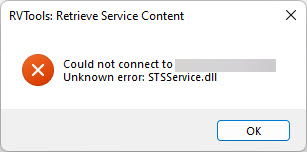
The command-line optios for RVTools is working (rvtools.exe -s <SERVER> -u <USERNAME> -p <PASSWORD>)
With a previous version of RDM this connection type was working. Could you please have a look at this problem?
Kind regards,
Marijn
STSService-DLL-Error.jpg
All Comments (4)
Hello Marijn,
Thank you for contacting us on that matter!
I have opened a ticket with our Engineering Department in order to see what can be done to support this change.
We will be in touch as soon as we will have an update to provide.
Best regards
James Lafleur
Hello,
We're trying a tentative fix for this issue. It should be available in 2022.2.21.
Regards,
Jafran Majeau
Hi,
Thank you for this information. I will wait and try if it is working in then next release.
Regards,
Marijn
I too had an issue with an old version of RVTools and RDM version of 2022.2.20.0. After upgrade to current version of RVTools, still received the error shown in the first post. I found that RDM version 2022.2.26.0 was available and upgraded. Long story short.... newest version of RVTools and RDM seems to have resolved any issues. So thank you for addressing the issues so quickly.