RDM Datasource is not connected when using powershell RemoteDesktopManager module
RDM Datasource is not connected when using powershell RemoteDesktopManager module

Very weird issue.
When I run Get-RDMCurrentDataSource or Get-RDMDataSource from powershell_ise I get:
ID          : 169a0507-d1c5-409e-afde-16b75c32738d
IsConnected : True
IsOffline   : False
Name        : rdm
Type        : SQLServer
Notice it says IsConnected : True.
However when I run the very same commandlets via powershell.exe I get the same datasource however it is not connected:
ID          : 169a0507-d1c5-409e-afde-16b75c32738d
IsConnected : False
IsOffline   : False
Name        : rdm
Type        : SQLServer
So further RDM-related code doesn't work as it requires successfull connection to datasource.
Why could that be? Module version is 2022.2.2.0 (latest).
Previously I've been successfully using pretty old version of powershell module that was supplied with RDM's installation, so that's my first attempt to use module downloaded from PSGallery.
All Comments (15)
Hello,
Is your module properly registered? To find out, please run the Get-RDMDiagnostic cmdlet.
As it's a stand alone PowerShell module, it also requires a license like RDM. You can use the same license as the one you use for your RDM.
You will find more information at the end of that article.
https://kb.devolutions.net/kb_rdmpowershellcore.html
Best regards,
Érica Poirier
Get-RDMDiagnostic looks like yours (key, islicensevalid=true, islicenseexpired=false but licensetype is none).
Any updates?
Hello,
Your license is valid then, the issue is elsewhere.
Could you simply try to set the current data source, it should try to connect to it:
$ds = Get-RDMDataSource -Name "NameOfYourDataSourceHere"
Set-RDMCurrentDataSource $ds

Get-RDMCurrentDataSource
Best regards,
Richard Boisvert
>> $ds = Get-RDMDataSource -Name "rdm"
>> $ds
>>
>> Set-RDMCurrentDataSource $ds
>> Get-RDMCurrentDataSource


ID          : acf3b14a-603b-4bdb-8ccf-ddd122a85a80
IsConnected : False
IsOffline   : False
Name        : rdm
Type        : SQLServer

ID          : acf3b14a-603b-4bdb-8ccf-ddd122a85a80
IsConnected : False
IsOffline   : False
Name        : rdm
Type        : SQLServer
Also reminding - it does work in powershell_ise (i.e. datasource is in connected state)
Hello,
Thank you for your feedback.
What RDM version are you using?
What authentication method are you using on this SQL Server data source? Is it Integrated Security or a SQL account?
Best regards,
Érica Poirier
Hello,
What PowerShell version are you using?
Could you please run the Get-RDMInstance on both places and post the result?
Best regards,
Érica Poirier
Username is the same in path to cfg file.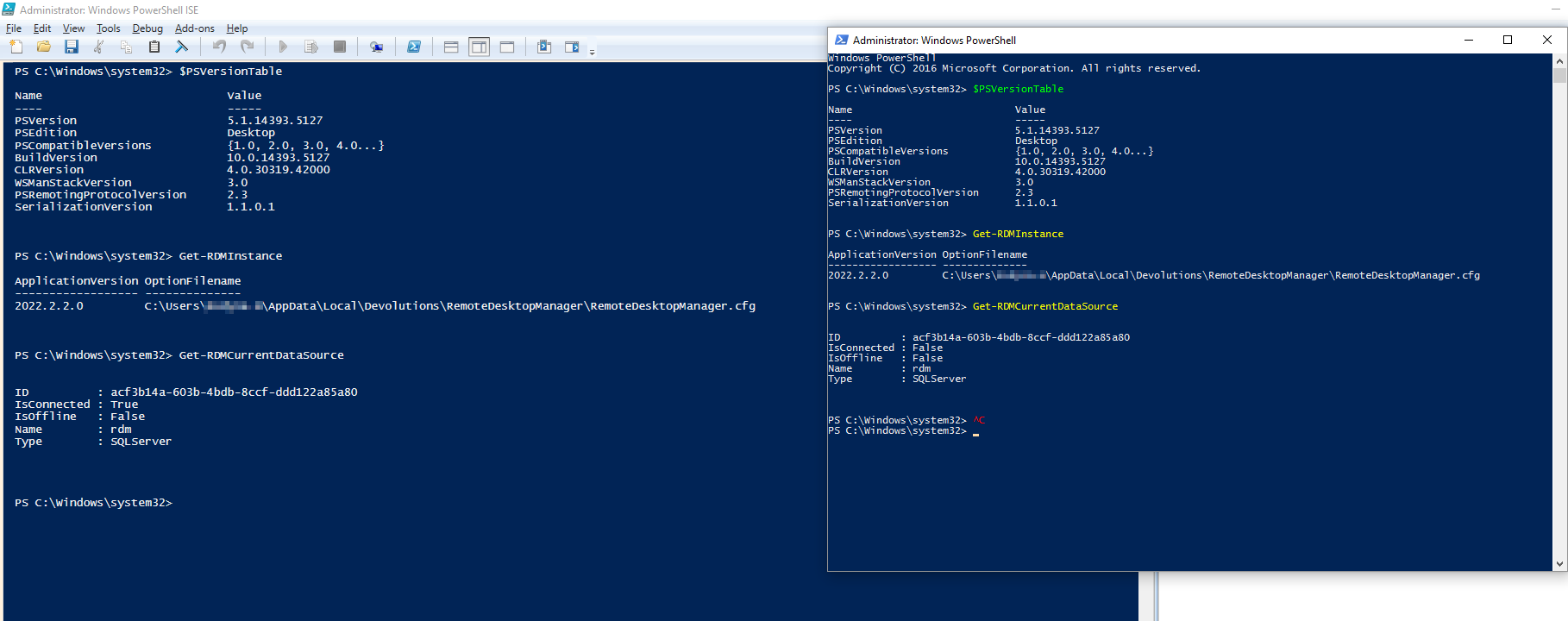
YwvB9zt.png
What RDM version are you using?
Desktip app? Tried these two versions - same result. Desktop app does work - it's only powershell module that doesn't work.
2022.1.11.0 64-bit
2022.2.20.0 64-bit
What authentication method are you using on this SQL Server data source? Is it Integrated Security or a SQL account?
Intergrated Security
Hello,
Thank you for the information.
Could you please try using a SQL account instead of the Integrated Security option?
Best regards,
Érica Poirier
Nope, doesn't work with SQL login either (used built-in SA).
Hello,
We tried to replicate this issue without success.
What Windows version are you using?
What SQL Server version are you using?
Is it possible to update your PowerShell to the latest 5.1.19 version to see if that will help?
Best regards,
Érica Poirier
What Windows version are you using?
Screenshots are from win10 LTSB (1607), hence why powershell version is that "low". But issue replicates the same way on windows server 2019 (PS version 5.1.17763.2931)
What SQL Server version are you using?
Microsoft SQL Server Enterprise (64-bit) 15.0.4236.7
Is it possible to update your PowerShell to the latest 5.1.19 version to see if that will help?
Not really. While workstation's OS is upgradable - it'll only be up to 5.1.17763.2931 (win10 LTSC 1809) and that, as a test, is already covered by windows server 2019. We did not adopt LTSC 2019 or Server 2021 yet.
Hello,
Thank you for your feedback.
That's odd and we are puzzled with this behaviour.
Are both PowerShell ISE and command prompt running in the same user context?
Can we set up a support call for investigation? Please send an email to service@devolutions.net with a reference to this thread to book the support session.
Best regards,
Érica Poirier