Highlight Color on Terminal

Hi,
Before writing here I really tried to find a way to change. But I couldn't find and I had to write and ask from here :)
Here is my problem:
When I use SSH (with black screen and white or gray text color), If I highlight some text such as for copying, the highlight color makes the text unreadable.
Please find the screenshots. you will understand my problem better.
I also added a screenshot from mRemote. It changes the background color to gray and text to black. I don't need a double color change, but at least expect to read comfortably.

MRemote Example: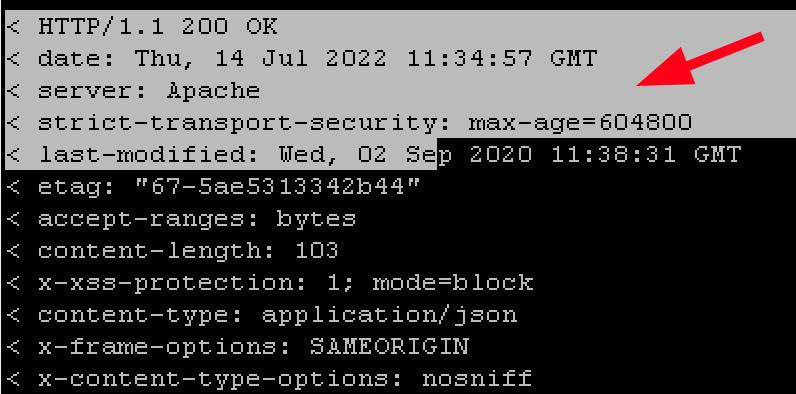
Best Regards
Samet
2022-07-22_17-14_Putty_Based_Selection_Example.jpeg
2022-07-22_16-25_RDM_Color_Options.png
2022-07-22_16-24_RDM_Selection_Color.jpeg
All Comments (12)
Hi,
I'll open an improvement ticket. We'll get back in touch when we have news.
Best regards,
Xavier Fortin
Hi Xavier,
Thanks for your quick response and attention.
Regards
Samet
Hi sametkalkanci,
We've recently release RDM and RDM Free 2022.2.15.0. It now supports customizing the selection color in terminal entries: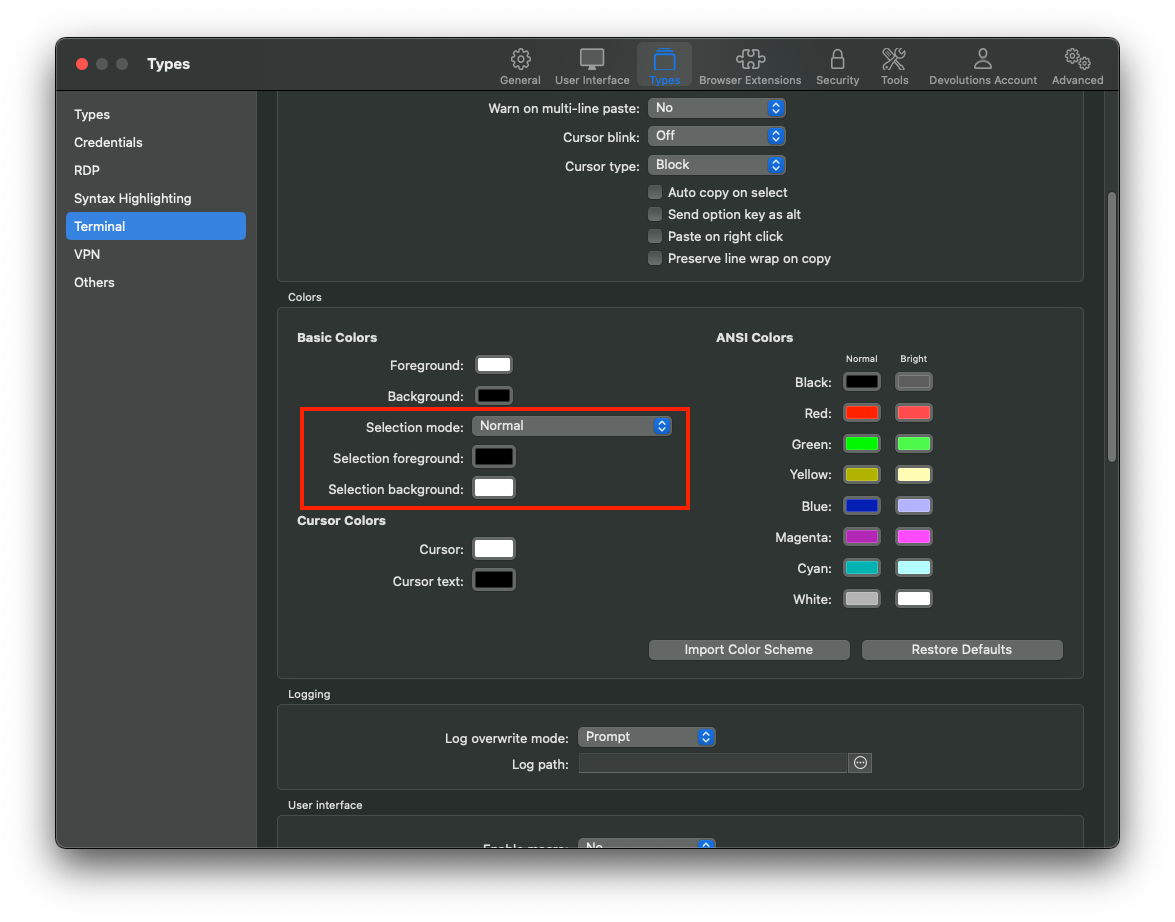
Best regards,
Xavier Fortin
HighlightColor.png
Hi Xavier
I can confirm that If I select an area, background color of area is shown as I customized. But I must ask one thing.
This same blue background color highlight situation is also happenning on some other behaviors such as searching a text via vi/vim editor.
does new update also covers this behaviour? Because I couldn't manage this behaviour
Best Regards
Samet
Hi sametkalkanci,
I can't seem to reproduce. You are referring to the vim search, by pressing the "/" key? In my case, it seems to behave as expected (using the settings configured):
Best regards,
Xavier Fortin
VimSearch.png
Hi Xavier,
Yes I mean vim search by pressing the "/" key.
I have attached color settings and the results of selecting an area and searhing. Selecting an area works perfect. However, when I search via vim, I see blue background colors.
But I realised that your screenshot is from an Ubuntu machine. So I also tried on an ubuntu and it worked as same as yours. this problem occurs on Red Hat based Operating Systems (Oracle Linux, Red Hat, etc).


2022-11-02_11-57_devolutions search highlight.png
2022-11-02_11-57_color settings.png
2022-11-02_11-56_devolutions highlight color.png
Ah, I see. This could indeed have to do with the OS. We'll check this out and validate.
Best regards,
Xavier Fortin
Hi sametkalkanci,
I've investigated a bit and got in touch with our Terminal product owner. The highlighting inside of a Vim session is actually determined by the server, not the local terminal, hence why it does not use the Selection Color settings. It's also why it differs between different OS. I tested with Terminal.app for instance, and the same thing also applies in it.
That being said, setting "xterm" in the "Override terminal type" of your RedHat entries might provide a more readable selection:
Hope this helps!
Best regards,
Xavier Fortin
xterm.png
Hi Xavier,
Thank you for deeper look.
I wrote "xterm" on "Override terminal type" to one of Red Hat based machines. It did change as you mentioned. It shown as yellow - not a color that I choose, but it is definitely readeble.
Since there is a "override terminal type" option, is there a way to do it for all terminals? Because I have lots of machines like this.
Thanks
Best Regards
Samet
Hi sametkalkanci,
Unfortunately no, it's not possible at the moment to set this globally. I will open a ticket for this and we will try to have this done for the next release.
We'll post back when a version with the change is available.
Best regards,
Xavier Fortin
Hi Xavier,
thank you for your concern. I am looking forward for new development.
Best Regards,
Samet
Hi sametkalkanci,
As of RDM Mac 2023.1.6.0, it is now possible to configure the override terminal type globally for all sessions: Best regards,
Xavier Fortin
DefaultTerminalType.png