DB and Web back ups functioned once

With the initial set up of back ups, I made changes to sql and permissions to allow the DB account to reach the file share where backups are stored. After I made this change, back ups functioned only once. The DB and web were backed up, but they are not backing up on the current schedule, nor are they saving the amount of backups I have specified. The logs show no indication of errors.
All Comments (3)
Hello,
Is your Scheduler running? (Windows Services > DevolutionsSchedulerService.)
The backup is using the identity set on this service to drop the file on the target location, and make sure the account set in database connection's configuration has the permission to backup the database (db_backupoperator).
Here's an older version of DVLS' KB article about this : https://kb.devolutions.net/dps_backup_restore_dps.html, some interfaces changed, but the essential is there.
I hope this helps, thanks for letting us know.
Best regards,
Alex Belisle
That sorted out the back ups. So sorry, simple fix there. But may I ask, 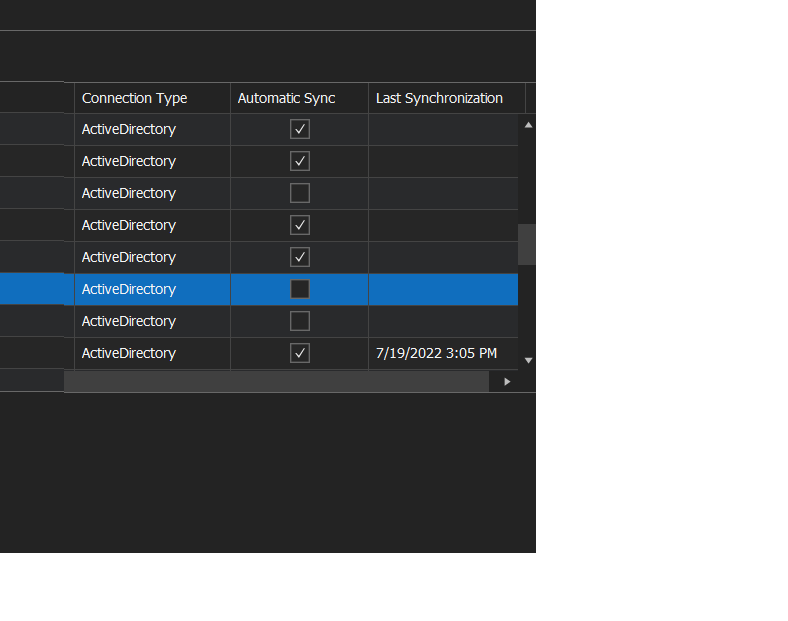
In background services, I'm unable to tick that those check boxes. And the synchronizers don't appear to be running on the schedule I have in place. They will run manually via CMD. This is before and following making sure that service was running.
393401e4-c512-4188-afe8-9dc74003d866.png
devo.png
Hello,
I think your synchronizers may not be set to run on the server side (from the DevolutionsSchedulerService), you can verify this here https://kb.devolutions.net/dps_synchronizer.html
If this is the case, your synchronizers are then relying on RDM, so if RDM is not running, it will execute the sync next time it can.
I hope this helps!
Best regards,
Alex Belisle