Passphrase generator
0 vote

Hi,
Could you implement passphrases in the Password Generator tool?
For some type of entries we need a strong password that we can type and the actual one is convenient to create super strong password but it's a pain to type them.
A passphrase is random words generated, here is some example: Bitwarden and Use a Passphrase .
For a good generator we should be able to set:
- Amount of words
- The character separator (space or dash at least)
- Capitalize the first letter of all words or a random one
- Including one or more numbers
Here is a usecase to demonstrate the benefit
Connecting to an ESXi host trough iDRAC console:
1) The engineer that installed the ESXi set a strong password like this while he have access trought web interface: !0?ZiuWCE#/HWM@N#QMrt%p`:I7LVw9:
2) Later some crash happened, a new tech have to connect trough iDRAC in a hurry, spend 10 minutes or 15 trying to connect again and again till it success
3) The tech modify the password by something bad like Hello22! that is super easy to hack and decrease the global security ...
This could have been prevented if the initial password was something like Cameo-Cultivate-Enjoyably-Opposing9 .
No one crying while typing the passwords, no tentation to use weak password, and the better: a template created in RDM !
Best regards,
Arnaud Spiroux
All Comments (25)
Hello Arnaud,
This has been requested by a few of our users already so we will definitely up the priority on being able to generate passphrases in RDM, since we can see it would be very useful for our community.
Thank you for the details on what kinds of customization options would be useful for you, we will be sure to add these possibilities. We will post back here once we have an update on this request.
Regards,
Hubert Mireault
Obligatory xkcd: xkcd: Password Strength
I think this would be a cool feature, too. I typically use correcthorsebatterystaple.net for generating passphrases instead of the generator in RDM.
I second the request. And if would be possible to change the passphrase keyword language it would be a plus!
Hi,
Do you have any updates on this request?
We really need this for implementing specific password policies.
Best regards
Hello,
Your interest in such a feature has been noted and added to the ticket opened with our Engineering Department.
That being said, we have no updates to provide on that matter at this time. We will update this thread as soon as we have more information.
Best regards,
James Lafleur
Hi,
We have added this feature internally. It should be available starting with version 2023.1
Regards,
Jean-Francois Duchesne
That's great news! Thanks, team, I look forward to using it once deployed.
Great news, thanks to the team!
This option will be available in DWL (browser extension) ?
Hi,
Thank you for the request. We've opened a ticket so we can add a passphrase mode for the password generator in DWL as well.
Best regards,
Olivier Désalliers
Or allow us to add a custom script to generate pass phrases so we could at a external generator like https://github.com/bbusschots/hsxkpasswd/releases
Hi?
I've just tried the new feature and it's looking great!
A last addition that could be really nice could be a character limit.
Some interfaces doesn't allow more than 20 characters but we still need a passphrase for various reason.
I would like to set be able to set a limit in de password templates, the goal is to avoid that someone generate a too long password and loose access because the interface didn't warned him.
Could this be possible please?
Hi,
I was responsible for the initial implementation on Windows, I'll be making a improvement ticket on your behalf and will keep you posted.
Regards,
Jean-Francois Duchesne
Great, thanks a lot
Hi,
I noticed that we can't define parameters for passphrase template with DVLS so the feature is basically useless for us...
We would like to be able to define this:
- Number of words
- Word's separator (dash, underscore, space, wildcard... you name it)
- If words starting or not in capital (or put capital on a random one)
- Include numbers or not, example: trick-poney-3cloud-silver
- And as previously requested, a maximum lenght would be very useful
This is critical for us, could you have a look to implement it soon please?
I'm convinced it will be a great feature and lot of other customer will use it.
Best regards,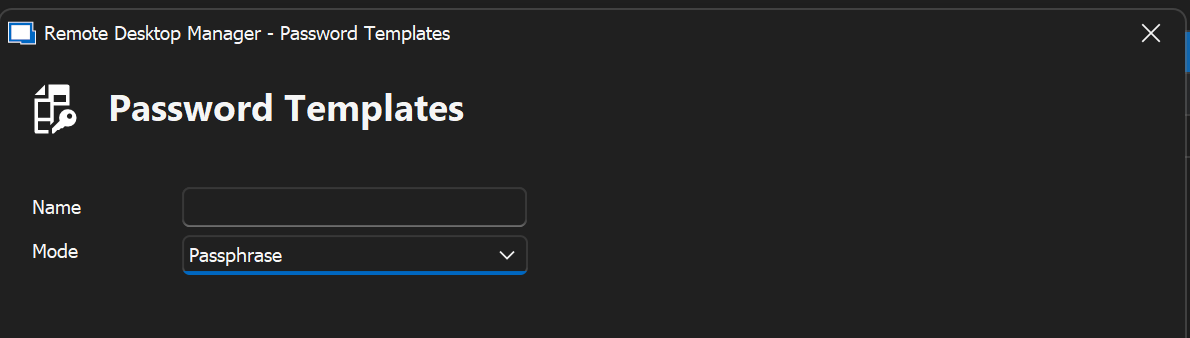
d4fa8df1-a164-43d8-aa83-14d69a5a7c09.png
Hi,
We made a ticket for this internally and will start working on this issue in the following weeks.
I'll make sure to keep you posted on further development
Regards,
Jean-Francois Duchesne
Hi Jean-François,
Thanks for the update!
Hi,
Is there any news about the lenght limit please?
We need this feature for implementing passphrase for some templates.
Here is more info about why this could be useful.
There is some systems that aren't coded nicely:
They let you to put more than the number of characters they allow, and when we commit they truncate the data.
This can lead to incident because the next time someone try to log he receive a bad password message, and we have to troubleshoot etc...
If the engineer isn't aware of this truncate issue, they could lose a lot of working time on it.
This is why we prefer to configure a password template with a characters lilmit for these systems.
Hi,
We don't have any news concerning this feature at the moment.
We increased its priority and will keep you informed about any further developments
Regards,
Jean-Francois Duchesne
Hi there,
Still not any news about this request?
I also noticed we can't select a passphrase password template when configuring a credential template with RDM.
Here is an example, I have a template that's named "Local account Windows Server (Template)" and it's not listed.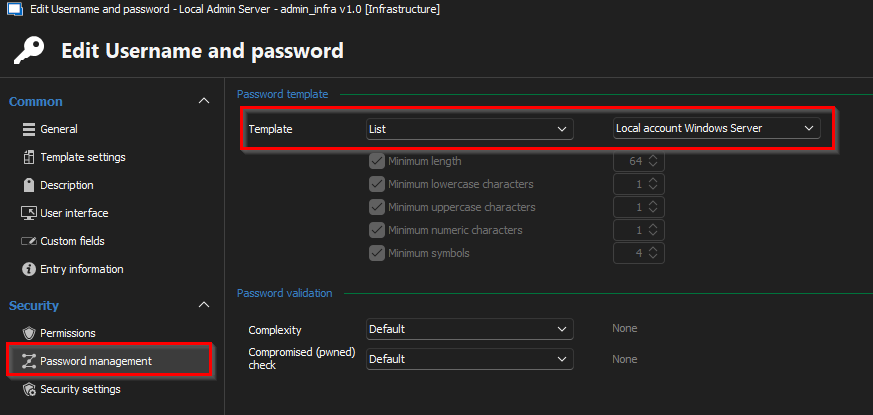
a9ff9ac1-8023-4079-9d68-b44b3b546907.png
Hello Arnaud,
I will see if we can increase the priority on this and schedule it for our 2025.2 roadmap. It's not a very complicated change but we do need to synchronize this between our different products and platforms, since this can be used in password templates.
As for your second point, the reason why this is not available at the moment is because of a technical limitation. The password template feature used to be separate from the "password complexity" and the two of them worked differently, and harmonizing them wasn't simple. We will see what we can do for this as well.
Regards,
Hubert Mireault
Hi,
We are one year later and 2025.2 is quite old now, maybe you could implement it in 2026.2?
Best regards
Hello Arnaud,
The character limit when generating a passphrase should be available in 2026.1. There's also a few other options that were added: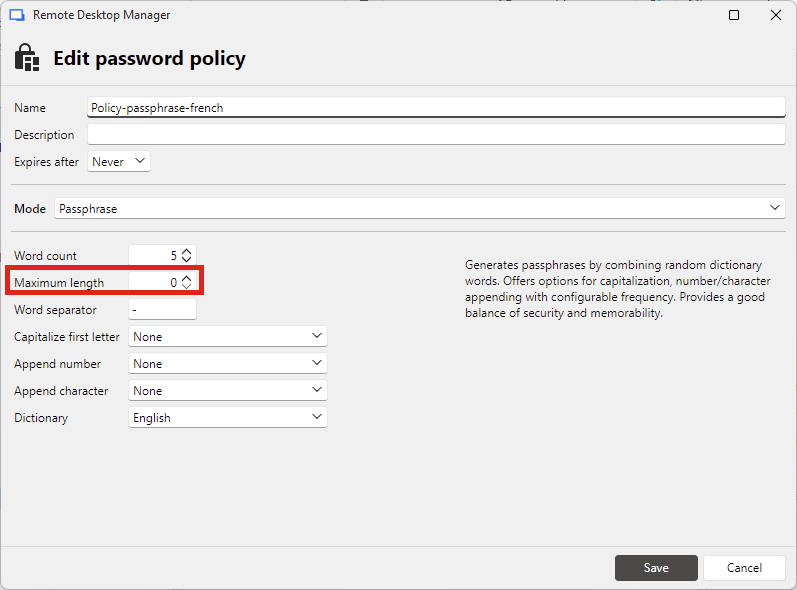
As for allowing configuring a password policy that generates a passphrase inside the entry settings, this is not yet available.
We could add support for the current non-supported types (passphrase, pronounceable, etc), with a notice that there would be no enforcement of the password validation using these policies. The reason for that is that we can't validate that your password is a passphrase for example, we can only validate the amount and type of characters contained.
Do you think that would be an appropriate solution for what you need? It's short for 2026.2, but we could see about putting this on a future roadmap.
Regards,
Hubert Mireault
bb4d47c3-3228-47f6-bfa1-5000ad6750d1.png
Hi Hubert,
I don't really understand how enforcement work for password policies in DVLS but it should do the trick.
Best regards,
I will open a ticket for this. At the moment I don't have an estimate on when we will be able to work on this.
Regards,
Hubert Mireault