edit html\txt (etc) files via SSH without downloading locally
edit html\txt (etc) files via SSH without downloading locally
0 vote

Hello
After connection to my linux server via SSH i want to edit my file (for example index.html)
When I choose "open" or "edit" file always downloading to temp folder on my windows pc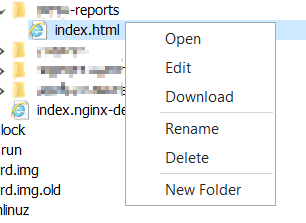
For example in MobaXTerm i have possibility to edit HTML file without downloading locally
Snipaste_2022-07-19_14-44-10.png
All Comments (7)
Hello,
Thank you for the request. We have opened an improvement ticket.
Regards,
Hubert Mireault
Thanks
Hello,
After investigating the behavior in MobaXTerm, they also seem to download the file locally, then reuploading it once it is edited. The only difference we could find is that MobaXTerm has a mode where it asks if you want to transfer the file back to the server, whereas RDM does it automatically.
If you're able to have MobaXTerm not download the file locally, did it take any special configuration to achieve this? Or is your issue that it downloads in the temporary folder instead of somewhere else?
Regards,
Hubert Mireault
"whereas RDM does it automatically"
>>>>> RDM does not do that, this is a main question\problem, no automatically no any questions about to transfer back. I tried press "open" and "edit" button - file just only downloading on local pc. Please tell me what i need to do or press to see how "RDM does it automatically"
Hello,
When you do "edit" on the remote file, it should download and open locally. Then, RDM monitors the file until you close it. If you modify it and save, it should upload it back to the remote server.
If it doesn't do it for you, then perhaps there's a bug with the feature, but the concept should already exist in RDM.
Regards,
Hubert Mireault
If it doesn't do it for you, then perhaps there's a bug with the feature
Yes, probably, this error was at RDM v2022.2.15.0 and still exist in v2022.2.18.0 (tried install RDM on 3 different PC - the same error on each of them). Could you please fix it ? (it's very useful feature and make life less "mouse clickable")
Hello,
Thank you for your reply!
We will shortly open a support ticket to further investigate this issue. You should receive an email soon through the ticket to confirm its opening.
Best regards,
Gabriel Degrandpré
