Embedded browser intune compliant

Hi,
I'm using conditional access in Azure AD to require device compliance for some web resources.
This works in Microsoft Edge on the systems.
This does not work when using Edge as a embedded browser inside the "Remote desktop manager".
I'm wondering if there is a way that the Remote Desktop Manager could allow the edge browser to pass requirements if it's embedded.
This is not a major issue for me.. But if it's possible, it would be handy.
All Comments (7)
Hello,
Do you get an error message? Do you have an idea why it does not work? And last question. Does it work with embedded Chrome?
Regards
David Hervieux
Hi,
I am having the same issue with Conditional Access and it appears to be that the embedded browser does not pass the device id as part of the sign-in.
For my example this is using SAML for CyberArk which works perfectly in Edge, but fails in RDM as the device ID is not passed so it fails conditional access.
Thanks,
Simon
I have found something that might help, a thread on stackoverflow mentions that the option `AllowSingleSignOnUsingOSPrimaryAccount` needs to be passed to WebView2 for conditional access to work (which we use to embed Edge). Let me check if we can test that quickly.
https://stackoverflow.com/a/71346206/1012827
Sébastien Duquette
We have confirmed that Conditional Access works with the option enabled. We have a minor release of RDM scheduled for this week, we will try to include the fix, otherwise it will be in the next minor release.
Sébastien Duquette
Hi there,
Keen as ever I noticed the release notes mentioned this for 2023.1.23.0 Release Notes - Remote Desktop Manager (devolutions.net)
However the device ID is still not being passed through so Conditional Access fails.
Regards,
Simon
Simon could you post a screenshot of the error message you're getting? Also it is necessary to log in to a new session for the conditional access to work.
Sébastien Duquette
Yep sure (Company name redacted). This is using the Confluence Login page from My Accounts, but I get the same from the CyberArk PWVA. I have tried starting a new session as well.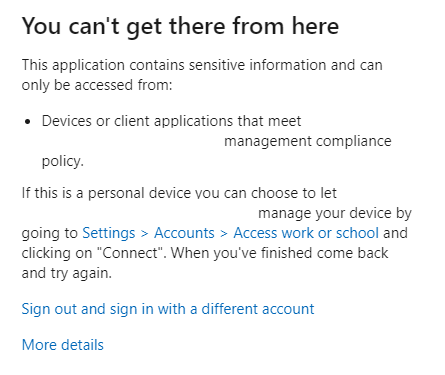
More details gives you this.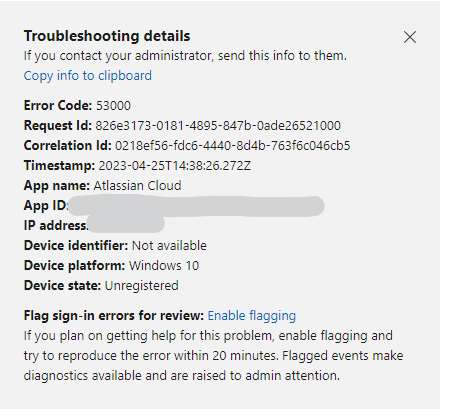
RDM-SAML2-2.png
RDM-SAML1.png