RDM Free with local SQLite db and encryption

Hi,
I've setup a local instance of RDM Free with a local datasource using SQLite.
I noticed that the connections.db file is 'easy' to read so I tried to figure out how to encrypt the database.
I've setup a password for the database, that did not help, then I tried to setup an application password and having the option to encrypt local files enabled.
I can still open the connection.db and read the information in plain text....
How can I completely encrypt the SQLite database?
All Comments (10)
Hi,
The SQLite encryption prior to v2022.2 was done at the provider level (aka the entire file). In the case of RDM Windows we use System.Data.SQLite and on the other platforms we use Mono.Data.Sqlite. This has for effect to not be able to share the SQLite file between RDM platforms since the implementation of the encryption is different from one provider to the next.
So with the release of v2022.2, we have changed the encryption to use our internal encryption library. This has for effect to only encrypt the field Connections.Data so if you look at the database you will notice that many fields are clear text. This is normal, since those fields don't contain any sensitive information (passwords or usernames for example). Furthermore most of the clear text fields only exist to support things like searching, query performance and other non-security type features.
Sample data, no password & password protected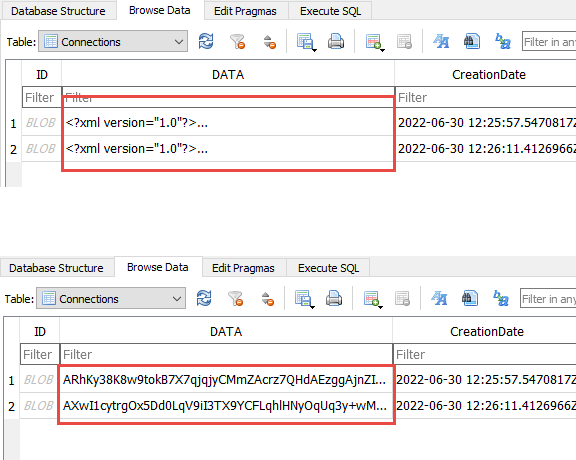
Best regards,
Stéfane Lavergne
2022-06-30_8-40-18.png
Hi,
Ah so it is by (recent) design change... to bad, I don't want ANY information in the database to be readable :(
I don't just find the username and password to be sensative, but comments, and connection properties to, the more information someone has the easier it is for them to 'attack'.
I understand your concern, in this case I would suggest you use an XML Data Source and set the "Master Key". This will result in having then entire file encrypted.
Best regards,
Stéfane Lavergne
Hi,
I exported and imported in a password protected XML file, looks great so far. To bad not all features are supported using XML, don't know if I will me missing those.
Time will tell...
There is a none documented tweak you could perform:
- In the latest RDM Free
- File > Manage Password > No Password
- Install an older version of RDM Free (v2022.1.21.0)
- Extract zip to a temp folder
- https://devolutions.net/remote-desktop-manager/home/previousversions/free
- Create a data source configuration on for you SQLite file
- Connect
- File > Manage Password
- Set a password
- This will apply full file encryption via the SQLite provider
- In the latest RDM Free
- File > Data Sources > Edit
- Configure the password
- Connect
Result you have a full encrypted file using the latest version of RDM Free. Do no change the password with the latest version of RDM Free since it will automatically convert the security and you will need to perform the revert step again.
Best regards,
Stéfane Lavergne
Hi,
Thnx for the workaround, for now I will be using the XML, so far so good.
I'm not a fan of using these kind of workarounds.
I hope you and your colleagues will reconsider the encryption and make a platform independent version which will completely encrypt the database.
Hi Stéphane,
Could you let me know if your colleagues have considered the encryption and make a platform-independent version that will completely encrypt the database?
Or nothing was changed in the new version.
Kind regards
Fred
Hi Fred,
Unfortunately, nothing has yet to be done on this. I will bump up the priority and talk with the security team to see what they think.
Best regards,
Stéfane Lavergne
Stéfane,
Just to clarify, if I use XML file and use password, the entire XML file is encrypted, correct?
What encryption is used?
Finally, what features are missing using XML vs SQLite?
Thank you.
@t2,
Correct, if you configure a password on your XML datasource, this will encrypt the entire database (connections.xml) file.
The information about the encryption that we are using could be found here
https://docs.devolutions.net/rdm/overview/security/
In conclusion, you can compare XML and SQLite datasource (as well as the other one's available in RDM) by comparing them with the data provided in this help article
https://docs.devolutions.net/rdm/data-sources/data-sources-types/
Best regards,
Jeff Dagenais